


TL;DR
Google Flights has no official API. QPX Express shut down on April 10, 2018 and nothing public ever replaced it. What works instead: pass a Google Flights results URL to an AI extraction API with a flight-shaped schema and get prices, airlines, times, and stops back as JSON. One call per route. Wrap it in a loop and you have a flight price tracker. All the code below is tested and also lives in the companion Google Colab.

Google Killed Its Flights API in 2018
The thing people search for as "Google Flights API" used to exist. It was called QPX Express, a pay-per-query airfare API that came out of Google's roughly $700 million acquisition of ITA Software. In November 2017 Google announced it would retire the service, citing "low interest among our travel partners", and on April 10, 2018 it went dark. The enterprise ITA pipeline survived for airlines and big OTAs with contracts. For everyone else, nothing.
Eight years later the demand never went away, which is why the search results for google flights api are now a wall of third-party products selling you access to data Google will not hand over. There is no official Google Flights API, no API key to request, and no partner program you can sign up for as a normal developer.
What Google does still publish, every second of every day, is the Google Flights front end: a URL that accepts a route and a date and renders live prices from hundreds of airlines. That page is the API now. The rest of this post turns it into JSON with one extraction call, then into a price tracker with a short Python loop. Everything you see below ran for real on July 22, 2026, against live Google Flights results.
What People Actually Want From a Google Flights API
Nobody wants an API for its own sake. The searches behind this phrase break down into three jobs:
- Read prices programmatically. Track a route, feed a dashboard, alert when a fare drops. You need numbers out of the results page, not tickets.
- Build search into a product. A travel tool that shows live flight options. You need structured offers on demand.
- Sell or issue tickets. Booking flows, fare rules, ticketing. No amount of scraping gives you this, and pretending otherwise wastes your time. That lane belongs to booking APIs like Duffel or Amadeus, covered near the end.
The first two jobs share one shape: a results page in, a list of offers out. That is an extraction problem, and it is the same pattern we used for Kayak travel data, whose official API requires partner approval.
The Google Flights URL Is the Input
Every search on Google Flights lives at a URL that accepts plain English in its q parameter. No session, no encoded state, no reverse engineering:
https://www.google.com/travel/flights?q=flights%20from%20JFK%20to%20LHR%20on%202026-08-10%20one%20way&hl=en&gl=us&curr=USDFour parameters do the work:
q: the search in plain English, URL-encoded. Routes, dates, "one way", "2 adults" all parse.hl: interface language (en)gl: country edition (us)curr: currency for displayed prices (USD)
Pin hl, gl, and curr on every request. Flight prices shift with locale and currency, so an unpinned URL gives you a time series contaminated by geography. The share links Google generates use a tfs parameter instead, an encoded state blob. Ignore it. The q form is stable, readable, and easy to build from three variables.
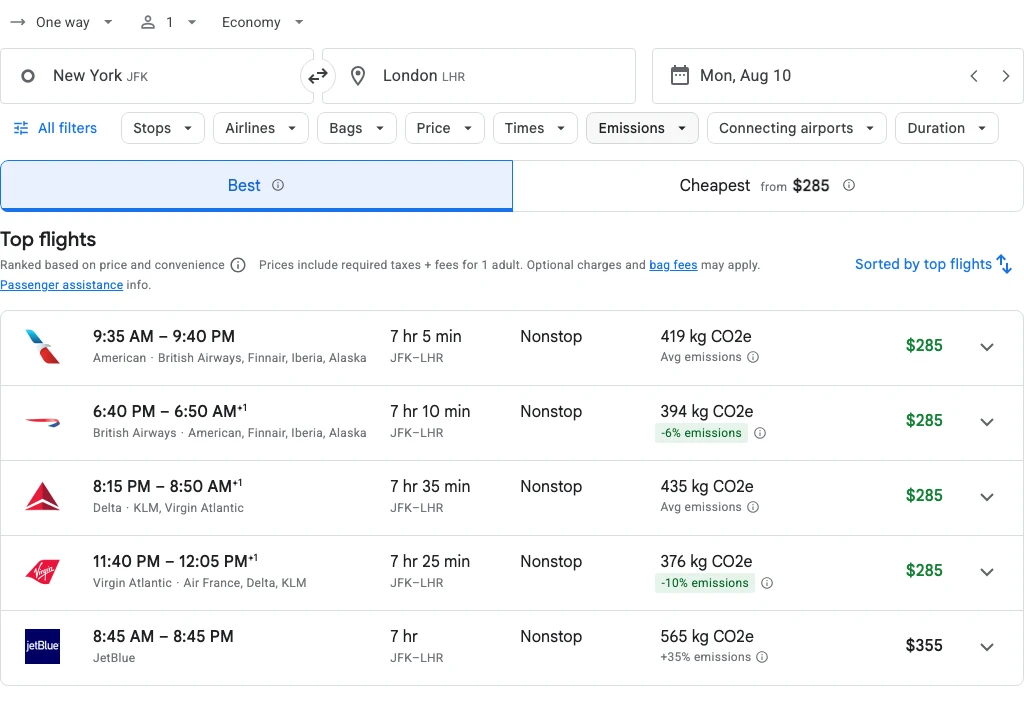
Get Flight Offers in One Call
Fetching that URL with plain requests.get() gets you a shell page with no fares in it, because the fares only exist after JavaScript runs. The extract endpoint handles fetching and rendering on its side, so the only thing you write is the schema you want back:
import os

from pydantic import BaseModel
from scrapegraph_py import ScrapeGraphAI


class FlightOffer(BaseModel):
    airline: str
    departure_time: str
    arrival_time: str
    duration: str
    stops: int
    price_usd: float


class FlightResults(BaseModel):
    route: str
    cheapest_price_usd: float
    flights: list[FlightOffer]


PROMPT = (
    "This is a Google Flights results page. Extract the flight offers shown. "
    "For each offer: the airline name on the card (when several partner airlines are listed, "
    "join every name with ' + ', never run two names together), departure time, arrival time, "
    "total duration, number of stops (0 for nonstop), and the displayed total price as a plain "
    "number in USD. List each offer once, in the order shown. Also return the route as "
    "'JFK -> LHR' and the cheapest displayed price."
)

URL = (
    "https://www.google.com/travel/flights"
    "?q=flights%20from%20JFK%20to%20LHR%20on%202026-08-10%20one%20way"
    "&hl=en&gl=us&curr=USD"
)

sgai = ScrapeGraphAI(api_key=os.environ["SGAI_API_KEY"])
res = sgai.extract(PROMPT, url=URL, schema=FlightResults.model_json_schema())

if res.status != "success":
    raise SystemExit(f"extract failed: {res.status}")

results = FlightResults(**res.data.json_data)
print(f"{results.route}: cheapest ${results.cheapest_price_usd:.0f}")
for f in results.flights[:5]:
    print(f"  ${f.price_usd:>4.0f}  {f.departure_time} -> {f.arrival_time}  "
f"{f.duration}, {f.stops} stops ({f.airline})")Tested output from July 22, 2026:
JFK -> LHR: cheapest $285
  $ 285  9:35 AM -> 9:40 PM  7 hr 5 min, 0 stops  (American + British Airways + Finnair + Iberia + Alaska)
  $ 285  6:40 PM -> 6:50 AM+1  7 hr 10 min, 0 stops  (British Airways + American + Finnair + Iberia + Alaska)
  $ 285  8:15 PM -> 8:50 AM+1  7 hr 35 min, 0 stops  (Delta + KLM + Virgin Atlantic)
  $ 285  11:40 PM -> 12:05 PM+1  7 hr 25 min, 0 stops  (Virgin Atlantic + Air France + Delta + KLM)
  $ 355  8:45 AM -> 8:45 PM  7 hr, 0 stops  (JetBlue)
Real fares, real codeshares, and the +1 markers on overnight arrivals came through intact. Two details in that prompt earn their keep. Google Flights lists every partner airline selling a codeshare seat, and without the "never run two names together" instruction the model returned AmericanBritish Airways mashed into one string on my first run. And "displayed total price as a plain number" stops you from getting "$285" back as a string when your schema says float.
The page needed no special handling here, but if a target ever comes back thin, the API accepts a fetchConfig object where you can force browser rendering ("mode": "js"), add a wait, scroll the page, or set a proxy country. That last one matters for fares: a country change is the clean way to see what a route costs from another market.
The Same Call With curl
The REST shape is one POST. Schema goes in as plain JSON Schema:
curl -X POST https://v2-api.scrapegraphai.com/api/extract \
  -H "SGAI-APIKEY: $SGAI_API_KEY" \
  -H "Content-Type: application/json" \
  -d '{
    "url": "https://www.google.com/travel/flights?q=flights%20from%20JFK%20to%20LHR%20on%202026-08-10%20one%20way&hl=en&gl=us&curr=USD",
    "prompt": "Return the cheapest displayed flight price on this Google Flights results page as a plain number in USD, the airline name on that offer, and its departure and arrival times.",
    "schema": {
      "type": "object",
      "properties": {
        "price_usd": {"type": "number"},
        "airline": {"type": "string"},
        "departure_time": {"type": "string"},
        "arrival_time": {"type": "string"}
      },
      "required": ["price_usd", "airline", "departure_time", "arrival_time"]
    }
  }'
The response puts your structured result under json:
{
  "id": "adf720d7-16f4-4e9f-be72-341e7f0ca49c",
  "raw": null,
  "json": {
    "price_usd": 285,
    "airline": "American+British Airways+Finnair+Iberia+Alaska",
    "departure_time": "9:35 AM",
    "arrival_time": "9:40 PM"
  },
  "usage": { "promptTokens": 13400, "completionTokens": 1336 }
}
A Flight Price Tracker in 40 Lines
One call answers "what does it cost today". The question worth automating is "did it drop". Same loop shape as our Bing rank tracker: check on a schedule, append to a CSV, compare against the last row, alert on movement.
import csv
import os
from datetime import date
from pathlib import Path

from pydantic import BaseModel
from scrapegraph_py import ScrapeGraphAI

ROUTES = [("JFK", "LHR", "2026-08-10"), ("SFO", "NRT", "2026-09-04")]
CSV_PATH = Path("flight_prices.csv")
ALERT_DROP = 0.10  # alert when the cheapest fare drops 10% or more


class CheapestFare(BaseModel):
    price_usd: float
    airline: str


def flights_url(origin: str, dest: str, day: str) -> str:
    q = f"flights from {origin} to {dest} on {day} one way"
    return ("https://www.google.com/travel/flights?q="
            + q.replace(" ", "%20") + "&hl=en&gl=us&curr=USD")


def cheapest(sgai: ScrapeGraphAI, origin: str, dest: str, day: str) -> CheapestFare | None:
    res = sgai.extract(
        "Return the cheapest displayed flight price on this Google Flights results page as a "
        "plain number in USD, and the airline name on that offer (join partner airlines "
        "with ' + ', never run two names together).",
        url=flights_url(origin, dest, day),
        schema=CheapestFare.model_json_schema(),
    )
    if res.status != "success":
        return None
    return CheapestFare(**res.data.json_data)


def previous_price(route: str) -> float | None:
    if not CSV_PATH.exists():
        return None
    rows = [r for r in csv.reader(CSV_PATH.open()) if r and r[1] == route]
    return float(rows[-1][2]) if rows else None


sgai = ScrapeGraphAI(api_key=os.environ["SGAI_API_KEY"])
with CSV_PATH.open("a", newline="") as f:
    writer = csv.writer(f, lineterminator="\n")
    for origin, dest, day in ROUTES:
        route = f"{origin}-{dest} {day}"
        fare = cheapest(sgai, origin, dest, day)
        if fare is None:
            print(f"{route}: check failed, will retry next run")
            continue
        prev = previous_price(route)
        writer.writerow([date.today().isoformat(), route, fare.price_usd, fare.airline])
        if prev and fare.price_usd <= prev * (1 - ALERT_DROP):
            print(f"ALERT {route}: ${prev:.0f} -> ${fare.price_usd:.0f} ({fare.airline})")
        else:
            print(f"{route}: ${fare.price_usd:.0f} ({fare.airline})")
I ran it twice on July 22 to seed the file and confirm the comparison logic:
JFK-LHR 2026-08-10: $285 (American + British Airways + Finnair + Iberia + Alaska)
SFO-NRT 2026-09-04: $515 (Philippine Airlines)2026-07-22,JFK-LHR 2026-08-10,285.0,American + British Airways + Finnair + Iberia + Alaska
2026-07-22,SFO-NRT 2026-09-04,515.0,Philippine AirlinesBoth runs returned the same fares an hour apart, so no alert fired, which is exactly what you want from a threshold: silence until something moves. Put the script on cron or GitHub Actions once a day per route and the CSV becomes a price history you own. Each route costs one extract call per check, so a five-route daily watcher spends five calls a day.
Two honest caveats before you trust the numbers. Fares are market-dependent: the same route queried through another country can price differently, so keep gl, curr, and any proxy country fixed for the life of a series. And Google shows current offers only. There is no way to backfill history you did not record, so the day you start the cron job is the day your dataset begins. The same discipline applies to any price scraping pipeline. Flights are just the most volatile version of it.
Flight Scrapers vs Rolling Your Own
Search for a flight scraper and most of what you find is packaged products: Apify actors, SerpApi's Google Flights endpoint, and similar tools that sell Google Flights data as a fixed API. Fair question: why not just buy one?
Buy one when you want a fixed response format with zero prompt maintenance, someone else on the hook for parser breakage, and per-search pricing you can put in a spreadsheet. Those products are genuinely good at the one page they wrap.
Roll your own when the wrapper's fixed schema is not your schema, or Google Flights is only one of your sources. The extract pattern above does not care that the URL is Google Flights. Point the same code at Kayak, an airline's own site, or a hotel page, change the Pydantic model, and you have a second data source before lunch. A dedicated wrapper locks you to one site's shape; a schema you control travels.
When Scraping Is the Wrong Tool
If your product books flights, stop scraping. Displayed prices are not guaranteed fares: the number on the results page can change at checkout, carries no fare rules, and gives you nothing to ticket against. That job needs a booking-grade API, where Duffel and Amadeus are the usual starting points, with airline NDC programs and GDS contracts above them. Those come with commercial agreements and certification for a reason: they return offers an airline commits to selling.
The split is simple. Scraping answers "what is Google showing travelers right now", booking APIs answer "sell this seat". Price monitoring, route research, fare-drop alerts, and market dashboards live in the first bucket, and that is the bucket this post covers.
Run It in Colab
The companion notebook contains everything above: the single-route extraction with the full offer schema and the two-route price tracker writing its CSV. Add your API key via getpass, run the cells top to bottom, and swap in your own routes. There is a free tier, so testing a route costs nothing: grab a key from the dashboard.
FAQ
Does Google Flights have an official API?
No. QPX Express, the public airfare API, was retired on April 10, 2018, and Google never shipped a replacement. The underlying ITA fare engine is only available through enterprise partnerships aimed at airlines and large travel sellers.
Is it legal to scrape Google Flights?
Fare listings are publicly displayed data, and courts have generally treated scraping public pages differently from breaching access controls, but it is not a settled area and terms of service still apply. Read our web scraping legality guide and make the call for your own use case, especially if the data feeds a commercial product.
Can I get historical flight prices from Google Flights?
Not from the page itself. Google Flights shows current offers, and its price-history hints are not exposed as data you can rely on. The practical route is the tracker above: record from today forward and your CSV becomes the history.
How often should a flight price tracker poll?
Daily is right for most leisure-fare monitoring, since fares reprice around inventory updates rather than by the minute. Tighten to two or three checks a day inside the last weeks before departure or during a sale window. More than that mostly buys you duplicate rows.