


TL;DR
Amazon's official product APIs are gated: PA-API 5 is deprecated and now returns 403s, its Creators API successor wants an Associates account that already ships qualifying sales, and SP-API is for sellers. The workaround is the public product page. Pass
https://www.amazon.com/dp/<ASIN>to an AI extraction API with a product-shaped schema and you get title, price, rating, and reviews back as JSON. Same trick works on search result pages. Every snippet below ran live on July 23, 2026, and sits in the companion Google Colab.

Amazon Has Product APIs. You Just Can't Use Them.
Search for an Amazon ASIN API and the official options fall apart one by one. Product Advertising API 5.0, the classic answer, is deprecated: its own documentation now redirects to a migration notice, and live calls fail with a 403 telling you to move to the Creators API. That successor is free but gated behind an approved Amazon Associates account, and affiliate tooling vendors report the current bar at 10 qualified sales in the trailing 30 days, with access revoked when referred sales stop. SP-API, the other official route, exists for people who sell on Amazon, not for people who need catalog data.
That leaves the chicken-and-egg that pushed you to this page: you need product data to build the product, and sales from that product before Amazon gives you the API.
What Amazon cannot gate is the product page itself. Every ASIN resolves to a public URL that renders the title, buy-box price, rating, and reviews to any visitor. This post turns those pages into an ASIN lookup, a search API, and a reviews feed with one extraction endpoint, then strings them into a price watcher. All outputs below are real, from live runs on July 23, 2026.
What an ASIN Actually Is
ASIN stands for Amazon Standard Identification Number: a 10-character code, usually starting with B0, that identifies one product listing in one marketplace. Books use their ISBN-10 instead. You find it in the product URL after /dp/, in the Product Information table, and in seller reports.
Two properties make ASINs the right key for any Amazon dataset. They are stable, and they deep-link:
https://www.amazon.com/dp/B004YAVF8IThe URL is the entire input contract. No API key from Amazon, no signed requests. The catch is that Amazon renders almost nothing without JavaScript and localizes aggressively by visitor location, which is exactly what the extraction layer has to handle.
ASIN Lookup in One Call
The extract endpoint fetches and renders the page on its side; you describe the JSON you want with a Pydantic schema. Two fetchConfig details matter on Amazon, and both came out of testing, not docs. "mode": "js" is mandatory, because the default fast fetch gets an empty shell back. And the i18n-prefs cookie pins the displayed currency: without it my first run returned the same mouse priced in EUR, because Amazon localized to the fetch layer's exit location.
import os

from pydantic import BaseModel
from scrapegraph_py import ScrapeGraphAI


class AsinProduct(BaseModel):
    asin: str
    title: str
    brand: str
    price: float
    currency: str
    rating: float
    ratings_count: int


FETCH = {
    "mode": "js",  # Amazon renders nothing without JavaScript
    "wait": 6000,
    "country": "us",
    "cookies": {"i18n-prefs": "USD", "lc-main": "en_US"},
}

PROMPT = (
    "This is an Amazon product page. Extract the ASIN, the product title from the page heading "
    "(never include any 'Amazon.com:' prefix), brand, the price a customer would pay right now "
    "as a plain number (the current offer price, never the crossed-out List Price), the currency "
    "as an ISO code from the displayed symbol, the average star rating as a number, and the "
    "total number of ratings as an integer."
)

ASIN = "B004YAVF8I"

sgai = ScrapeGraphAI(api_key=os.environ["SGAI_API_KEY"])
res = sgai.extract(
    PROMPT,
    url=f"https://www.amazon.com/dp/{ASIN}",
    schema=AsinProduct.model_json_schema(),
    fetch_config=FETCH,
)

if res.status != "success":
    raise SystemExit(f"extract failed: {res.status}")

p = AsinProduct(**res.data.json_data)
print(f"{p.asin}  {p.brand}  {p.price} {p.currency}  {p.rating} stars ({p.ratings_count:,} ratings)")
print(p.title[:80])Tested output, twice in a row with identical results:
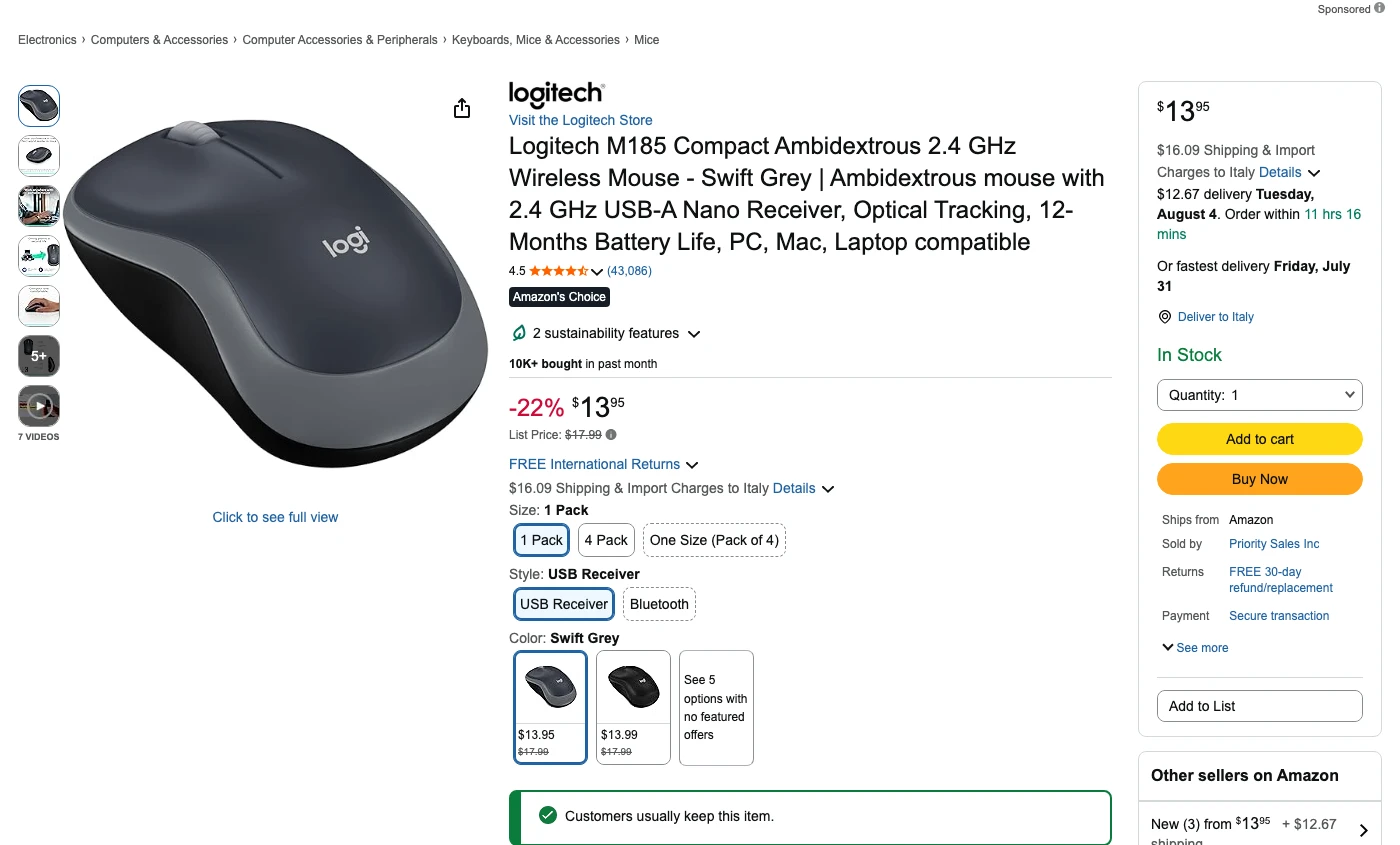
B004YAVF8I  Logitech  13.95 USD  4.5 stars (43,086 ratings)
Logitech M185 Compact Ambidextrous 2.4 GHz Wireless Mouse - Swift Grey | Ambidex
The prompt is longer than you might expect because Amazon pages actively fight naive extraction. A product page often shows three prices: the offer price, a crossed-out List Price, and variant prices in a comparison table. Before I added "never the crossed-out List Price", the same gaming mouse came back as $89.99 in one run and $34.98 in another; the second number was what a buyer would actually pay. Say precisely which price you mean and the wobble disappears.
An Amazon Search API Without the API
The second thing people mean by "Amazon API" is search: query in, ranked products out. Same move, different URL. https://www.amazon.com/s?k=<query> is public, and each result card links to /dp/<ASIN>, so the ASINs come along for free:
class SearchResult(BaseModel):
    asin: str | None
    title: str
    price: float | None
    rating: float | None
    sponsored: bool


class SearchResults(BaseModel):
    query: str
    results: list[SearchResult]


PROMPT = (
    "This is an Amazon search results page. Extract the first 8 product results in the order "
    "shown. For each: the ASIN from the result's /dp/ link, the product title, the displayed "
    "price as a plain number (null when no price is shown), the average star rating as a number, "
    "and whether the result is marked Sponsored. List each product once, never repeat a result. "
    "Also return the search query."
)

res = sgai.extract(
    PROMPT,
    url="https://www.amazon.com/s?k=wireless+mouse",
    schema=SearchResults.model_json_schema(),
    fetch_config=FETCH,
)
Tested output for wireless mouse:
B004YAVF8I    $13.95  4.5  Logitech M185 Compact Ambidextrous 2.4 GHz Wirel
B0CP3HTHLZ    $14.98  4.6  TECKNET Wireless Mouse (BT5.0/3.0 & 2.4G) Rechar
B0DKFGJDCN     $5.99  4.3  Wireless Bluetooth Mouse, Rechargeable, LED, Sil
B015NBTAOW     $9.99  4.5  TECKNET Wireless Mouse, 2.4G Ergonomic Optical M
B005EJH6Z4     $9.96  4.5  Amazon Basics 2.4 GHz Wireless Optical Computer
B0FB9BR23C    $19.99  4.5  TECKNET Wireless Mouse, Bluetooth Mouse (BT5.3/5
B00PGB7OKM     $9.06  4.5  Logitech-910-003636-Wireless-Mouse-M185
B0BXBC26X8    $39.59  4.4  Razer Basilisk V3 X HyperSpeed Customizable Wire
Keep the sponsored flag even though this particular run caught none. Amazon rotates ad slots per session, and an earlier run of the same query flagged a sponsored result in position three. If you feed this data into ranking analysis or a price index, ads and organic results are different animals.
Amazon Reviews as JSON
Reviews come with a catch the first two calls do not have. Full review pages sit behind a login on amazon.com, so an honest "amazon reviews api" works with what the product page shows: the rating histogram and the handful of top reviews Amazon renders there. For monitoring sentiment or star drift, that is usually enough.
from pydantic import Field


class Review(BaseModel):
    reviewer: str
    stars: float
    title: str
    excerpt: str


class ReviewData(BaseModel):
    average_rating: float
    ratings_count: int
    percent_5_star: int
    percent_1_star: int
    top_reviews: list[Review] = Field(max_length=3)


res = sgai.extract(
    "This is an Amazon product page. From the review section visible on the page extract: the "
    "average star rating, the total ratings count, the percentage of 5-star and 1-star ratings "
    "from the rating breakdown, and the first 3 written customer reviews from the main review "
    "list only. For each review: reviewer name, star rating, review title, first sentence of the "
    "text. Skip carousels, video highlights, and any entry whose reviewer name or star rating is "
    "not visible. Exactly 3 reviews, no more.",
    url="https://www.amazon.com/dp/B004YAVF8I",
    schema=ReviewData.model_json_schema(),
    fetch_config=FETCH,
)
Tested output:
4.5 average over 43,086 ratings (78% five star, 6% one star)
  5.0  Good and inexpensive  (P.B. Salamon)
  5.0  Dependable, Reliable  (Metal Sphere)
  5.0  Works great right away.  (Cinski446)
The Field(max_length=3) is doing real work. My first attempt asked for "up to 3 reviews" and got eleven back, including a broken entry from a video carousel with no reviewer name. Constraining the schema and telling the prompt what to skip fixed both in one pass.
The Same Call With curl
curl -X POST https://v2-api.scrapegraphai.com/api/extract \
  -H "SGAI-APIKEY: $SGAI_API_KEY" \
  -H "Content-Type: application/json" \
  -d '{
    "url": "https://www.amazon.com/dp/B004YAVF8I",
    "prompt": "Extract this Amazon product page: ASIN, product title from the page heading, the price a customer would pay right now as a plain number (never the crossed-out List Price), average star rating, and total ratings count.",
    "schema": {
      "type": "object",
      "properties": {
        "asin": {"type": "string"},
        "title": {"type": "string"},
        "price": {"type": "number"},
        "rating": {"type": "number"},
        "ratings_count": {"type": "integer"}
      },
      "required": ["asin", "title", "price", "rating", "ratings_count"]
    },
    "fetchConfig": {"mode": "js", "wait": 6000, "country": "us", "cookies": {"i18n-prefs": "USD", "lc-main": "en_US"}}
  }'
Real response:
{
  "id": "5a854169-f472-43e5-bb9a-cb381b601568",
  "raw": null,
  "json": {
    "asin": "B004YAVF8I",
    "title": "Logitech M185 Compact Ambidextrous 2.4 GHz Wireless Mouse - Swift Grey | Ambidextrous mouse with 2.4 GHz USB-A Nano Receiver, Optical Tracking, 12-Months Battery Life, PC, Mac, Laptop compatible",
    "price": 13.95,
    "rating": 4.5,
    "ratings_count": 43086
  },
  "usage": { "promptTokens": 115063, "completionTokens": 7710 }
}
Note the usage block: an Amazon product page is roughly ten times heavier than a Google Flights results page through the same endpoint. Budget accordingly if you plan to check thousands of ASINs.
A Price Watcher for an ASIN List
With lookup working, monitoring is a loop and a CSV, the same shape as our Google Flights tracker:
import csv
from datetime import date
from pathlib import Path

ASINS = ["B004YAVF8I", "B0CP3HTHLZ"]
CSV_PATH = Path("asin_prices.csv")
ALERT_DROP = 0.10  # alert when the price drops 10% or more


class AsinPrice(BaseModel):
    title: str
    price: float | None


def check(sgai: ScrapeGraphAI, asin: str) -> AsinPrice | None:
    res = sgai.extract(
        "Extract this Amazon product's title from the page heading (never include any "
        "'Amazon.com:' prefix) and the price a customer would pay right now as a plain number "
        "in USD (the current offer price, never the crossed-out List Price). "
        "If no price is displayed, return null for the price.",
        url=f"https://www.amazon.com/dp/{asin}",
        schema=AsinPrice.model_json_schema(),
        fetch_config=FETCH,
    )
    if res.status != "success":
        return None
    return AsinPrice(**res.data.json_data)


def previous_price(asin: str) -> float | None:
    if not CSV_PATH.exists():
        return None
    rows = [r for r in csv.reader(CSV_PATH.open()) if r and r[1] == asin]
    return float(rows[-1][2]) if rows else None


sgai = ScrapeGraphAI(api_key=os.environ["SGAI_API_KEY"])
with CSV_PATH.open("a", newline="") as f:
    writer = csv.writer(f, lineterminator="\n")
    for asin in ASINS:
        item = check(sgai, asin)
        if item is None:
            print(f"{asin}: check failed, will retry next run")
            continue
        if item.price is None:
            print(f"{asin}: no displayed price (out of stock or buying options)")
            continue
        prev = previous_price(asin)
        writer.writerow([date.today().isoformat(), asin, item.price, item.title[:60]])
        if prev and item.price <= prev * (1 - ALERT_DROP):
            print(f"ALERT {asin}: ${prev:.2f} -> ${item.price:.2f}  {item.title[:40]}")
        else:
            print(f"{asin}: ${item.price:.2f}  {item.title[:40]}")
Two consecutive runs on July 23:
B004YAVF8I: $13.95  Logitech M185 Compact Ambidextrous 2.4 G
B0CP3HTHLZ: no displayed price (out of stock or buying options)
That second line is not a bug, and it is the most important lesson in this post. Some Amazon listings hide the buy-box price from visitors whose delivery location does not fit, and a datacenter fetch has no delivery address. During testing, one popular mouse alternated between a visible price and "See buying options" across fetches of the same URL. Treat a missing price as missing data, never as zero, or one bad fetch will fire your price-drop alert on every product you track. For the wider monitoring workflow around this loop, alerts included, see Amazon Price Monitoring.
Packaged Amazon Scrapers vs Your Own Schema
Plenty of products sell Amazon data as a fixed API: Apify actors, SerpApi-style endpoints, dataset vendors. Buy one when you want a stable contract with zero prompt maintenance and someone else responsible when Amazon changes its markup. They are good at exactly that.
The schema-first approach wins when your fields are not their fields, or Amazon is one source among several. The four snippets above share one endpoint and differ only in the Pydantic model and prompt. Point the same code at Walmart, eBay, or your distributor's catalog and the Amazon-specific parts are two cookie names. The cross-store version of this argument, with matching logic, lives in Ecommerce Price Scraping API for Developers.
When the Official APIs Are the Right Tool
If you run an Associates account that already ships qualifying sales, use the Creators API: it is free, ToS-clean, and returns canonical catalog data with affiliate links built in. If you sell on Amazon, SP-API gives you your own listings, orders, and pricing feeds with guarantees scraping cannot offer. Extraction fits the cases those programs exclude: competitor monitoring, research, and building the prototype that has to exist before any of the official gates open, all without an affiliate quota or a seller account. For the legal side of scraping public pages, our web scraping legality guide covers where the lines sit, and Amazon's terms deserve a read before you ship anything commercial.
The ZoomInfo API guide applies the same source-fit test to company data.
Run It in Colab
The companion notebook has all four workflows wired together: ASIN lookup, search extraction, the reviews call, and the price watcher with its CSV. Paste an API key via getpass, run top to bottom, swap in your own ASINs. A free-tier key covers the whole notebook.
FAQ
What is an ASIN?
An Amazon Standard Identification Number: a 10-character code (usually starting with B0) that identifies one product listing in one Amazon marketplace. The same physical product can carry different ASINs in different countries. Books use their ISBN-10.
Does Amazon have a free product data API?
Technically yes, practically only for established affiliates. PA-API 5 is deprecated and rejects calls. The Creators API that replaced it is free but requires an approved Associates account with recent qualifying sales, and reported thresholds revoke access when referred sales stop.
How do I get Amazon product data without PA-API access?
Extract it from the public product page. An AI extraction call on https://www.amazon.com/dp/<ASIN> with a product schema returns title, price, rating, and reviews as JSON, which is the workflow this post demonstrates with live outputs.
Is scraping Amazon allowed?
Public product pages are visible to anyone, but Amazon's conditions of use prohibit automated access, and enforcement is real even when legal precedent around public data is murky. Read the legality guide, keep request volumes sane, and get legal advice before building a commercial product on scraped Amazon data.