


TL;DR
You can check Bing rankings for any keyword by passing a Bing search URL to an AI extraction API and asking for a rank-shaped JSON object back: position, ranking URL, competitors above you. Wrap that call in a small polling script and you have a Bing rank tracker that writes position history to a CSV. No official Bing API required, which is good, because Microsoft retired it. The full workflow is in the companion Google Colab.

Bing Killed Its Search API. Rank Tracking Survived.
Microsoft retired the Bing Search API on August 11, 2025. Announced in May, keys disabled three months later, every sub-API gone. If you want the full story and the replacement landscape, we wrote it up in Bing Search API Alternatives.
That retirement left a hole that most SEO tooling never bothered to fill. Rank trackers are Google-first. Bing gets a checkbox in the enterprise tier, if it appears at all. Meanwhile Bing still serves a real audience: default engine on a lot of corporate desktops, the search layer behind Copilot answers, and a source of cheap clicks in niches where nobody optimizes for it.
Here is the part that makes this worth your time. Bing rankings are not your Google rankings, and neither matches what your SEO tool told you last month. For ai web scraping python, Ahrefs had this site around position 5 on Google in late June. When I ran the checks below on July 22, a Google-backed search put us at 1 and Bing put us at 2, behind our own GitHub repository. Three sources, three numbers. The only way to get a number you can act on is to measure it yourself, on the engine you care about, on a schedule you control.
So this post builds a Bing rank tracker the same way we built the Google one: one API call that turns a search results page into structured JSON, then a polling script that runs it on a schedule. Python SDK, curl, and a Colab you can run without installing anything.
The Bing Search URL Is Your Input
There is no rankings endpoint anymore. What Bing still has is a plain search URL:
https://www.bing.com/search?q=ai+web+scraping+python&count=10&mkt=en-USThree parameters matter for tracking:
q: the keyword, URL-encodedcount: how many results per pagemkt: the market, likeen-USorde-DE, which pins language and region so your checks are comparable day to day
Do not bother fetching that URL with plain curl, though. I tried while writing this: Bing answers a bot challenge page with zero organic results in it, all JavaScript and no SERP. The page a real browser sees and the page your HTTP client sees are different documents.
That is exactly the gap the Extract endpoint covers. It fetches the URL with real browser rendering and anti-bot handling, reads the page, and returns whatever JSON structure you define. You describe the rank object, it fills the fields.
Check a Bing Ranking in One Call
Install the SDK (Python 3.12+) and set your key from the dashboard:
pip install "scrapegraph-py>=2.1.0" pydantic
export SGAI_API_KEY="sgai-your-api-key"
The schema mirrors the Google position checker, so if you already run that one, the two feel like the same tool pointed at different engines:
import os
from pydantic import BaseModel, Field
from scrapegraph_py import ScrapeGraphAI


class OrganicResult(BaseModel):
    position: int = Field(description="Visible organic result position")
    title: str = Field(description="Visible result title")
    url: str = Field(description="Result URL")
    domain: str = Field(description="Result domain")


class BingRankCheck(BaseModel):
    keyword: str = Field(description="Keyword used in the Bing query")
    search_url: str = Field(description="Bing search URL that was inspected")
    target_domain: str = Field(description="Domain being tracked")
    found: bool = Field(description="Whether the target appears in visible organic results")
    organic_position: int | None = Field(description="First visible organic position for the target")
    ranking_url: str | None = Field(description="Ranking URL for the target domain")
    organic_results: list[OrganicResult] = Field(description="Visible organic results in order")
    competitors_above: list[OrganicResult] = Field(description="Organic results above the target")


keyword = "ai web scraping python"
target_domain = "scrapegraphai.com"
search_url = "https://www.bing.com/search?q=ai+web+scraping+python&count=10&mkt=en-US"

sgai = ScrapeGraphAI(api_key=os.environ["SGAI_API_KEY"])

prompt = f"""
Extract a rank-tracking JSON object from this Bing search result page.
Keyword: {keyword}
Search URL: {search_url}
Target domain: {target_domain}

Return keyword, search_url, and target_domain exactly as given above.
Return only visible organic results in order, with position, title, url, and domain.
Ads marked Sponsored are not organic results. Skip them without using up a position.
Find the first organic result whose domain is {target_domain} or a subdomain of it.
If found, set found=true and fill organic_position and ranking_url.
If not found, set found=false, use null for both, and list all organic results as competitors_above.
List each result once. Positions must increase strictly from 1.
Bing repeats some listings in carousels and related blocks. Ignore repeats.
Do not invent results.
""".strip()

res = sgai.extract(
    prompt,
    url=search_url,
    schema=BingRankCheck.model_json_schema(),
)

if res.status != "success":
    raise RuntimeError(res.error)

check = BingRankCheck.model_validate(res.data.json_data)
print(check.model_dump())The prompt does the SERP hygiene that trips up naive scrapers: sponsored results are excluded explicitly, because on Bing they sit inside the same results list and look almost identical to organic listings.
Here is that Bing SERP in a live browser session on July 22, 2026:
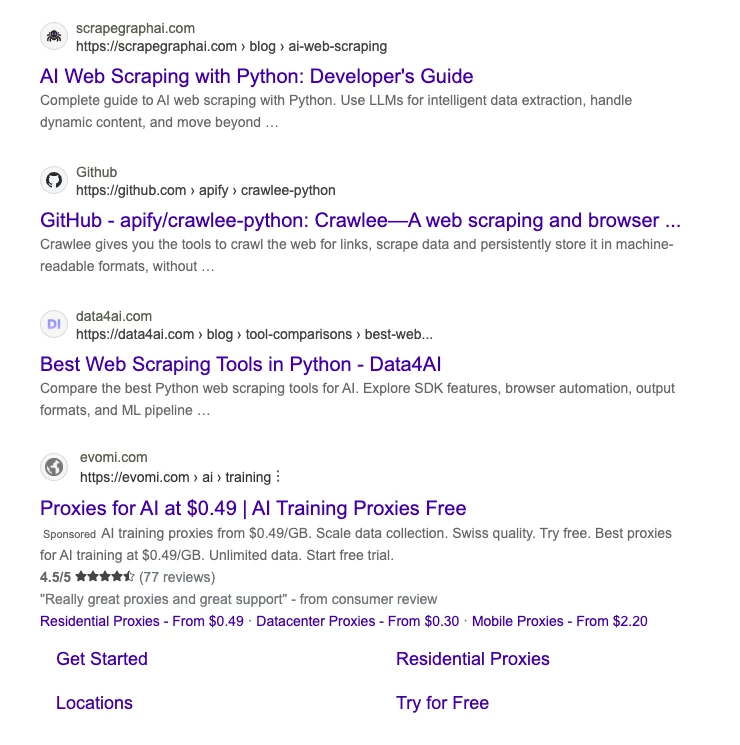
The tracked domain's guide as the top classic listing, with crawlee and data4ai below it. The Sponsored evomi listing does not use up a position. Above this crop, Bing also renders our GitHub repository as a rich organic card, which is why the tracker reports position 2 rather than 1.
I ran this exact code on July 22, 2026. The response, trimmed to the first four organic results:
{
  "keyword": "ai web scraping python",
  "search_url": "https://www.bing.com/search?q=ai+web+scraping+python&count=10&mkt=en-US",
  "target_domain": "scrapegraphai.com",
  "found": true,
  "organic_position": 2,
  "ranking_url": "https://scrapegraphai.com/blog/ai-web-scraping",
  "organic_results": [
    {"position": 1, "title": "ScrapeGraphAI/Scrapegraph-ai : Python scraper based on AI - GitHub", "url": "https://github.com/ScrapeGraphAI/Scrapegraph-ai", "domain": "github.com"},
    {"position": 2, "title": "AI Web Scraping with Python : Developer's Guide", "url": "https://scrapegraphai.com/blog/ai-web-scraping", "domain": "scrapegraphai.com"},
    {"position": 3, "title": "GitHub - apify/crawlee-python : Crawlee--A web scraping and browser ...", "url": "https://github.com/apify/crawlee-python", "domain": "github.com"},
    {"position": 4, "title": "Best Web Scraping Tools in Python - Data4AI", "url": "https://data4ai.com/blog/tool-comparisons/best-web-scraping-tools-in-python-for-ai-workflows", "domain": "data4ai.com"}
  ],
  "competitors_above": [
    {"position": 1, "title": "ScrapeGraphAI/Scrapegraph-ai : Python scraper based on AI - GitHub", "url": "https://github.com/ScrapeGraphAI/Scrapegraph-ai", "domain": "github.com"}
  ]
}
Ten results, positions strictly increasing, and the ranking URL, AI Web Scraping with Python, is a real article on this site. The one competitor above us is our own GitHub repository, which Bing renders as a rich card but still counts as a ranked organic result.
Run the same cell again a few minutes later and you will not always get the identical list. On a re-run while writing this, Bing surfaced a different one of our pages first and dropped us to organic position 1, with the repository card sliding down. That is not the code being flaky. That is Bing being Bing. It is also the entire argument for tracking on a schedule instead of trusting one screenshot: a single check is a coin flip between neighboring positions, and only the trend line over days tells you anything real.
What Counts as Position 1 on Bing
Position numbers are only useful if you count the same way every day, and Bing gives you plenty of chances to count wrong. The live SERP behind that screenshot contained, in order: a sponsored proxy ad dressed up with sitelinks and review stars, a rich repository card pulled from GitHub, a video carousel, and only then the classic blue-link results. A knowledge panel sat in the right rail.
The rules this tracker applies, confirmed against the tested output above:
- Ads never use up a position. The evomi listing sits inside the results column and mimics an organic result, and it still counts for nothing.
- Carousels and repeated related-content blocks are ignored. Bing likes to re-render the same listing twice; without an explicit instruction the extractor dutifully returned duplicates in an early test run.
- Rich cards that are really organic results still count. The GitHub repository card is a ranked organic listing wearing a fancier template, and the extractor counts it. That is why the tested output says position 2, not 1.
None of these rules is a law of nature. They are choices, and the only thing that matters is making them once and never mixing schemes in one history file. If you ever change how you count, start a new CSV. Mixing counting schemes in one file is how rank charts turn into fiction.
One more variable worth pinning: mkt. Bing localizes hard, and en-US and en-GB can order the same organic results differently. Track one market per row, and if you sell into several, add the market as a column and check each one explicitly rather than letting Bing guess from the request's origin.
The Same Check With curl
No SDK, same call. If any flag here is unfamiliar, the curl guide covers all of them:
curl -X POST https://v2-api.scrapegraphai.com/api/extract \
  -H "SGAI-APIKEY: $SGAI_API_KEY" \
  -H "Content-Type: application/json" \
  -d '{
    "url": "https://www.bing.com/search?q=ai+web+scraping+python&count=10&mkt=en-US",
    "prompt": "Extract a rank-tracking JSON object from this Bing search result page. Target domain: scrapegraphai.com. Return visible organic results in order with position, title, url, domain. Skip Sponsored ads without using up a position. List each result once, positions strictly increasing, ignoring repeated carousel listings. Set found, organic_position, and ranking_url (the full result URL) for the first organic result on the target domain or a subdomain. Do not invent results.",
    "schema": {
      "type": "object",
      "properties": {
        "found": { "type": "boolean" },
        "organic_position": { "type": ["integer", "null"] },
        "ranking_url": { "type": ["string", "null"] },
        "organic_results": {
          "type": "array",
          "items": {
            "type": "object",
            "properties": {
              "position": { "type": "integer" },
              "title": { "type": "string" },
              "url": { "type": "string" },
              "domain": { "type": "string" }
            },
            "required": ["position", "title", "url", "domain"]
          }
        }
      },
      "required": ["found", "organic_position", "ranking_url", "organic_results"]
    }
  }'
Auth is one header, SGAI-APIKEY. Plans start free, then Starter at $20 if the tracker becomes part of your routine.
From One Check to a Bing Rank Tracker
A rank checker answers "where am I today". A rank tracker answers "what changed". The difference is a loop and a CSV:
import csv
import os
import time
from datetime import date
from urllib.parse import quote_plus

from scrapegraph_py import ScrapeGraphAI

sgai = ScrapeGraphAI(api_key=os.environ["SGAI_API_KEY"])

KEYWORDS = [
    "ai web scraping python",
    "web scraping api",
    "rank tracking api",
]
TARGET = "scrapegraphai.com"
CSV_PATH = "bing_positions.csv"


def check_bing_position(keyword: str) -> dict:
    url = f"https://www.bing.com/search?q={quote_plus(keyword)}&count=10&mkt=en-US"
    prompt = (
        f"Extract visible organic results from this Bing SERP in order. "
        f"Skip Sponsored ads without using up a position. "
        f"List each result once, positions strictly increasing, ignoring repeated "
        f"carousel or related-content listings. "
        f"Report the first organic position and URL for {TARGET} or a subdomain, "
        f"or found=false with nulls if absent. "
        f"ranking_url must be the full URL of that result, not the shortened "
        f"breadcrumb shown under the title. Do not invent results."
    )
    res = sgai.extract(prompt, url=url, schema=BingRankCheck.model_json_schema())
    if res.status != "success":
        raise RuntimeError(res.error)
    return res.data.json_data


def last_position(keyword: str) -> int | None:
    if not os.path.exists(CSV_PATH):
        return None
    rows = [r for r in csv.DictReader(open(CSV_PATH)) if r["keyword"] == keyword]
    if not rows or rows[-1]["position"] == "":
        return None
    return int(rows[-1]["position"])


write_header = not os.path.exists(CSV_PATH)
with open(CSV_PATH, "a", newline="") as f:
    writer = csv.writer(f)
    if write_header:
        writer.writerow(["date", "keyword", "position", "ranking_url"])
    for kw in KEYWORDS:
        prev = last_position(kw)
        data = check_bing_position(kw)
        pos = data.get("organic_position")
        writer.writerow([date.today().isoformat(), kw, pos, data.get("ranking_url")])
        if prev is not None and pos is not None and pos > prev:
            print(f"DROP: {kw} moved {prev} -> {pos} on Bing")
        time.sleep(2)
Run it once a day from cron or a GitHub Actions schedule and the CSV becomes your position history. This is the actual file the loop above produced on July 22, 2026:
date,keyword,position,ranking_url
2026-07-22,ai web scraping python,2,https://scrapegraphai.com/blog/ai-web-scraping
2026-07-22,web scraping api,,
2026-07-22,rank tracking api,,
Honest output: one keyword where we rank, two where we are nowhere in Bing's top results. Keep those empty rows. A keyword where you stopped appearing entirely is the signal you most want a timestamp for, and a keyword where you never appeared is a to-do list. One more note from running this: daily is the right frequency for Bing. Its SERPs move slower than Google's, so hourly polling burns credits to record the same number.
The cost math stays boring on purpose: one extract call per keyword per day. Ten keywords is ten calls. When you outgrow the CSV, the database schema and API design in Rank Tracking API for Developers apply to Bing rows unchanged.
Track Google and Bing Side by Side
One honest clarification, because the naming invites confusion. ScrapeGraphAI also has a Search endpoint, the searchscraper: you give it a query instead of a URL and it runs the web search for you. Its results are Google-backed, so it will not tell you your Bing position. What it gives you is the other half of the comparison without you having to build Google URLs at all:
from pydantic import BaseModel, Field


class GooglePosition(BaseModel):
    found: bool = Field(description="Whether the target domain appears")
    position: int | None = Field(description="Position of the target domain in the results")


def google_position(keyword: str, attempts: int = 3):
    prompt = (
        f"Report whether scrapegraphai.com or a subdomain appears in these results "
        f"and at which position, counting from 1. Do not invent results."
    )
    for attempt in range(attempts):
        res = sgai.search(keyword, num_results=10, prompt=prompt,
                          schema=GooglePosition.model_json_schema())
        if res.status == "success" and res.data:
            return res.data.json_data
        time.sleep(3)
    raise RuntimeError("search failed after retries")


google = google_position("ai web scraping python")
bing = check_bing_position("ai web scraping python")

print(f"Google: {google.get('position')}  Bing: {bing.get('organic_position')}")
The retry loop is not decoration. The search endpoint occasionally returns an empty response under load, and a bare sgai.search(...).data.json_data will throw on it; retrying two or three times with a short pause turns a flaky one-shot into something a scheduled job can rely on. On July 22, 2026 the printed line, once search returned, was:
Google: 1 Bing: 2| Keyword | Google (search endpoint) | Bing (extract) | Ahrefs, late June |
|---|---|---|---|
| ai web scraping python | 1 | 2 | ~5 on Google |
Three measurements, three answers, all defensible. The search endpoint counts within its own returned set, the Bing extract counts organic listings on one specific SERP, and Ahrefs samples its own way on its own schedule. And as the re-run earlier showed, even the Bing number wobbles between 1 and 2 from one minute to the next. Pick one measurement and stick to it; the trend line matters more than which absolute number you bless. The what is a SERP guide goes deeper on why the same query produces different pages in different contexts.
Run It in Colab
Everything above, the single check, the polling loop, and the Google vs Bing comparison, is in the companion Colab. Paste an API key, run the cells top to bottom, swap in your own keywords and domain. The free tier covers the whole notebook.
FAQ
Does Bing have an official rank tracking API?
No. The Bing Search API was retired on August 11, 2025, and its successor inside Azure AI Foundry serves grounding for AI agents, not SERP data. Bing Webmaster Tools reports average positions for your own verified site, which is useful but cannot check an arbitrary keyword against an arbitrary domain, and says nothing about competitors.
How often should I check Bing rankings?
Daily covers almost every real use case. Bing SERPs reshuffle less often than Google's, so tighter intervals mostly record the same positions twice. Weekly works if you only watch a handful of money keywords.
Can I track Google and Bing with the same script?
Yes. The extract pattern is engine-agnostic: swap the Bing URL for a Google search URL and keep the same schema. That Google version, plus what to store once you outgrow a CSV, is covered in Rank Tracking API for Developers.
Is it allowed to scrape Bing results?
Search results pages are publicly accessible data, and checking your own rankings is one of the most common monitoring tasks on the web. For the broader picture on what is and is not defensible, read Is Web Scraping Legal?.
Related Articles
- Rank Tracking API for Developers: the Google version of this tracker, with database schema and API response design.
- Bing Search API Alternatives: 7 Best Replacements in 2026: what actually replaced the retired API.
- What Is a SERP? Search Results Pages Explained: the vocabulary behind every position this tracker records.
- SEO Web Scraping: AI Keyword Research & SERP Analysis: the wider SEO data playbook this tracker slots into.