


TL;DR
KAYAK has official travel APIs, but production access is partner-gated. Apply, optionally prototype with free sandbox keys, then request production keys after approval. KAYAK publishes no fixed API price. The Python workflow below targets public result pages only. On July 29, 2026, KAYAK sent both normal and JavaScript fetches to its bot page, so validation stopped without creating fare data. Use the Colab to reproduce the check, not to bypass controls.

What is the KAYAK API?
The KAYAK API is an official suite for approved travel partners. It can power flight, hotel, and car search, price insights, place autocomplete, static hotel feeds, and advertising placements. It is not an unrestricted API where any developer creates a production key from a dashboard and starts sending requests.
KAYAK asks applicants to describe their business and use case. You can request free sandbox access while applying. Sandbox keys use test-style data for prototyping. Production keys become available only after KAYAK approves the use case as a full affiliate integration.
So, does KAYAK have an API? Yes. The older version of this guide said there was no official API, which was wrong. KAYAK offers an official partner API, not an open production API that anyone can activate without review.
This guide keeps the two access paths separate. Official product claims come from KAYAK's own developer and affiliate pages. Executable Python appears only in the public-page extraction section because the public documentation does not provide enough context to invent a production request for your contract.
Which APIs does KAYAK offer?
The KAYAK developer portal lists eight API families. The affiliate site groups them into travel search, travel data, and advertising products.
| Product | Public description | Typical use |
|---|---|---|
| Flights Search API | Returns flight results | Flight discovery and comparison inside an approved product |
| Hotels Search API | Searches for hotels | Hotel discovery, pricing, and availability |
| Cars Search API | Returns rental car results | Car rental search and comparison |
| Flights Price Insights API | Returns recently observed cheapest prices | Deal discovery, date comparison, and price context |
| Autocomplete API | Suggests airports, cities, countries, and properties | Destination and place inputs |
| Static Data Feeds API | Provides hotel and place reference data | Local catalogs and periodic reference-data imports |
| CompareTo Ads API | Returns Compare To advertisements | KAYAK affiliate ad placements |
| Inline Ads API | Returns inline advertisements | Ads placed within a travel experience |
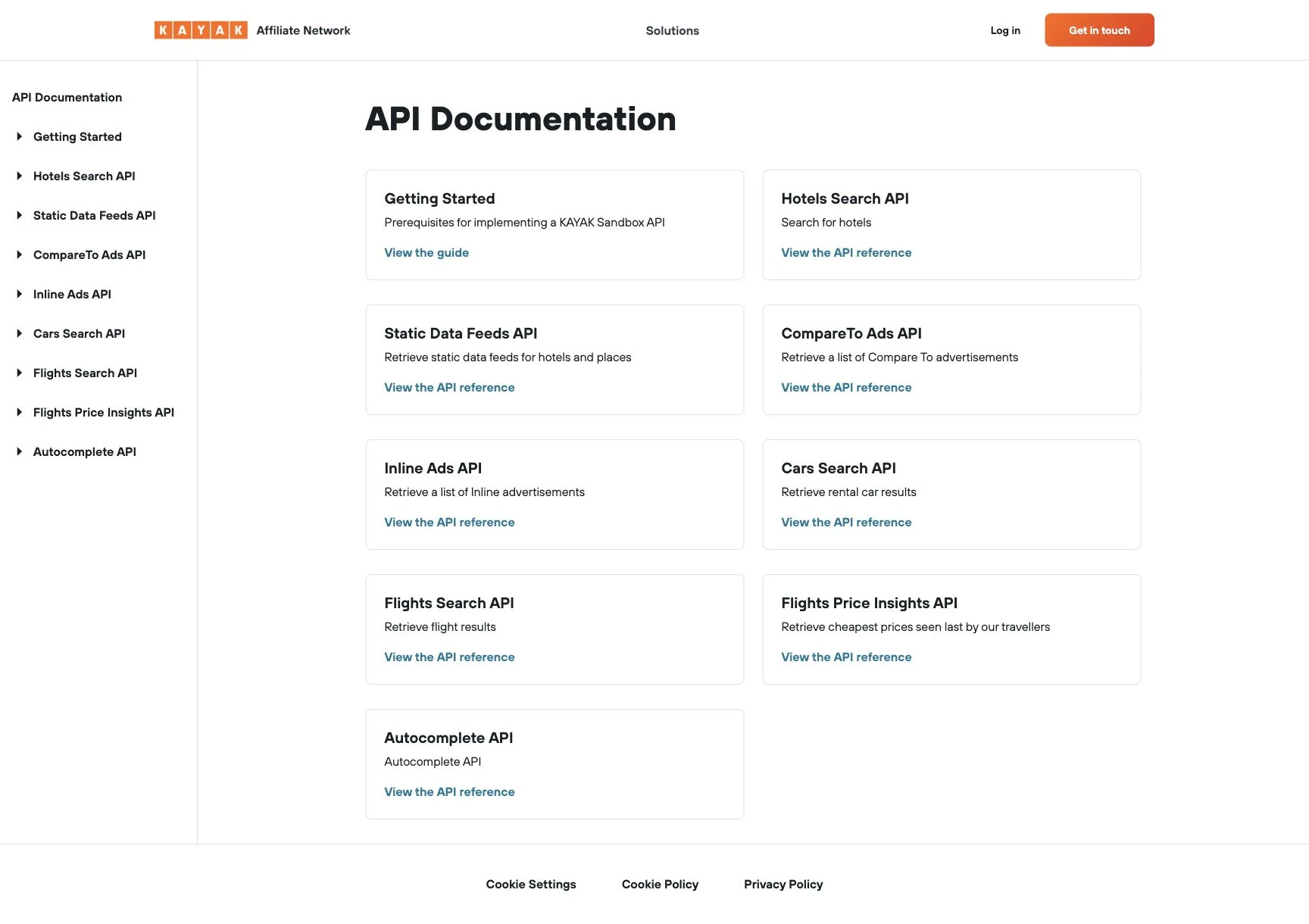
KAYAK developer documentation captured July 29, 2026. View the live API documentation.
The Flights API page describes one-way, round-trip, multi-city, flexible-date, nearby-airport, passenger, fare-family, baggage, and provider data. It also describes a two-step search that returns quick provider results before the broader search completes. Those product details do not reveal a public request shape, and this article does not convert them into imaginary endpoints.
KAYAK's Travel Data API page gives more detail on the non-search products. Price Insights supports route and calendar comparisons. Autocomplete covers airports, cities, countries, and named properties. Static feeds use NDJSON and cover hotel and place reference data. Contract terms and provisioned documentation still decide what a specific partner can call.
Access, sandbox keys, production keys, and documentation
KAYAK publishes a clear four-step access workflow:
- Apply with your business, website, and intended use case.
- Request free sandbox access if you want to prototype first.
- After approval as an affiliate integration, request production keys for the products you need.
- Launch with KAYAK's documentation, account guidance, and performance tracking.
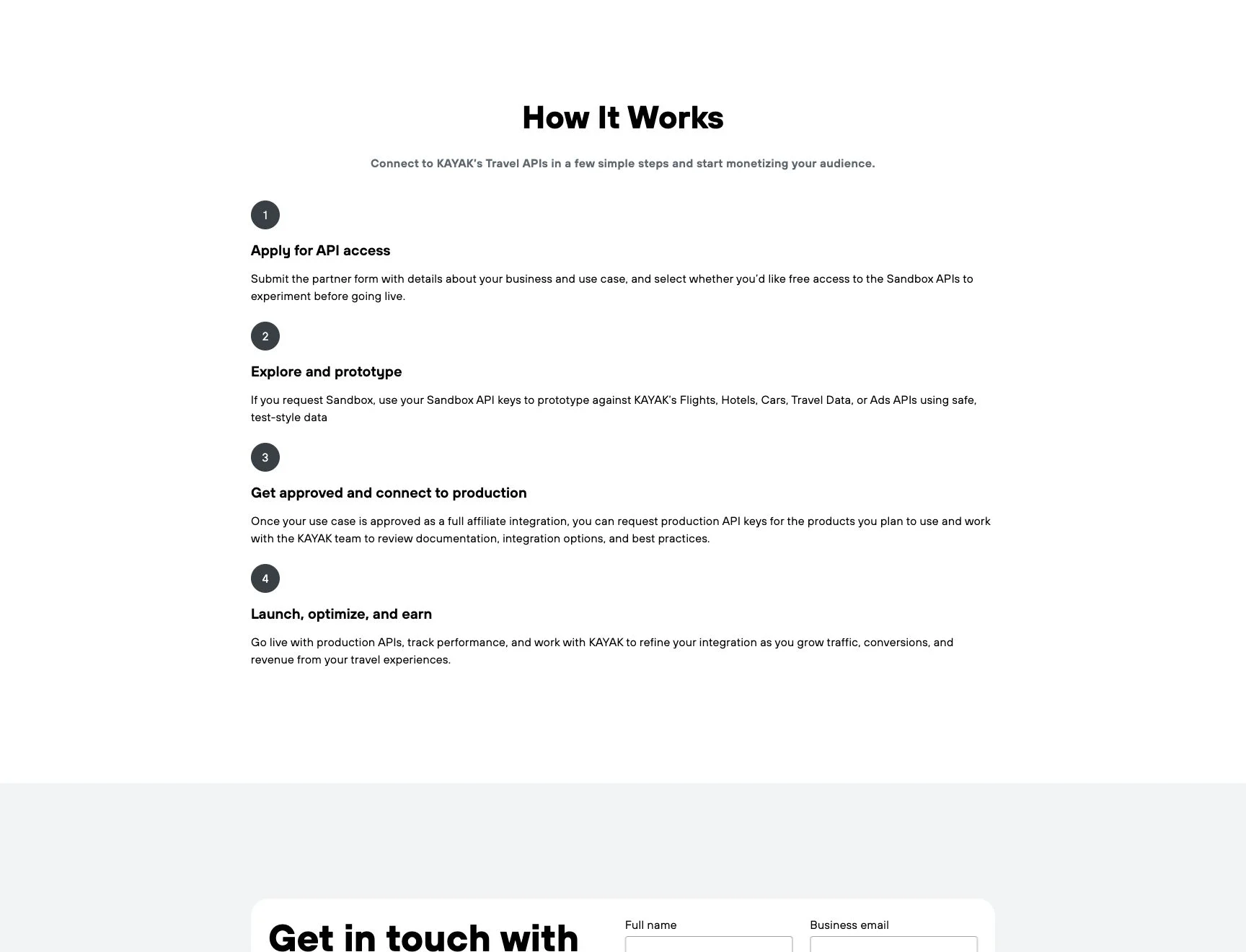
KAYAK affiliate API access workflow captured July 29, 2026. View the live access page.
The sandbox is useful for schema design, UI work, and integration planning because its test-style data does not depend on live booking inventory. It is not evidence that production access will be approved. KAYAK says production keys follow approval of the use case as a full affiliate integration.
Ask for the provisioned KAYAK API documentation before estimating the engineering work. A practical review needs answers to questions the public marketing pages do not settle:
- Which APIs, fields, markets, and brands are included?
- How do sandbox responses differ from production responses?
- What authentication material and rotation process does the contract use?
- How do the two flight-search steps signal partial and complete results?
- Which quotas, concurrency rules, retry instructions, and service levels apply?
- What attribution, referral, caching, storage, and display rules apply to returned data?
- Where does KAYAK hand the traveler to an airline or booking provider?
Do not copy request code from an unrelated partner and assume it will work. KAYAK can provision different products and commercial rights, so the documentation attached to your approval is the specification that matters.
KAYAK API pricing and cost
KAYAK does not publish a fixed API price table on the developer or affiliate pages checked for this guide. There is no public per-request price, monthly minimum, standard quota, or overage figure that can be quoted responsibly.
The access page frames the product as an affiliate partnership. It mentions free sandbox keys, production approval, monetization, and account support. That is not the same as saying production access is free. Commercial terms can depend on the APIs requested, expected traffic, business model, markets, and referral arrangement.
Bring a concrete workload to the partnership discussion:
- products required, such as Flights Search plus Autocomplete;
- peak searches per minute and expected monthly search volume;
- countries, currencies, locales, and brands;
- whether the application displays prices, sends referrals, or supports booking integration;
- storage and cache requirements;
- sandbox duration and production launch date;
- support and service-level requirements.
Then ask KAYAK to state the production allowance, restrictions, support, attribution, revenue terms, and any charges in writing. A blog cannot price a contract it has not seen.
Official KAYAK API versus public-page extraction
The official API and public-page extraction solve different problems. Pick based on what the finished product must do, not which option produces the faster demo.
| Requirement | Official KAYAK API | Public-page extraction with ScrapeGraphAI |
|---|---|---|
| Approved production integration | Yes, after partner approval | No |
| Sandbox with test-style data | Available on request | No dedicated sandbox |
| Contracted fields and documentation | Yes | You define a schema against visible page content |
| Live search and booking integration | Designed for approved partner products | Not a booking interface |
| Publicly displayed facts | May return them through the contract | Can extract them when the public page is accessible |
| Stable access expectations | Defined by partner terms | The page may change or block automated fetching |
| KAYAK production key | Required | Never used |
Use the official API when flight search is part of a customer-facing product, when you need documented production behavior, or when the booking handoff is central to the experience. Use a public-page workflow for limited research or monitoring only when the page is openly accessible and your use follows its terms and robots rules.
ScrapeGraphAI is not a way to obtain KAYAK partner data without approval. It does not grant API entitlement, reveal authenticated records, or turn a displayed price into a bookable offer. The separate KAYAK scraping guide covers page extraction in more detail. If you are comparing another public flight-search surface, the Google Flights API guide explains its different access situation.
Set up the guarded Python workflow
The code below uses Python 3.12, scrapegraph-py==2.1.0, Pydantic 2, and pandas. The SDK reads SGAI_API_KEY from the environment. The companion Colab uses getpass, so the key is not echoed or stored in notebook output.
python -m pip install "scrapegraph-py==2.1.0" "pydantic==2.13.4" "pandas==2.3.3"
export SGAI_API_KEY="your-key"
Two models describe the visible result. displayed_price stays a string because the source can include a currency sign, grouping separator, or qualification. Normalize it only after checking the locale and source text.
from datetime import datetime

from pydantic import BaseModel, Field


class FlightOffer(BaseModel):
    airline: str = Field(min_length=1)
    departure_time: str = Field(min_length=1)
    arrival_time: str = Field(min_length=1)
    duration: str = Field(min_length=1)
    stops: int = Field(ge=0)
    displayed_price: str = Field(min_length=1)
    booking_provider: str | None = None


class FlightSearchResults(BaseModel):
    origin_airport: str = Field(min_length=3, max_length=3)
    destination_airport: str = Field(min_length=3, max_length=3)
    travel_date: str = Field(min_length=10)
    currency: str = Field(min_length=3, max_length=3)
    offers: list[FlightOffer] = Field(min_length=1)
    source_url: str = ""
retrieved_at: datetime | None = Nonesource_url and retrieved_at are provenance, so the extraction request should not ask the model to invent them. This helper removes those fields from the JSON Schema sent to the API, validates the returned fields with model_validate, then adds the input URL and UTC clock locally.
import json
import time
from datetime import datetime, timezone
from typing import Any

from pydantic import ValidationError
from scrapegraph_py import FetchConfig, ScrapeGraphAI


def extraction_schema() -> dict[str, Any]:
    schema = FlightSearchResults.model_json_schema()
    schema["properties"].pop("source_url", None)
    schema["properties"].pop("retrieved_at", None)
    required = schema.get("required", [])
    schema["required"] = [
        field for field in required if field not in {"source_url", "retrieved_at"}
    ]
    return schema


def parse_json_data(response: Any) -> Any:
    data = response.data.json_data
    return json.loads(data) if isinstance(data, str) else data


def extract_flights(
    sgai: ScrapeGraphAI,
    url: str,
    origin: str,
    destination: str,
    travel_date: str,
) -> tuple[FlightSearchResults, dict[str, Any]]:
    prompt = (
        f"Extract up to three flight offers visibly listed for {origin} to {destination} "
        f"on {travel_date}. Copy the displayed airline, local departure and arrival times, "
        "duration, number of stops, price text, three-letter currency, and booking provider "
        "when shown. Do not infer hidden fares or unavailable fields."
    )
    errors: list[str] = []

    for attempt in range(2):
        started = time.perf_counter()
        kwargs: dict[str, Any] = {"url": url, "schema": extraction_schema()}
        if attempt == 1:
            kwargs["fetch_config"] = FetchConfig(mode="js", stealth=True, wait=2000)

        response = sgai.extract(prompt, **kwargs)
        elapsed = round(time.perf_counter() - started, 2)
        try:
            if response.status != "success":
                raise RuntimeError(response.error or f"request status: {response.status}")

            results = FlightSearchResults.model_validate(parse_json_data(response))
            if results.origin_airport.upper() != origin:
                raise ValueError(f"expected origin {origin}, got {results.origin_airport}")
            if results.destination_airport.upper() != destination:
                raise ValueError(
                    f"expected destination {destination}, got {results.destination_airport}"
                )
            if results.travel_date != travel_date:
                raise ValueError(f"expected date {travel_date}, got {results.travel_date}")

            verified = results.model_copy(
                update={"source_url": url, "retrieved_at": datetime.now(timezone.utc)}
            )
            return verified, {
                "attempts": attempt + 1,
                "javascript_retry": attempt == 1,
                "elapsed_seconds": elapsed,
                "errors_before_success": errors,
            }
        except (RuntimeError, ValidationError, ValueError, TypeError) as error:
            errors.append(f"{type(error).__name__}: {error}")
            if attempt == 1:
                raise RuntimeError(
                    f"Extraction failed after normal and JavaScript attempts: {errors}"
                ) from error

    raise RuntimeError("unreachable")
The second attempt runs only after a request or required-field failure. It uses the documented FetchConfig(mode="js", stealth=True, wait=2000). There is no loop that keeps changing identities or retrying until KAYAK lets the request through.
Single-route flight extraction
The first requested example is a one-way JFK to LHR search for September 15, 2026:
sgai = ScrapeGraphAI()

jfk_lhr, jfk_meta = extract_flights(
    sgai=sgai,
    url="https://www.kayak.com/flights/JFK-LHR/2026-09-15",
    origin="JFK",
    destination="LHR",
    travel_date="2026-09-15",
)

print(jfk_lhr.model_dump(mode="json"))
On the July 29 test, KAYAK redirected the normal fetch to /help/bots.html. The JavaScript and stealth retry also produced no visible flight offers. Pydantic rejected the placeholder currency and empty offers list, which is the correct outcome. The workflow did not print a fare and did not treat the bot page as flight data.
Two-route price tracker and CSV export
If both extractions validate, reuse the jfk_lhr result and make one additional request for SFO to NRT. This avoids spending a third call on the first route.
import pandas as pd

sfo_nrt, sfo_meta = extract_flights(
    sgai=sgai,
    url="https://www.kayak.com/flights/SFO-NRT/2026-09-15",
    origin="SFO",
    destination="NRT",
    travel_date="2026-09-15",
)

searches = [jfk_lhr, sfo_nrt]
rows = []
for search in searches:
    for offer in search.offers:
        rows.append(
            {
                "route": f"{search.origin_airport}-{search.destination_airport}",
                "travel_date": search.travel_date,
                "currency": search.currency,
                **offer.model_dump(),
                "source_url": search.source_url,
                "retrieved_at": search.retrieved_at.isoformat(),
            }
        )

frame = pd.DataFrame(rows)
csv_path = "kayak_flight_prices.csv"
frame.to_csv(csv_path, index=False)

assert len(frame) >= 2
assert set(frame["route"]) == {"JFK-LHR", "SFO-NRT"}
assert frame["source_url"].str.startswith("https://www.kayak.com/").all()
assert frame["retrieved_at"].notna().all()
assert pd.read_csv(csv_path).shape == frame.shape
The independent SFO to NRT check hit the same stop condition on July 29. Across the two requested routes, the final validation run made four extraction calls: two normal attempts and two JavaScript retries. Both routes were blocked, zero routes validated, and no CSV was created. The redacted run is part of the article's repository evidence; there is no fabricated fare table in this post.
This is the result the test produced. It is still useful engineering evidence. A production job should fail closed when the source gives it a bot page. Saving empty or invented offers would corrupt a price history and make later alerts meaningless.
For a general monitoring design that can use accessible sources, read the price scraping guide. If hotel inventory is the actual requirement, the Booking.com scraping guide covers a different page shape and its own access constraints.
What a valid schema can still get wrong
Pydantic proves that the response has the requested shape. It does not prove that the response means what you think it means.
A displayed_price string can be a per-person fare, an installment, a cabin upgrade, or a total with some fees excluded. An airline label can represent an operating carrier, a marketing carrier, or several codeshare partners. An arrival time can refer to the next day even when the page uses only a small +1 marker. A booking provider can be absent from the first result card and appear only after another interaction.
Check semantics against the source before normalizing:
- confirm route, travel date, locale, and currency;
- preserve the exact displayed price text;
- keep next-day markers with local times;
- distinguish nonstop from missing stop data;
- retain every named carrier when the page shows a codeshare;
- record the source URL and UTC retrieval time;
- reject pages that show a challenge, consent wall, or empty state instead of offers.
Only after those checks should a pipeline convert prices to decimals, compare routes, or trigger alerts. The same rule applies to a generic web scraping API: a schema is a contract for shape, not a substitute for source review.
Production considerations and the booking boundary
Flight prices are unusually volatile. The same route can change between extraction and checkout, and a displayed result may omit baggage, seat selection, payment fees, or fare restrictions. Store the page's display currency and locale with every record. Do not combine USD and GBP observations in one time series.
Keep the search definition stable as well. A one-way economy search for one adult is not comparable with a round trip, a premium cabin, or a search that includes nearby airports. Save passenger count, cabin, trip type, airport scope, and any visible filter state beside the fare. If one of those inputs changes, start a new series rather than pretending the rows describe the same product.
Recheck a sample of accepted rows against the page on every release. Confirm that the airline text, stops, date boundary, and price label still map to the same fields. A schema can keep passing after a layout change while the meaning shifts to a nearby card. That is a semantic regression, and unit tests built only from old JSON will miss it.
Use conservative scheduling. A monitoring job should set a small route list, a clear business reason, and a fixed interval. Stop on repeated access blocks. Do not add endless retries, rotate identities to evade a refusal, or assume that a browser mode grants permission.
Read the site's terms and robots rules before collection. Avoid personal traveler data, account pages, and authenticated booking flows. The web scraping legality guide explains the broader legal questions, but it is not legal advice and does not replace KAYAK's contract or terms.
Error handling should separate source failures from data failures. A timeout, challenge page, empty results page, Pydantic error, and unexpected route each deserve a different log entry. Keep the last known good record instead of replacing it with an empty row. Alert on repeated failures so a human can decide whether to pause the source.
Displayed data also stops at the booking boundary. Public extraction can answer, "What did this accessible page show at this time?" It cannot guarantee the fare, issue a ticket, apply fare rules, or complete payment. Approved booking integration belongs to the official KAYAK partner product or another booking-grade supplier.
Run the workflow in Google Colab
The KAYAK public-web Colab contains the pinned installation, hidden key input, schemas, retry helper, both routes, CSV assertions, download cell, and limitations. It is shared as anyone-with-link viewer and was anonymously downloaded byte-for-byte on July 29, 2026.
The notebook contains no credential and no saved fare output. Run the cells in order. If the first route reaches KAYAK's bot page again, stop there. A failed validation is the expected safety behavior, not an invitation to add bypasses.
Does KAYAK have an API?
Yes. KAYAK publishes official APIs for flights, hotels, cars, price insights, autocomplete, static data feeds, and advertising. Production access requires an approved affiliate integration; it is not an unrestricted self-serve API.
Is the KAYAK API free?
KAYAK lets applicants request free sandbox access for prototyping. Its public pages do not publish a fixed production price or say that every production integration is free. Ask KAYAK for the commercial terms tied to your products, traffic, and use case.
How do I get a KAYAK API key?
Submit the partner form with your business and intended use. You can request sandbox keys in the application. After KAYAK approves a full affiliate integration, you can request production keys for the products in scope.
Can ScrapeGraphAI replace the official KAYAK API?
No. ScrapeGraphAI can structure facts from an accessible public page. It does not provide KAYAK partner rights, contracted fields, stable production access, or booking capability. Use the official API for an approved travel product and public extraction only for permitted research where the source remains accessible.