


TL;DR
curl URLsends a GET,curl -dsends a POST,-Hadds headers,-Lfollows redirects, and-ishows you what the server actually said. Those five cover most of what you will ever type. Add-sfor scripts,-wwhen you need timings, and pipe JSON responses intojq. The rest of this guide is the honest version of the manpage: each flag with a command you can paste, plus a full section on driving a real scraping API with nothing but curl.
curl is the tool you reach for when you want to see what an HTTP conversation really looks like, without a browser or an SDK adding opinions on top. It ships preinstalled on macOS, Linux, and every Windows 10+ machine, it speaks basically every protocol that matters, and the syntax you learn today still works in CI scripts ten years from now.
The problem is that man curl documents around 250 options and gives you no sense of which twelve you will actually use. That is what this guide is for. Every command below was run before being pasted here (curl 8.7.1, July 2026), with the real output next to it.
Sending a GET Request
A bare curl call is already a GET request:
curl https://example.comThe raw response body lands straight in your terminal, HTML tags and all:
<!doctype html><html lang="en"><head><title>Example Domain</title><link rel="icon" href="data:,"><meta name="viewport" content="width=device-width, initial-scale=1"><style>body{background:#eee;width:60vw;margin:15vh auto;font-family:system-ui,sans-serif}h1{font-size:1.5em}div{opacity:0.8}a:link,a:visited{color:#348}</style></head><body><div><h1>Example Domain</h1><p>This domain is for use in documentation examples without needing permission. Avoid use in operations.</p><p><a href="https://iana.org/domains/example">Learn more</a></p></div></body></html>That is the whole point and the whole problem: curl hands you exactly what the server sent, no more and no less. Three flags make it useful:
curl -s -o page.html https://example.com-s silences the progress meter, -o writes the body to a file instead of stdout. For APIs, skip the file and pipe straight into jq:
curl -s https://api.github.com/repos/ScrapeGraphAI/Scrapegraph-ai | jq .stargazers_count28506That one-liner pattern, curl -s piped into jq, is the backbone of API debugging. Query parameters go in the URL; quote it so your shell doesn't eat the &:
curl -s "https://httpbingo.org/get?page=2&limit=50"Sending a POST Request
The moment you add -d, curl switches to POST. No -X POST needed:
curl -d "name=Ada" -d "role=engineer" https://httpbingo.org/postEach -d adds a form field, and curl sets Content-Type: application/x-www-form-urlencoded for you. The echo service confirms what arrived:
{
  "form": { "name": ["Ada"], "role": ["engineer"] }
}
Most modern APIs want JSON instead. Two changes: declare the content type and pass the JSON as one -d argument:
curl -X POST https://httpbingo.org/post \
  -H "Content-Type: application/json" \
  -d '{"name": "Ada", "role": "engineer"}'
Note the quoting: single quotes around the JSON so the double quotes inside survive the shell. This is the single most common curl mistake; if an API keeps rejecting your "valid" JSON, check your quotes before blaming the API.
If a value contains characters that need escaping, --data-urlencode handles it for form posts:
curl --data-urlencode "q=web scraping & AI" https://httpbingo.org/postWorking With Headers
-H sets a request header and you can repeat it as many times as you want:
curl -s https://httpbingo.org/get \
  -H "Accept: application/json" \
  -H "X-Request-Source: tutorial"
Two flags show you the other direction, what the server sends back. -i prints response headers above the body; -I sends a HEAD request and prints only headers:
curl -I https://www.scrapegraphai.comHTTP/2 301
content-type: text/html; charset=utf-8
location: https://scrapegraphai.com/There it is: the www host answers with a 301 and a location header pointing at the apex domain. -I is the fastest way to check status codes, redirect targets, cache headers, and rate-limit headers without downloading anything.
Changing the user agent gets its own shorthand, -A:
curl -A "Mozilla/5.0 (Macintosh; Intel Mac OS X 10_15_7)" https://example.comSome sites serve different content (or a block page) depending on this header, which is why it comes up constantly in scraping work.
Following Redirects
curl does not follow redirects unless you ask. That surprises people:
curl -s -o /dev/null -w "%{http_code}\n" http://github.com301Add -L and curl chases the location header to the final destination:
curl -s -o /dev/null -w "%{http_code} after %{num_redirects} redirects -> %{url_effective}\n" -L http://github.com200 after 1 redirects -> https://github.com/That -w (write-out) format string is worth stealing: it turns curl into a tiny monitoring probe. --max-redirs 5 caps the chase so a misconfigured redirect loop can't hang your script.
One warning: -L re-sends your headers to wherever the redirect points. If a request carries an authorization header, make sure you trust the redirect chain before following it blindly.
The Flags That Actually Matter
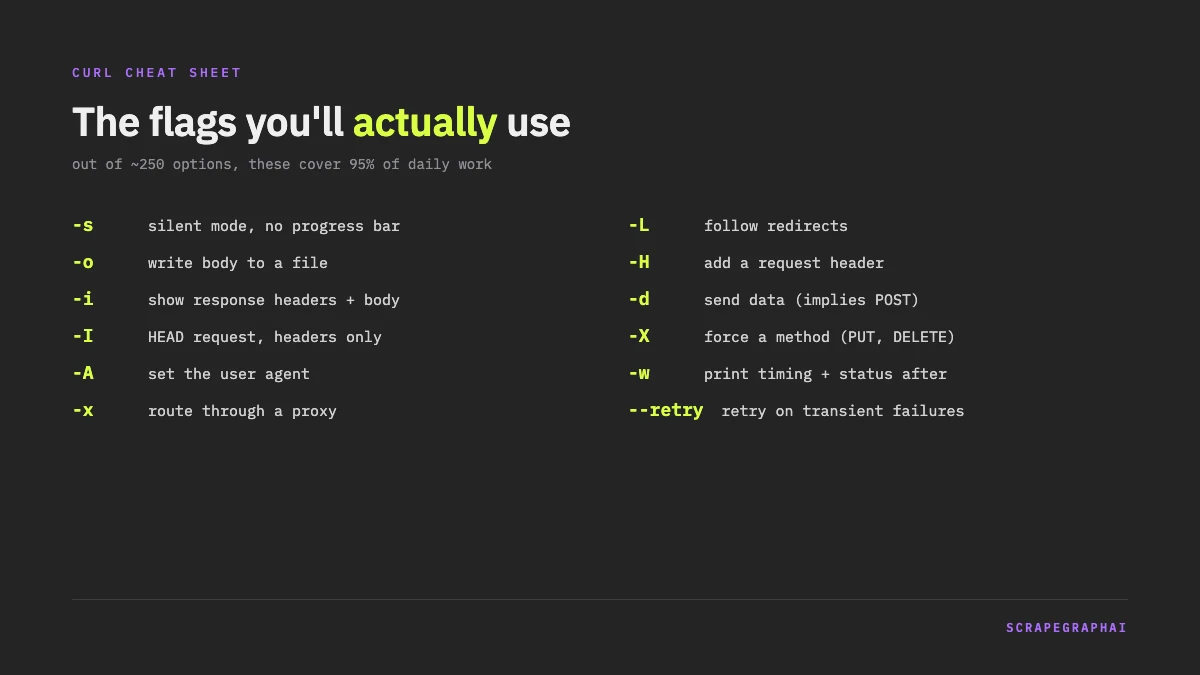
Out of curl's ~250 options, this covers 95% of daily use:
| Flag | What it does | Typical use |
|---|---|---|
-s |
Silent mode, no progress bar | Every script |
-o file |
Write body to file | Downloads |
-O |
Save with the remote filename | Quick downloads |
-i |
Show response headers + body | Debugging |
-I |
HEAD request, headers only | Status checks |
-H |
Add a request header | Auth, content type |
-d |
Send data (implies POST) | Forms, JSON |
-X |
Force a method (PUT, DELETE...) | REST APIs |
-L |
Follow redirects | Shortened/moved URLs |
-A |
Set the user agent | Scraping, testing |
-w |
Print metadata after transfer | Timing, status codes |
--retry 3 |
Retry on transient failures | Flaky networks, CI |
The -w variables deserve one concrete example, because timing a request is something everyone eventually needs:
curl -s -o /dev/null -w "status: %{http_code} time: %{time_total}s size: %{size_download} bytes\n" https://example.comstatus: 200 time: 0.192322s size: 559 bytesIgnoring SSL Certificates (Carefully)
-k (or --insecure) tells curl to accept certificates it can't verify:
curl -k https://localhost:4000/api/healthThere is exactly one good reason to use it: local development against self-signed certificates. Against anything on the public internet, -k throws away the only guarantee that you're talking to the server you think you are. If a production endpoint fails certificate verification, the fix is --cacert your-ca.pem or fixing the server, not silencing the check.
curl Through a Proxy
-x routes the request through a proxy:
curl -x http://user:pass@proxy.example.com:8080 https://httpbingo.org/ipcurl also respects the https_proxy and http_proxy environment variables, which is usually the cleaner setup in CI. If you're proxying to avoid IP blocks while scraping, know that this is the point where hand-rolled setups start eating your time; that problem is what managed scraping APIs exist for, which is where we're headed below.
curl vs wget
Both fetch things over HTTP, and the overlap ends about there.
| curl | wget | |
|---|---|---|
| Best at | Talking to APIs | Downloading files and mirroring sites |
| Recursive download | No | Yes (-r) |
| Resume downloads | -C - |
-c |
| Protocols | HTTP(S), FTP, SMTP, IMAP, and ~20 more | HTTP(S), FTP |
| Preinstalled | macOS, Windows 10+, most Linux | Most Linux only |
| Library form | libcurl, embedded everywhere | None |
The honest verdict: use wget when you want to mirror a website or grab a big file over a bad connection, and curl for everything else. If you're testing, scripting, or calling APIs, curl is the right default, and it's already on your machine.
curl on Windows
Windows 10 and later ship a real curl at curl.exe. The trap is PowerShell: curl there is an alias for Invoke-WebRequest, which takes completely different arguments. The fix is to always type the extension:
curl.exe -s https://api.github.com/repos/ScrapeGraphAI/Scrapegraph-aiQuoting also differs. PowerShell mangles single-quoted JSON bodies in ways that depend on the PowerShell version, so the reliable pattern is double quotes outside and escaped double quotes inside:
curl.exe -X POST https://httpbingo.org/post -H "Content-Type: application/json" -d "{\"name\": \"Ada\"}"Or skip the pain and put the JSON in a file: -d "@body.json" works identically on every platform.
Calling a Scraping API With curl
Everything above comes together the moment you point curl at a real API. These examples use ScrapeGraphAI; the same flags apply to any JSON API. Put your API key in an environment variable so it never lands in your shell history file or a pasted screenshot:
export SGAI_API_KEY="your-key-here"Extract structured data from a page. One POST, a URL, and a plain-English prompt:
curl -s -X POST https://v2-api.scrapegraphai.com/api/extract \
  -H "SGAI-APIKEY: $SGAI_API_KEY" \
  -H "Content-Type: application/json" \
  -d '{"url": "https://news.ycombinator.com", "prompt": "Extract the top 5 story titles and their points"}'
The response comes back with the extracted data under json, plus token usage metadata. Pipe it through jq .json and you have clean structured data in one shell line. Add a "schema" field with a JSON Schema object when you need the output to match an exact shape.
Turn a page into markdown with the scrape endpoint:
curl -s -X POST https://v2-api.scrapegraphai.com/api/scrape \
  -H "SGAI-APIKEY: $SGAI_API_KEY" \
  -H "Content-Type: application/json" \
  -d '{"url": "https://example.com", "formats": [{"type": "markdown"}]}'
Search the web and get parsed results instead of scraping a search engine yourself:
curl -s -X POST https://v2-api.scrapegraphai.com/api/search \
  -H "SGAI-APIKEY: $SGAI_API_KEY" \
  -H "Content-Type: application/json" \
  -d '{"query": "best web scraping tools 2026", "numResults": 3}'
Crawl a whole site with the start-then-poll pattern, which is also a nice curl exercise in itself. Start the job and grab its id:
JOB_ID=$(curl -s -X POST https://v2-api.scrapegraphai.com/api/crawl \
  -H "SGAI-APIKEY: $SGAI_API_KEY" \
  -H "Content-Type: application/json" \
  -d '{"url": "https://example.com", "maxPages": 20}' | jq -r .id)
Then poll until the status field flips from running:
curl -s https://v2-api.scrapegraphai.com/api/crawl/$JOB_ID \
  -H "SGAI-APIKEY: $SGAI_API_KEY" | jq '{status, finished, total}'
and page through the results with GET /api/crawl/$JOB_ID/pages when it completes.
One debugging tip that applies to any authenticated API: when a call fails, re-run it with -i first. The status code and headers usually tell you more than the error body. A 401 here means the SGAI-APIKEY header is missing, a 403 means the key is wrong, and a 402 means you're out of credits:
curl -i -X POST https://v2-api.scrapegraphai.com/api/extract \
  -H "Content-Type: application/json" \
  -d '{"url": "https://example.com", "prompt": "Extract the title"}'
HTTP/2 401
{"error":{"type":"auth_missing_key","message":"API key required"}}Once your curl call works, porting it to Python or JavaScript is mechanical, and every request you'll ever debug can be reduced back to a curl command. That's the real reason to learn the tool properly: it's the lingua franca of HTTP debugging. If you're processing the JSON these endpoints return, our Python JSON guide picks up exactly where this one ends.
Quick Answers
How do I send a POST request with curl?
Add -d with your data. For JSON: curl -X POST url -H "Content-Type: application/json" -d '{"key": "value"}'. For form data, -d "field=value" alone is enough; curl switches to POST automatically.
What makes curl show response headers?
-i prints headers followed by the body. -I sends a HEAD request and prints only the headers, which is faster when the body doesn't matter.
Does curl follow redirects by default?
No. Without -L you get the redirect response itself (a 301 or 302 and a location header). With -L, curl follows the chain to the final URL.
Is curl better than wget? For APIs and debugging, yes. For recursively downloading a website or resuming huge downloads on a flaky connection, wget is the better tool. They're complements, not rivals.
Why does my curl command fail in PowerShell but work on Mac?
PowerShell aliases curl to Invoke-WebRequest. Use curl.exe explicitly and swap single-quoted JSON for escaped double quotes, or pass the body from a file with -d "@body.json".
Related Articles
- ScrapeGraphAI API Guide: Scrape, Extract, Search: every endpoint from this guide's API section, covered in depth with SDK examples.
- Web Scraping API: How to Choose One in 2026: what to look for before you commit your curl scripts to any scraping vendor.
- Python JSON Guide: dumps, loads, and Real-World Parsing: what to do with the JSON your curl calls return.
- AI Web Scraping with Python: Developer's Guide: the Python version of the extraction workflow shown here in shell.