


TL;DR
A rank tracking API turns a keyword, a target domain, and a search location into structured JSON: position, ranking URL, competitors above you, and the visible search results. With ScrapeGraphAI, you can build that workflow by passing a Google search URL to
extract, defining the schema you want, and storing the response in your own database. You can run the same workflow in the companion Google Colab without installing anything.
A rank tracking API is useful when you need programmatic search visibility data your product can store, compare, and expose through your own interface. Developers want the same core answer every time: for this keyword and target domain, which URL ranks, at what position, and who is above it?
Dedicated SERP APIs return pre-structured Google results. ScrapeGraphAI gives you another path: treat the Google result page as a URL, use the Extract endpoint, and ask for the exact JSON object your application needs. That lets you build a lightweight Google position checker, a SERP tracking API, or an internal SEO monitoring job with the same schema-first workflow you already use for web extraction.
This guide shows the tested pattern with https://www.google.com/search?q=scrapegraphai, then adapts it for production rank tracking.
The whole workflow also runs in the browser. Open the notebook, paste your API key, and press run:

What a Rank Tracking API Should Return
The smallest useful rank checker response is not the full search page. It is a normalized record your system can store and compare over time.
{
  "keyword": "scrapegraphai",
  "target_domain": "scrapegraphai.com",
  "found": true,
  "organic_position": 2,
  "ranking_url": "https://scrapegraphai.com/",
  "ranking_title": "ScrapeGraphAI",
  "competitors_above": [
    {
      "position": 1,
      "title": "ScrapeGraphAI/Scrapegraph-ai: Python scraper based on AI - GitHub",
      "url": "https://github.com/ScrapeGraphAI/Scrapegraph-ai",
      "domain": "github.com"
    }
  ]
}
That shape answers the business question directly. You can add raw SERP results, SERP features, country, language, and timestamps later, but the rank record should stay stable.
The mistake is storing a page-shaped blob when your product needs a rank-shaped object. SERP pages are messy. Rank tracking jobs need repeatable rows.
Why ScrapeGraphAI Extract Can Replace a SERP API
ScrapeGraphAI Extract can act as the SERP API layer for a rank tracking workflow. Instead of adapting your application around a vendor response like organic_results, ads, related questions, local packs, shopping results, or knowledge panels, you define the exact rank object you want back.
That is the main advantage for developers. The output can match your database, your internal API, or your monitoring job from the first request. You pass a Google results URL, describe the rank-checking task, attach a schema, and receive structured JSON with the fields your product actually needs.
Use ScrapeGraphAI Extract as a complete SERP API substitute when:
- you already know the exact Google search URL you want to inspect
- you want a custom JSON schema instead of a provider-specific response shape
- you want to enrich the output with your own rank object, competitor list, or monitoring metadata
- your workflow mixes search pages with other pages, such as competitor landing pages, pricing pages, docs, or product pages
Dedicated SERP APIs such as SerpApi, DataForSEO, Bright Data, ScrapingDog, or Serper are useful when you want their prebuilt SERP taxonomy. For this rank-tracking API, ScrapeGraphAI is the more direct path: the extraction result is already the object your application stores, compares, and exposes.
Install the SDK and Get an API Key
Install the Python SDK and Pydantic. The v2 SDK requires Python 3.12 or newer:
pip install "scrapegraph-py>=2.1.0" pydanticCreate an API key in the ScrapeGraphAI dashboard, then keep it in an environment variable:
export SGAI_API_KEY="sgai-your-api-key"The examples below use the Extract endpoint. The same workflow is available through the Python SDK, the JavaScript and TypeScript SDK, or direct REST calls.
Build a Google Position Checker with Extract
Start with a normal Google search URL. Add parameters that make the request more explicit:
qfor the keywordhlfor languageglfor countrynumfor the number of resultspws=0to reduce personalization
For the tested example:
https://www.google.com/search?q=scrapegraphai&hl=en&gl=us&num=10&pws=0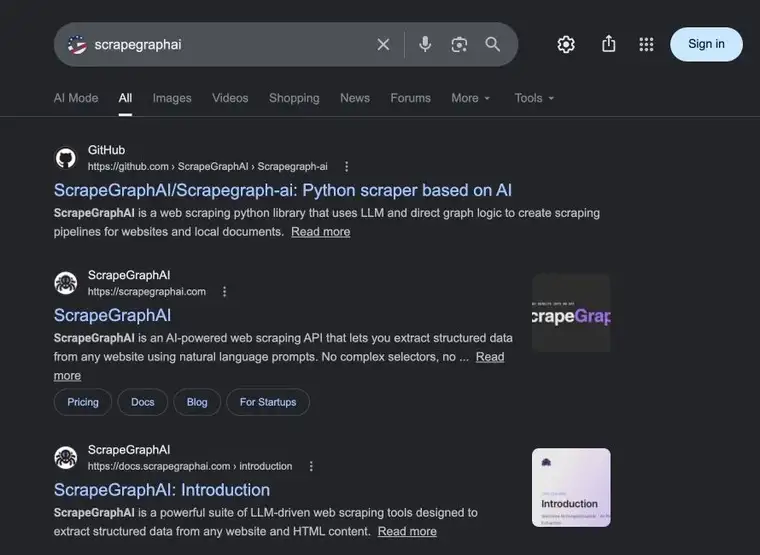
Google SERP for scrapegraphai. This is the page the Extract endpoint reads before returning a rank-shaped JSON object.
Now define the output schema. This schema intentionally avoids snippets because a fetched Google result page may expose titles and URLs reliably while hiding snippets depending on markup, consent state, or result type.
import os
from pydantic import BaseModel, Field
from scrapegraph_py import ScrapeGraphAI


class OrganicResult(BaseModel):
    position: int = Field(description="Visible organic result position")
    title: str = Field(description="Visible result title")
    url: str = Field(description="Result URL")
    domain: str = Field(description="Result domain")


class RankCheck(BaseModel):
    keyword: str = Field(description="Keyword used in the Google query")
    search_url: str = Field(description="Google search URL that was inspected")
    target_domain: str = Field(description="Domain being tracked")
    found: bool = Field(description="Whether the target domain appears in visible organic results")
    organic_position: int | None = Field(description="First visible organic position for the target")
    ranking_url: str | None = Field(description="Ranking URL for the target domain")
    ranking_title: str | None = Field(description="Ranking result title for the target domain")
    organic_results: list[OrganicResult] = Field(description="Visible organic results in order")
    competitors_above: list[OrganicResult] = Field(description="Organic results above the target")
    serp_features: list[str] = Field(description="Visible SERP features, if any")
    extraction_notes: str = Field(description="Notes about the extraction run")


keyword = "scrapegraphai"
target_domain = "scrapegraphai.com"
search_url = "https://www.google.com/search?q=scrapegraphai&hl=en&gl=us&num=10&pws=0"

sgai = ScrapeGraphAI(api_key=os.environ["SGAI_API_KEY"])

prompt = f"""
Extract a clean rank-tracking JSON object from this Google search result page.
Keyword: {keyword}
Search URL: {search_url}
Target domain: {target_domain}

Return keyword exactly as: {keyword}
Return search_url exactly as: {search_url}
Return target_domain exactly as: {target_domain}
Do not infer keyword, search_url, or target_domain from the page content.
Return only visible organic results in order. For each result, return position, title, url, and domain.
Find the first organic result whose domain is exactly {target_domain} or a subdomain of {target_domain}.
If found, set found=true and return organic_position, ranking_url, and ranking_title.
If not found, set found=false and use null for organic_position, ranking_url, and ranking_title.
competitors_above must include only visible organic results above the target domain.
If the target is not found, include all visible organic results.
serp_features should list visible SERP features only.
If the SERP is readable, set extraction_notes to "Clean SERP extraction".
Do not include snippets. Do not return placeholder values. Do not invent results.
""".strip()

res = sgai.extract(
    prompt,
    url=search_url,
    schema=RankCheck.model_json_schema(),
    mode="normal",
)

if res.status != "success":
    raise RuntimeError(res.error)

rank_check = RankCheck.model_validate(res.data.json_data)
print(rank_check.model_dump())The same request through REST:
curl -X POST https://v2-api.scrapegraphai.com/api/extract \
  -H "SGAI-APIKEY: $SGAI_API_KEY" \
  -H "Content-Type: application/json" \
  -d '{
    "url": "https://www.google.com/search?q=scrapegraphai&hl=en&gl=us&num=10&pws=0",
    "mode": "normal",
    "prompt": "Extract a clean rank-tracking JSON object from this Google search result page. Keyword: scrapegraphai. Search URL: https://www.google.com/search?q=scrapegraphai&hl=en&gl=us&num=10&pws=0. Target domain: scrapegraphai.com. Return keyword exactly as scrapegraphai. Return search_url exactly as https://www.google.com/search?q=scrapegraphai&hl=en&gl=us&num=10&pws=0. Return target_domain exactly as scrapegraphai.com. Do not infer keyword, search_url, or target_domain from the page content. Return visible organic results in order, the first ranking URL for the target domain, competitors above it, visible SERP features, and extraction notes. If the SERP is readable, set extraction_notes to Clean SERP extraction. Do not include snippets. Do not invent results.",
    "schema": {
      "type": "object",
      "properties": {
        "keyword": { "type": "string" },
        "search_url": { "type": "string" },
        "target_domain": { "type": "string" },
        "found": { "type": "boolean" },
        "organic_position": { "type": ["integer", "null"] },
        "ranking_url": { "type": ["string", "null"] },
        "ranking_title": { "type": ["string", "null"] },
        "organic_results": {
          "type": "array",
          "items": {
            "type": "object",
            "properties": {
              "position": { "type": "integer" },
              "title": { "type": "string" },
              "url": { "type": "string" },
              "domain": { "type": "string" }
            },
            "required": ["position", "title", "url", "domain"]
          }
        },
        "competitors_above": {
          "type": "array",
          "items": {
            "type": "object",
            "properties": {
              "position": { "type": "integer" },
              "title": { "type": "string" },
              "url": { "type": "string" },
              "domain": { "type": "string" }
            },
            "required": ["position", "title", "url", "domain"]
          }
        },
        "serp_features": { "type": "array", "items": { "type": "string" } },
        "extraction_notes": { "type": "string" }
      },
      "required": [
        "keyword",
        "search_url",
        "target_domain",
        "found",
        "organic_position",
        "ranking_url",
        "ranking_title",
        "organic_results",
        "competitors_above",
        "serp_features",
        "extraction_notes"
      ]
    }
  }'
Tested Output
This workflow was tested on July 2, 2026 with the query scrapegraphai and target domain scrapegraphai.com.
{
  "keyword": "scrapegraphai",
  "search_url": "https://www.google.com/search?q=scrapegraphai&hl=en&gl=us&num=10&pws=0",
  "target_domain": "scrapegraphai.com",
  "found": true,
  "organic_position": 2,
  "ranking_url": "https://scrapegraphai.com/",
  "ranking_title": "ScrapeGraphAI",
  "organic_results": [
    {
      "position": 1,
      "title": "ScrapeGraphAI/Scrapegraph-ai: Python scraper based on AI - GitHub",
      "url": "https://github.com/ScrapeGraphAI/Scrapegraph-ai",
      "domain": "github.com"
    },
    {
      "position": 2,
      "title": "ScrapeGraphAI",
      "url": "https://scrapegraphai.com/",
      "domain": "scrapegraphai.com"
    },
    {
      "position": 3,
      "title": "ScrapeGraphAI: Introduction",
      "url": "https://docs.scrapegraphai.com/introduction",
      "domain": "docs.scrapegraphai.com"
    },
    {
      "position": 4,
      "title": "ScrapeGraphAI Tutorial | LLM-Powered Web Scraping - Medium",
      "url": "https://medium.com/data-science-collective/llm-assisted-web-data-extraction-with-scrapegraphai-a-practical-2025-walkthrough-ee56960394db",
      "domain": "medium.com"
    }
  ],
  "competitors_above": [
    {
      "position": 1,
      "title": "ScrapeGraphAI/Scrapegraph-ai: Python scraper based on AI - GitHub",
      "url": "https://github.com/ScrapeGraphAI/Scrapegraph-ai",
      "domain": "github.com"
    }
  ],
  "serp_features": [],
  "extraction_notes": "Clean SERP extraction"
}
Search results change by country, device, time, language, personalization, and Google interface state. Treat a rank check as a snapshot. Store the search_url, keyword, target domain, collected timestamp, and raw response ID with every run.
Turn One Keyword into a Batch Rank Tracker
Once the single-keyword version works, the production loop is straightforward.
import os
from datetime import datetime, timezone
from urllib.parse import quote_plus

from pydantic import BaseModel, Field
from scrapegraph_py import ScrapeGraphAI


class OrganicResult(BaseModel):
    position: int = Field(description="Visible organic result position")
    title: str = Field(description="Visible result title")
    url: str = Field(description="Result URL")
    domain: str = Field(description="Result domain")


class RankCheck(BaseModel):
    keyword: str = Field(description="Keyword used in the Google query")
    search_url: str = Field(description="Google search URL that was inspected")
    target_domain: str = Field(description="Domain being tracked")
    found: bool = Field(description="Whether the target domain appears in visible organic results")
    organic_position: int | None = Field(description="First visible organic position for the target")
    ranking_url: str | None = Field(description="Ranking URL for the target domain")
    ranking_title: str | None = Field(description="Ranking result title for the target domain")
    organic_results: list[OrganicResult] = Field(description="Visible organic results in order")
    competitors_above: list[OrganicResult] = Field(description="Organic results above the target")
    serp_features: list[str] = Field(description="Visible SERP features, if any")
    extraction_notes: str = Field(description="Notes about the extraction run")


api_key = os.environ["SGAI_API_KEY"]
sgai = ScrapeGraphAI(api_key=api_key)


def google_search_url(keyword: str, country: str = "us", language: str = "en"):
    encoded = quote_plus(keyword)
    return f"https://www.google.com/search?q={encoded}&hl={language}&gl={country}&num=10&pws=0"


def track_keyword(keyword: str, target_domain: str):
    search_url = google_search_url(keyword)
    prompt = f"""
    Extract a clean rank-tracking JSON object from this Google search result page.
    Keyword: {keyword}
    Search URL: {search_url}
    Target domain: {target_domain}
    Return keyword exactly as: {keyword}
    Return search_url exactly as: {search_url}
    Return target_domain exactly as: {target_domain}
    Do not infer keyword, search_url, or target_domain from the page content.
    Return visible organic results in order, the first ranking result for the target domain,
    competitors above it, visible SERP features, and extraction notes.
    If the SERP is readable, set extraction_notes to "Clean SERP extraction".
    Do not include snippets. Do not invent results.
    """.strip()

    res = sgai.extract(
        prompt,
        url=search_url,
        schema=RankCheck.model_json_schema(),
        mode="normal",
    )

    if res.status != "success":
        return {
            "keyword": keyword,
            "target_domain": target_domain,
            "status": "failed",
            "error": res.error,
            "collected_at": datetime.now(timezone.utc).isoformat(),
        }

    data = RankCheck.model_validate(res.data.json_data).model_dump()
    return {
        **data,
        "status": "completed",
        "collected_at": datetime.now(timezone.utc).isoformat(),
    }


keywords = [
    "rank tracking api",
    "rank checker api",
    "serp tracking api",
    "google position checker api",
]

records = [track_keyword(keyword, "scrapegraphai.com") for keyword in keywords]
print(records)
For a first internal tool, run 20 to 100 keywords daily. Store every run in a table with keyword, target_domain, country, language, organic_position, ranking_url, competitors_above, extraction_notes, and collected_at.
What to Store in Your Database
Use one table for rank snapshots and one table for configured tracking jobs.
| Field | Why it matters |
|---|---|
keyword |
The search query being tracked |
target_domain |
The domain you are matching against |
search_url |
The exact URL sent to Extract |
country |
Search location changes rankings |
language |
Result titles and SERP layout can change |
organic_position |
The metric most teams trend over time |
ranking_url |
Shows which page owns the query |
competitors_above |
Explains who blocks the next position |
extraction_notes |
Separates clean SERPs from blocked or partial pages |
collected_at |
Makes the row usable for charts and diffs |
Do not overwrite the previous row. Append rank snapshots. Ranking history is only useful when every run is preserved.
Design the API Response for Your Product
If you are building a rank checker API for customers, do not expose every internal extraction detail by default. Give users the concise answer first, then let them request deeper SERP context when they need it.
A clean public response can look like this:
{
  "keyword": "rank tracking api",
  "target_domain": "scrapegraphai.com",
  "country": "us",
  "language": "en",
  "found": true,
  "organic_position": 4,
  "ranking_url": "https://scrapegraphai.com/blog/rank-tracking-api",
  "checked_at": "2026-07-02T10:00:00Z"
}
Then add optional expansion fields:
{
  "include": ["organic_results", "competitors_above", "serp_features", "extraction_notes"]
}
That keeps the default API fast to read and easy to store. Developers can build dashboards, alerts, or reports from the compact object. Power users can inspect the full SERP snapshot when a rank changes, a page disappears, or a competitor moves above the target.
The internal implementation can still store the full ScrapeGraphAI response. Separate the storage model from the public API model. Storage should preserve evidence. The public response should answer the rank-tracking question with as little noise as possible.
For team dashboards, keep the latest snapshot cached separately from the historical table. That gives users a fast current view without deleting the evidence needed for trend analysis.
For the first version, keep the endpoint small. A POST /rank-checks request can accept keyword, target_domain, country, and language, run Extract behind the scenes, and return one normalized snapshot. Add scheduling, webhooks, project folders, and historical charts after the single-check response is stable. That order matters because it proves the API contract before you build product surface around it. It also keeps the first integration easy to test.
If you are evaluating the best rank tracker with an API, the decision comes down to three practical questions:
- Can I send my own keywords and domains?
- Can I get JSON back without using a dashboard?
- Can I explain why a rank changed?
The Extract workflow answers those questions because the output schema is yours. You can expose the exact fields your product needs instead of inheriting a provider-specific payload.
How This Differs from Search Console and Ahrefs
Google Search Console tells you how your own site performed in real searches. Ahrefs estimates rankings, traffic, keyword difficulty, and competitor visibility at a broader SEO level. A custom rank checker answers a narrower operational question: what did this configured search URL show when my job ran?
That makes this workflow useful for:
- verifying high-intent keywords after publishing a page
- checking whether a target URL appears in the visible top results
- monitoring competitor pages above your URL
- building an internal exception queue for SEO work
- feeding a custom dashboard, spreadsheet, or agent workflow
It should not be presented as an official Google ranking source. The value is control: your keywords, your schema, your storage, your review workflow.
When to Use Search Instead
This article uses extract because the input is already a Google search URL. That makes it easier to reproduce one exact query shape. The same pattern works against a Bing results URL: Bing Rank Tracker: Track Bing Rankings via API builds the full Bing version, polling script included.
Use the Search endpoint when your workflow starts with a query and you want ScrapeGraphAI to search and fetch the result pages for you. Use extract when you already have the URL you want to inspect.
In practice, teams often use both:
- Use
searchfor discovery workflows, such as finding pages about a competitor or topic. - Use
extractfor fixed URLs, such as Google result pages, competitor pages, ecommerce product pages, or documentation pages. - Store the normalized JSON in one database model.
If you are comparing search-specific APIs, ScrapeGraph vs SerperAPI: Web Data Extraction 2026 explains the difference between a dedicated SERP API and a general extraction workflow.