


TL;DR
ScrapeGraphAI slots into LangChain as plain tools, so an agent can scrape, extract, and search the live web while it reasons.
- Install:
pip install langchain langchain-openai scrapegraph-py. - Keys: set both
SGAI_API_KEYandOPENAI_API_KEY. - Wrap: decorate SDK calls with
@tool, or use the full toolkit covering scrape, extract, search, crawl, monitors, and account endpoints. - Run: hand the tools to
create_agentand let the model call them mid-conversation.
The gap LangChain leaves open
LangChain is great at orchestration. It handles the prompt templates, the tool-calling loop, the agent scaffolding. What it doesn't do is read the live web for you. A model wired up with LangChain still can't see this morning's prices or the page a user just pasted in.
That's the piece ScrapeGraphAI fills. Wrap its SDK methods as LangChain tools and the agent gains a reliable way to turn any URL or query into structured data. You write the tool definitions once; the model figures out when to reach for them.
Setup
Install LangChain, a model provider, and the ScrapeGraphAI SDK together:
pip install langchain langchain-openai scrapegraph-pyTwo keys are in play here, one for scraping and one for the model:
export SGAI_API_KEY="your-scrapegraph-key"
export OPENAI_API_KEY="your-openai-key"
Your ScrapeGraphAI key comes from the dashboard.
Defining a tool
The cleanest pattern is a small module, say sgai_tools.py, that holds your client and your tool functions. LangChain's @tool decorator turns a function into something the agent can call:
from langchain_core.tools import tool
from scrapegraph_py import ScrapeGraphAI

sgai = ScrapeGraphAI()  # reads SGAI_API_KEY from env

@tool
def scrape(url: str) -> str:
    """Fetch a web page and return its content as markdown."""
    res = sgai.scrape(url)
    if res.status == "error":
        return f"error: {res.error}"
return res.dataThe docstring matters more than it looks. LangChain feeds it to the model as the tool description, so it's how the agent decides whether this is the right tool for the step.
You can build out the same way for the rest of the surface: an extract(url, prompt) tool for structured pulls, a search(query, num_results) tool for web search, and so on. The full toolkit covers seventeen endpoints in all, including crawl job control (crawl_start, crawl_get, crawl_stop, crawl_resume, crawl_delete), scheduled monitors (monitor_create, monitor_list, monitor_pause, and friends), and account calls like credits and history_list.
Calling a tool directly
Before you hand anything to an agent, you can invoke a tool on its own. Useful for testing the wiring:
from sgai_tools import scrape

print(scrape.invoke({"url": "https://example.com"}))
Letting an agent drive
Once the tools exist, building the agent is short. Give the model the toolset and a system prompt that frames the job:
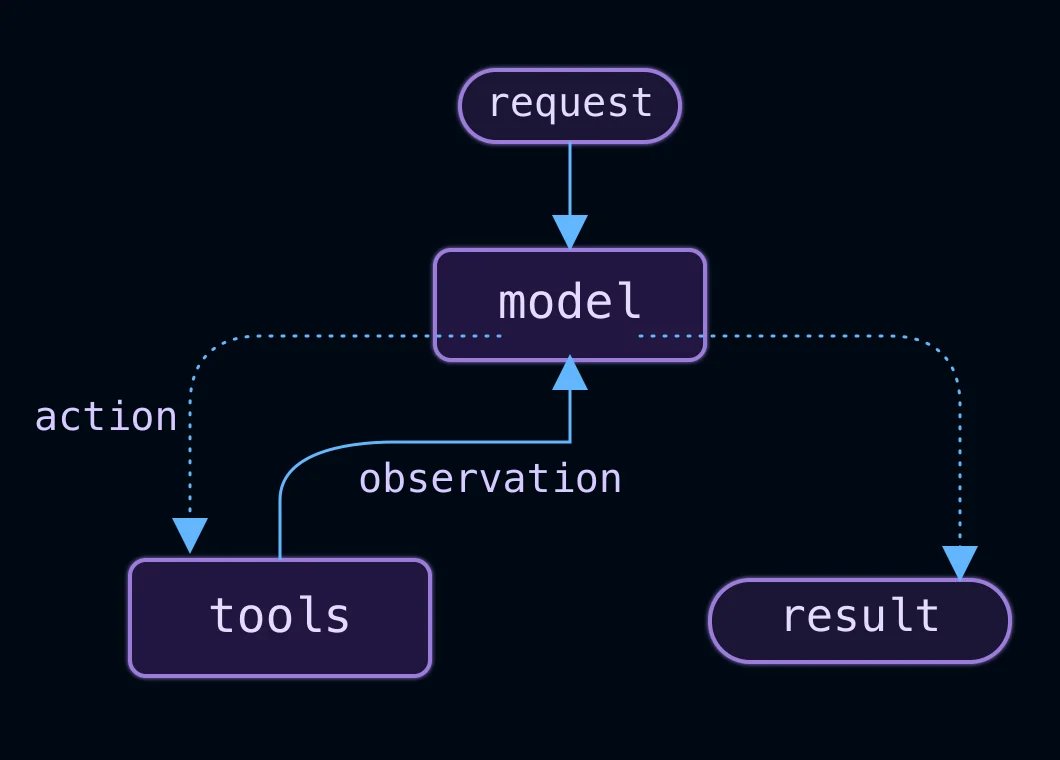 The model can call a tool, inspect its observation and continue before returning a result. Source: LangChain documentation.
from langchain.agents import create_agent
from langchain_openai import ChatOpenAI
from sgai_tools import ALL_TOOLS

llm = ChatOpenAI(model="gpt-4o", temperature=0)
agent = create_agent(
    model=llm,
    tools=ALL_TOOLS,
    system_prompt="You are a web research agent...",
)
Ask it a question that needs live data and it will pick the right tool, call it, read the result, and answer. You never wrote fetch-and-parse logic, only the goal and the toolbox.
Structured output
When you need typed results out the other end, pair extract with a Pydantic model and validate the response:
from pydantic import BaseModel
from sgai_tools import extract

class Company(BaseModel):
    name: str
    tagline: str

result = extract.invoke({"url": "https://scrapegraphai.com", "prompt": "Get the name and tagline"})
company = Company(**result["json_data"])
A small helper that unwraps SDK responses into plain dicts keeps every tool returning the same shape, which makes this validation step uniform across the toolkit.
Wrapping up
LangChain gives you the agent; ScrapeGraphAI gives that agent eyes on the web. Wrap the SDK methods as tools, write honest docstrings so the model chooses well, and hand the set to create_agent. Start with scrape, extract, and search, then add crawl and monitor tools as your workflows grow into multi-step research.
Related Articles
- ScrapeGraphAI + LangGraph: Stateful Scraping Agents - Take the same tools into a graph with custom routing and state.
- ScrapeGraphAI Python SDK: Scrape, Extract, Crawl - The methods underneath every tool above.
- ScrapeGraphAI + CrewAI: Build Data Collection Agents - The same idea, applied to multi-agent crews.
- ScrapeGraphAI + Vercel AI SDK: Web Tools for Agents - The TypeScript equivalent of this pattern.