


TL;DR
CrewAI organizes multiple agents around roles and tasks. ScrapeGraphAI gives any of those agents a reliable way to pull live data off the web.
- Install:
pip install crewai scrapegraph-py. - Keys:
SGAI_API_KEYandOPENAI_API_KEY. - Tools: a toolkit of scrape, extract, search, crawl control, monitors, and account calls.
- Assign: pass the tools to an
Agent, give it aTask, run theCrew.
The case for a crew
A single agent juggling research, extraction, and synthesis can get muddled. CrewAI takes a different tack: you define specialized agents with distinct roles, hand each one a focused task, and let the crew coordinate. A researcher gathers, an analyst structures, a writer summarizes.
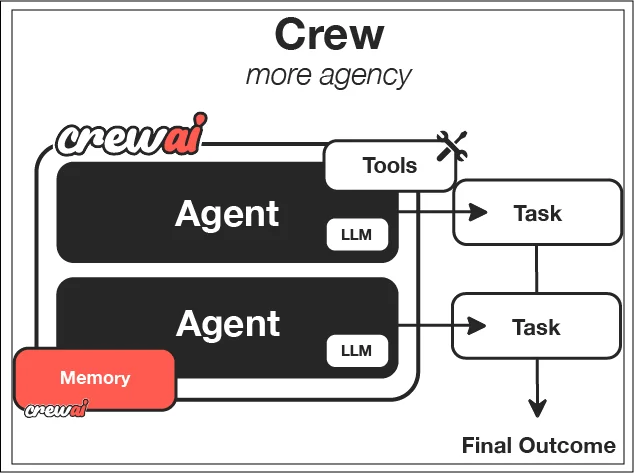 CrewAI’s overview connects agents, their tasks and the tools they use. Source: CrewAI documentation.
For that to work, the agents that touch the web need a dependable data tool. ScrapeGraphAI is that tool. Wrap its methods, assign them to whichever roles do the gathering, and your crew can collect real information instead of hallucinating it.
Setup
pip install crewai scrapegraph-pyYou'll need a key for ScrapeGraphAI and one for the model behind your agents:
export SGAI_API_KEY="your-scrapegraph-key"
export OPENAI_API_KEY="your-openai-key"Grab the ScrapeGraphAI key from the dashboard.
The toolkit
Keep your tools in a module like sgai_tools.py. The toolkit mirrors the SDK: content operations (scrape, extract, search), crawl job control (crawl_start, crawl_get, crawl_stop, crawl_resume, crawl_delete), scheduled monitors (monitor_create, monitor_list, monitor_get, monitor_pause, monitor_resume, monitor_delete, monitor_activity), and account calls (history_list, history_get, credits).
You can run any of them on their own to check the wiring before building a crew:
from sgai_tools import scrape, extract, search, credits

print(credits.run())
print(scrape.run(url="https://example.com"))
print(extract.run(url="https://scrapegraphai.com", prompt="Extract company name"))
Putting tools on an agent
A CrewAI agent gets a role, a goal, and a set of tools. Give your researcher the full toolkit and a clear objective:
from crewai import Agent, Crew, Task
from sgai_tools import ALL_TOOLS

researcher = Agent(
    role="Web Researcher",
    goal="Gather accurate website information",
    tools=ALL_TOOLS,
    verbose=True,
)

task = Task(description="Extract company details...", agent=researcher)
crew = Crew(agents=[researcher], tasks=[task])
result = crew.kickoff()
crew.kickoff() runs the whole thing. The researcher reads its task, decides it needs to scrape or extract, calls the right tool, and works toward the goal. With verbose=True you can watch the reasoning and the tool calls scroll by, which is the fastest way to debug a crew.
Scaling to more roles
The single-researcher setup is the starting point, not the ceiling. Add an analyst agent that takes the researcher's raw output and structures it, or a writer that turns findings into a report. Each agent gets only the tools its role needs. The data-gathering agents carry the ScrapeGraphAI toolkit; the downstream agents may need no web tools at all, just the output of the ones before them.
That separation is the whole point of CrewAI. Narrow tools per role keep each agent's decisions sharp, and the crew handles passing work down the line.
Wrapping up
CrewAI coordinates a team of agents; ScrapeGraphAI makes sure the ones facing the web bring back real data. Wrap the SDK as a toolkit, assign it to your gathering roles, and let kickoff run the crew. Start with one researcher and the core scrape, extract, and search tools, then split responsibilities across more agents as the workflow grows.
Related Articles
- ScrapeGraphAI + LangChain: Web Tools for Your Agents - Single-agent tool calling with the same SDK.
- ScrapeGraphAI + Agno: Fast Agents With Web Access - A drop-in toolkit class for agent web access.
- ScrapeGraphAI Python SDK: Scrape, Extract, Crawl - The methods every tool wraps.
- ScrapeGraphAI + LlamaIndex: Agentic Data Extraction - Another agent framework, same data engine.