


TL;DR
LangGraph gives you stateful, controllable agent graphs. ScrapeGraphAI gives those graphs real web data. Together they cover everything from open-ended research to fixed pipelines.
- Install:
pip install langchain langchain-openai langgraph scrapegraph-py. - Keys:
SGAI_API_KEYandOPENAI_API_KEY. - Tools: fourteen decorated functions (scrape, extract, search, crawl control, monitors, utilities) usable as graph nodes.
- Three patterns: ReAct agent, custom
StateGraph, or a deterministic no-LLM pipeline.
Why LangGraph and not just an agent
A simple tool-calling agent works until you need control. You want checkpoints so a long run can resume. You want explicit routing instead of hoping the model loops correctly. You want to stream intermediate state to a UI. That's the territory LangGraph is built for, modeling your agent as a graph of nodes and edges with state flowing between them.
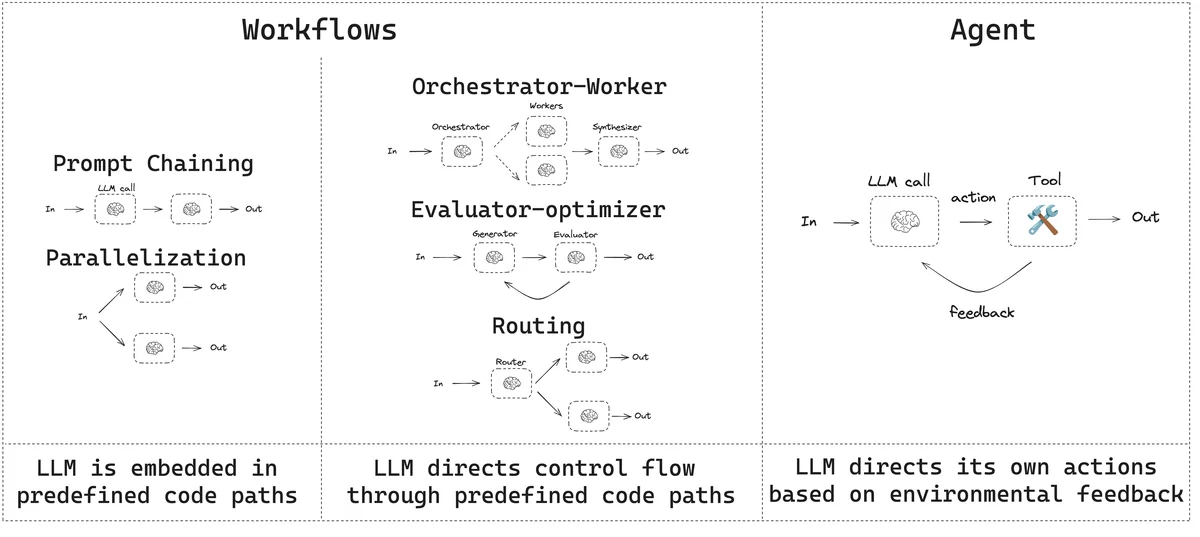 Workflows follow predefined paths; agents choose their next step. Source: LangGraph’s workflows and agents guide.
ScrapeGraphAI plugs in as the data layer. The same SDK methods become tools your graph can call, and because LangGraph sits on top of LangChain, the tool definitions carry straight over.
Setup
pip install langchain langchain-openai langgraph scrapegraph-pyexport SGAI_API_KEY="your-scrapegraph-key"
export OPENAI_API_KEY="your-openai-key"The tools themselves are decorated functions, the same kind you'd write for LangChain: scrape, extract, and search for data, the crawl_* family for crawl jobs, the monitor_* family for scheduled work, and utilities like history_list and credits. Fourteen in total, kept in a reusable sgai_tools.py.
Pattern A: the ReAct agent
When the task is open-ended and you trust the model to reason its way through, the prebuilt agent is the fastest path:
from langchain.agents import create_agent
from langchain_openai import ChatOpenAI
from sgai_tools import ALL_TOOLS

llm = ChatOpenAI(model="gpt-4o", temperature=0)
agent = create_agent(model=llm, tools=ALL_TOOLS)
final_state = agent.invoke({"messages": [("user", "your query")]})
The agent reasons, calls tools, observes results, and repeats until it can answer. Good for research questions where you don't know the steps in advance.
Pattern B: the custom StateGraph
When you need control over how the graph moves, build it yourself. Combine StateGraph to hold state, a ToolNode to execute tool calls, and tools_condition to route between thinking and acting. This is the pattern to reach for when you want custom checkpointing, conditional branches, or streaming partial state out to a frontend. You decide exactly which node runs next instead of leaving it to the model.
Pattern C: the deterministic pipeline
Not everything needs an LLM in the loop. If your workflow is fixed, say search and then extract from the top result, you can call the tools directly in sequence:
A deterministic pipeline skips model routing entirely. You invoke search, take the result, feed it to extract, and you're done. It's reproducible, cheap, and fast, with no token spend on deciding what to do next. Use it whenever the sequence is known ahead of time and you want the same path every run.
Choosing a pattern
The three aren't competing so much as covering different needs:
- Pattern A for open-ended reasoning where the steps emerge at runtime.
- Pattern B when you need custom state, checkpointing, or streaming.
- Pattern C when the workflow is fixed and you want it reproducible.
Many real systems mix them. A deterministic pipeline can feed a ReAct agent, or a custom graph can wrap a fixed sub-pipeline as one of its nodes.
Wrapping up
LangGraph turns an agent from a loop into a graph you can shape, and ScrapeGraphAI supplies the live data that graph reasons over. Start with the ReAct agent to prove the idea, graduate to a custom StateGraph when you need checkpoints and routing, and drop down to a deterministic pipeline wherever the steps are known. Same tools throughout, just different amounts of control.
Related Articles
- ScrapeGraphAI + LangChain: Web Tools for Your Agents - The simpler tool-calling agent these patterns build on.
- ScrapeGraphAI Python SDK: Scrape, Extract, Crawl - The methods behind every node.
- ScrapeGraphAI + LlamaIndex: Agentic Data Extraction - Another agent framework, same scraping engine.
- ScrapeGraphAI MCP Server: Give Your AI the Web - The no-code route to the same capabilities.