


TL;DR
The scrapegraph-py SDK is the official Python client for ScrapeGraphAI. One client object, five core methods, structured output when you want it.
- Install:
pip install "scrapegraph-py>=2.1.0". - Authenticate: set
SGAI_API_KEY, or passapi_key=to the client. - Call:
scrape,extract,search,crawl, andmonitorall hang off oneScrapeGraphAI()object. - No surprises: every call returns an
ApiResultwithstatus,data, anderror. API failures don't raise. - Async ready: swap in
AsyncScrapeGraphAIfor concurrent workloads.
Why an SDK instead of raw requests
You can hit the ScrapeGraphAI API with requests and a dictionary of headers. Plenty of people start there. The trouble shows up later: you end up hand-rolling retries, re-typing the same JSON payloads, and parsing responses that all look slightly different.
The Python SDK collapses that into typed method calls. You describe what you want in plain English, optionally hand it a schema, and get back data in a predictable shape. The same five capabilities that power our API and CLI live behind one object.
Getting set up
Install the package. Version 2.1 or newer is what these examples assume:
pip install "scrapegraph-py>=2.1.0"Then make your key available. The client reads SGAI_API_KEY from the environment by default:
export SGAI_API_KEY="sgai-..."You can grab a key from the ScrapeGraphAI dashboard. Prefer to keep it out of the environment? Pass it directly:
from scrapegraph_py import ScrapeGraphAI

sgai = ScrapeGraphAI(api_key="sgai-...")
Most of the time the no-argument form is cleaner:
from scrapegraph_py import ScrapeGraphAI

sgai = ScrapeGraphAI() # reads SGAI_API_KEY from the environmentThe five methods you'll use
scrape
Fetch a page in whatever format you need: markdown, HTML, links, images, JSON, or a screenshot.
from scrapegraph_py import MarkdownFormatConfig

res = sgai.scrape("https://example.com", formats=[MarkdownFormatConfig()])
extract
This is the one most people came for. Describe the data, point at a URL, and let the model pull it out.
res = sgai.extract(
    "Extract product names",
    url="https://example.com",
    schema={"type": "object", "properties": {"products": {"type": "array"}}},
)
search
Run a web search and get structured results back in a single call, no separate fetch step.
res = sgai.search("best programming languages 2024", num_results=5)crawl
Walk many pages of a site. Crawling is asynchronous, so you start a job and poll for it:
start = sgai.crawl.start("https://example.com", max_depth=2, max_pages=50)
status = sgai.crawl.get(start.data.id)
monitor
Schedule a recurring extraction. The interval is a cron expression, so "every hour on the hour" is 0 * * * *:
mon = sgai.monitor.create("https://example.com", "0 * * * *", name="Price Monitor")There's also a history resource (sgai.history.list(...)) when you need to look back at recent requests.
Typed output with Pydantic
Hand-writing JSON Schema gets old. If you already model your data with Pydantic, generate the schema from your model and the SDK will steer extraction toward that shape:
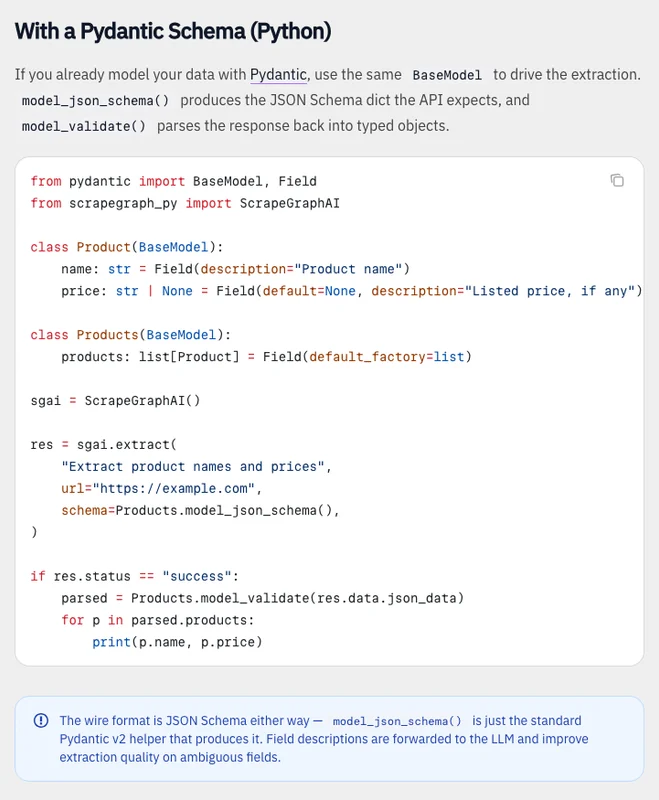 The same Pydantic model defines the requested fields and validates the response. Source: Extract documentation.
from pydantic import BaseModel

class Product(BaseModel):
    name: str
    price: str | None = None

res = sgai.extract(
    "Extract products",
    url="https://example.com/store",
    schema=Product.model_json_schema(),
)
Now the returned data lines up with the structure your code already expects. From there, everything in the Python JSON guide applies: dump it to a file, stream it as JSON Lines, or flatten it into a DataFrame.
Errors that don't explode
A design choice worth calling out: API errors do not throw. Every method returns an ApiResult carrying status, data, error, and elapsed_ms. You branch on the status instead of wrapping everything in try/except:
res = sgai.scrape("https://example.com")
if res.status == "error":
    print("scrape failed:", res.error)
else:
    print(res.data)
That makes the SDK pleasant inside data pipelines, where one flaky URL shouldn't take down the whole run.
Going async
For workloads where you're fanning out across dozens of URLs, the async client lets the event loop do the waiting:
from scrapegraph_py import AsyncScrapeGraphAI

async with AsyncScrapeGraphAI() as sgai:
    res = await sgai.scrape("https://example.com")
The method surface is identical. You add await and run inside an event loop, and your concurrent scrapes stop blocking each other.
Wrapping up
The Python SDK is the most direct way to put ScrapeGraphAI inside an application. Install it, set one key, and you have scraping, extraction, search, crawling, and monitoring behind a single typed client. Start with extract and a Pydantic model, reach for the async client when volume picks up, and lean on the ApiResult shape so failures stay quiet and inspectable.
Related Articles
- ScrapeGraphAI CLI: Web Scraping From Your Terminal - Prototype the same calls from a shell before committing to code.
- ScrapeGraphAI JavaScript SDK: Typed Web Scraping in Node - The same five methods, in TypeScript.
- ScrapeGraphAI + LangChain: Web Tools for Your Agents - Wrap these methods as tools an LLM can call.
- ScrapeGraphAI MCP Server: Give Your AI the Web - The no-code path to the same engine inside Claude and Cursor.