


TL;DR
The @scrapegraph-ai/ai-sdk package drops ScrapeGraphAI straight into Vercel AI SDK agents as tools the model can call mid-run.
- Install:
npm i @scrapegraph-ai/ai-sdk ai @ai-sdk/openai. - Configure: set
SGAI_API_KEYand your model provider key. - Add tools: pass
scrapeTool(),extractTool(),searchTool(),crawlTools(), ormonitorTools()intogenerateText. - Result: your agent scrapes, extracts, searches, and crawls the live web while it reasons.
The problem with offline agents
A language model on its own is frozen in time. It cannot see today's prices, this morning's headlines, or the page a user just asked about. The Vercel AI SDK solves the orchestration half of that problem with its tool-calling loop. ScrapeGraphAI supplies the missing half: a reliable way to turn any URL or query into structured data.
The @scrapegraph-ai/ai-sdk package connects the two. It exposes ScrapeGraphAI's capabilities as AI SDK tools, so the model decides when to scrape and you get clean data back without writing fetch-and-parse code.
Installation
Install the integration alongside the AI SDK and a model provider:
npm i @scrapegraph-ai/ai-sdk ai @ai-sdk/openaiThen provide both keys, one for ScrapeGraphAI and one for your model:
export SGAI_API_KEY="your-scrapegraph-key"
export OPENAI_API_KEY="your-openai-key"
You can get a ScrapeGraphAI key from the dashboard.
A minimal agent
Here is the smallest useful example. Give the model a goal, hand it the scrape tool, and let it run:
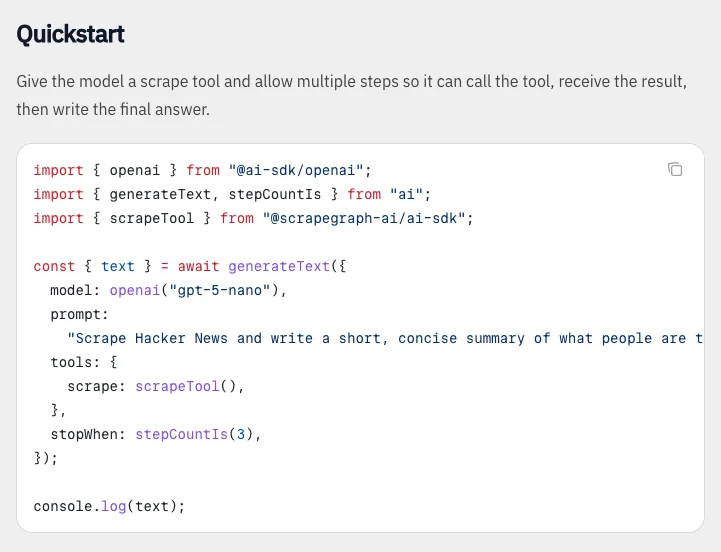 The quick start registers a scrape tool and allows the model to use it before answering. Source: Vercel AI SDK integration documentation.
import { openai } from "@ai-sdk/openai";
import { generateText, stepCountIs } from "ai";
import { scrapeTool } from "@scrapegraph-ai/ai-sdk";

const { text } = await generateText({
  model: openai("gpt-5-nano"),
  prompt: "Find the main headline on https://example.com",
  tools: { scrape: scrapeTool() },
  stopWhen: stepCountIs(5),
});

console.log(text);
The model reads the prompt, decides it needs the page, calls scrape, and answers using the real content. stepCountIs(5) caps how many tool-calling rounds it can take, which keeps runaway loops in check.
The available tools
The package ships one tool (or tool group) per ScrapeGraphAI capability:
| Tool | What it gives the model |
|---|---|
scrapeTool() |
Page content as markdown, HTML, JSON, links, images, summaries, or screenshots |
extractTool() |
Structured JSON from a URL or raw HTML, driven by your prompt |
searchTool() |
Web search with optional extraction from the results |
crawlTools() |
Crawl-job management: start, poll, paginate, stop, resume, delete |
monitorTools() |
Scheduled monitoring: create, list, update, pause, resume, delete, inspect |
Add only the tools an agent needs. A research agent might take searchTool() and scrapeTool(); a data-collection agent might lean on extractTool() and crawlTools().
Composing tools into a real agent
Tools combine cleanly. Hand the model a few of them and a higher step budget, and it will chain calls on its own:
import { openai } from "@ai-sdk/openai";
import { generateText, stepCountIs } from "ai";
import { searchTool, extractTool } from "@scrapegraph-ai/ai-sdk";

const { text } = await generateText({
  model: openai("gpt-5-nano"),
  prompt:
    "Find three recent articles about AI web scraping and summarize each in one sentence with its source URL.",
  tools: {
    search: searchTool(),
    extract: extractTool(),
  },
  stopWhen: stepCountIs(10),
});

console.log(text);
The agent searches, picks promising results, extracts the details it needs, and synthesizes the answer. You wrote no scraping logic, just a goal and a toolbox.
Tips for production
- Bound the loop: always set
stopWhenso a confused agent cannot spin forever. - Scope the tools: fewer, well-chosen tools make the model's decisions sharper and cheaper.
- Prefer
extractoverscrape+ parsing: if you know the shape you want, letextractTool()return structured JSON directly. - Stream when it matters: swap
generateTextforstreamTextto surface progress in a UI.
Wrapping up
The Vercel AI SDK gives you the agent loop; ScrapeGraphAI gives that loop eyes on the live web. Install the package, set two keys, and pass in the tools your use case calls for. From a one-line headline fetch to a multi-step research agent, the same primitives scale with you.
Related Articles
- ScrapeGraphAI MCP Server: Give Your AI the Web - The no-code path to the same tools inside Claude and Cursor.
- ScrapeGraphAI CLI: Web Scraping From Your Terminal - Prototype the same calls from a shell before wiring them into agents.
- Integrating ScrapeGraphAI into Intelligent Agents - The broader playbook for agent-driven scraping.