


TL;DR
- For an application that needs place lookups, evaluate Google's Places API. For recurring location datasets, compare Outscraper, Apify and Bright Data.
- Check review coverage, geographic limits, reuse terms and optional charges before comparing the price per place.
- Use ScrapeGraphAI to enrich place records with services and contact details from the linked business websites.
A place lookup inside an application and a recurring location dataset need different evaluations. Compare the official Places API with dedicated collectors such as Outscraper, Apify's Google Maps Scraper and Bright Data against the fields, coverage and permitted use your project requires. ScrapeGraphAI complements those workflows with extraction from the business websites attached to place records.
ScrapeGraphAI publishes this comparison. The product descriptions and prices come from the vendors' documentation; the sections below explain which operation and output each option covers.
Define the location dataset
“Restaurants in Milan” leaves several decisions unresolved: the geographic boundary, categories, closed locations, branches and the time of observation. A tool cannot produce a defensible citywide dataset until those decisions are made.
Use a collection specification with these fields:
| Requirement | What to preserve | What can go wrong |
|---|---|---|
| Identity | Place ID or another documented source identifier | The same place appears in several overlapping searches |
| Geography | Query area and returned location | Nearby results outside the intended boundary enter the analysis |
| Business record | Name, category, address, website and observed status | Branches are merged merely because their names match |
| Hours | Source values, date and timezone context | “Open now” is stored as a permanent opening schedule |
| Rating | Rating value, review count and observation time | An old count is compared with a new rating |
| Reviews | Individual review ID, source date and parent place | A sample is described as the complete review history |
Keep discovery separate from details. Finding a place through a keyword search and refreshing a known place are different operations. Deduplicate by source identity where available, then manually inspect ambiguous records rather than merging only on names.
Five options and their roles
Google Places API for an authorized place interface
Place Details returns selected information for a known place ID. A field mask controls which fields are requested, with consequences for response content and billing. This is a candidate for an application whose interface and data use fit Google's service model.
Review the Places API policies before designing persistent storage or display. They describe caching restrictions and exceptions, attribution requirements and different terms for EEA billing addresses. The place ID has an explicit storage exception; that should not be generalized to every returned field.
The official API should be evaluated on those terms and the fields your application needs. It is not interchangeable with an unrestricted CSV export or a complete review archive.
Outscraper for a place-data export workflow
Outscraper's Google Maps Scraper provides exports and documents a field dictionary covering location, business and review-summary information. Its listed rates cover the first 500 places free, then $3 per 1,000 records through 100,000 places, and $1 per 1,000 beyond that threshold.
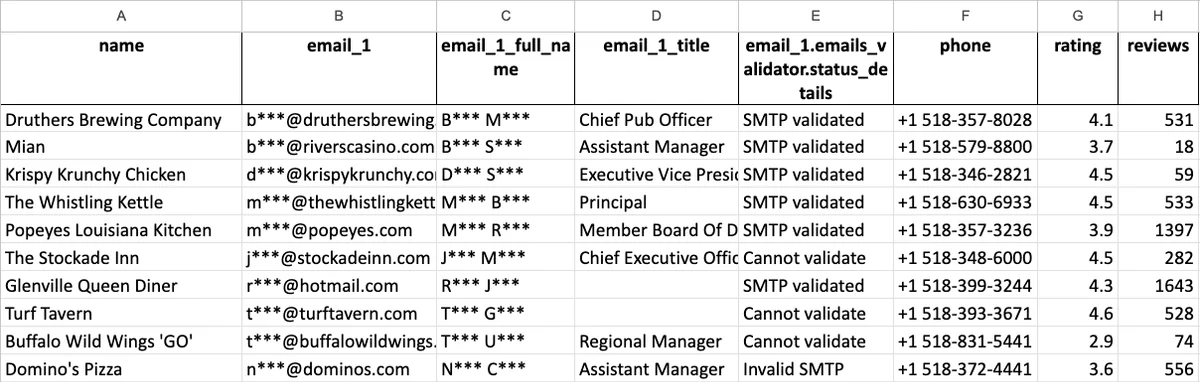 An Outscraper sample combines business ratings and review counts with contact enrichment; the email fields are enrichment data. Source: Outscraper.
The service also offers enrichments. Confirm their separate scope and charges before including them in a forecast. An email discovered from a linked business website should retain that website as its source; it is not necessarily a field supplied by Google Maps.
This option is worth evaluating when the output is a place dataset that a team will inspect or process. Check actual area coverage and duplicates from overlapping searches, not just the number of exported rows.
Apify's Google Maps Scraper for configurable collection
The Compass Google Maps Scraper maintained by Apify documents place collection, reviews and optional enrichment. Its advertised base price starts at $1.50 per 1,000 scraped places.
Optional events can materially change the workload. Its documentation describes add-ons that trigger more detail collection, reviews or enrichment. A base place price should not be used as the total cost of a review-heavy job.
Evaluate the exact input settings, returned place IDs and separate review output. Record the Actor ID and version or build when available. This lets you distinguish a source change from a collector configuration change when an export later differs.
Bright Data for separate place and review collectors
Bright Data's Maps catalog lists full place information, location discovery, place-ID inputs and separate review collection. Its advertised allowance is 5,000 free records per month, with pay-as-you-go pricing of $1.50 per 1,000 records.
Request a sample from the specific collector you need. A place summary with a review count does not establish that the individual reviews are included. Check pagination, time boundaries and the identity of each returned record before comparing it with another provider.
For batch delivery, preserve the input query or place identifier with the output. A table of business names alone is difficult to audit after a location closes or changes its name.
ScrapeGraphAI for linked-website extraction
A Maps workflow often reaches the business's own website. ScrapeGraphAI can request structured fields from accessible page content, such as the described services or published business contact details. The public Page metadata example demonstrates source checks and missing-value handling on a separately identified source.
Start with the website URL attached to a place record, then define the extra fields you need, such as service descriptions or a published contact email. Keep the place ID with each enriched record and save the website URL as the source for those fields. This lets you refresh website details while retaining the connection to the original place.
When matching a business website to a place, inspect location and branch context. A chain's national homepage may describe services that a particular branch does not offer.
Measure coverage before comparing row counts
Define a small evaluation area and a short list of categories relevant to the project. Include businesses with multiple branches, service-area businesses and a location you know has closed. These cases expose errors that a single popular-place query will miss.
Record the original query, geographic settings, language, collection time and limits. Measure unique accepted places after deduplication. A vendor returning 1,200 rows does not outperform one returning 900 if the larger set contains duplicates or places outside the agreed boundary.
A practical pilot report should show:
- Unique places inside the intended area.
- Duplicate identities across queries.
- Missing required fields and ambiguous branch matches.
- Closed or unavailable places, kept separate from failed requests.
- Whether review collection stopped at a configured limit.
For a review analysis, define the sampling window and avoid describing a limited result as all customer opinion. Keep any permitted review quotations attached to the original source and date.
Budget for discovery, refreshes and enrichment
An illustrative project with 2,000 known places refreshed monthly has 2,000 detail observations per month. Adding 50 review observations per place creates up to 100,000 review records, before deduplication and any separately billed discovery or website work.
That difference can overwhelm a small change in the base place price. Model each operation using the provider's current billing unit and selected options. For the official API, evaluate the exact requested fields and applicable pricing instead of substituting a scraper's per-record rate.
Use the scraping cost calculator to include review and maintenance time. Save the query settings, accepted output and actual charges from the pilot before scheduling repeated collection.
Keep the source and intended use visible
A provider's ability to return records does not settle every reuse question. Review the applicable terms and purpose before storing, republishing or using collected details for outreach. The legal overview explains why access, contracts, privacy and intellectual property need separate consideration.
Keep Google Maps observations, business-website evidence and your own classification in distinct fields, each with its source and observation time. That makes the result easier to verify and prevents an inferred business attribute from appearing to be a source-provided fact.