



TL;DR
Use search only when you do not already have product URLs, then extract every retailer with one schema. If your catalog already stores Amazon, Best Buy, Walmart, or competitor URLs, skip discovery and extract directly. ScrapeGraphAI returns normalized offer records you can store in a database, CSV, Excel export, or price monitoring dashboard. You can run the same workflow in the companion Google Colab without installing anything.
The whole workflow also runs in the browser. Open the notebook, paste your API key, and press run:

Install the SDK and Get an API Key
Install the Python SDK and Pydantic before running the examples:
pip install scrapegraph-py pydanticThen sign up for ScrapeGraphAI, open the ScrapeGraphAI playground, and create or copy an API key. The API key guide explains where keys live and how to rotate them.
This article uses Python because Pydantic makes the output schema easy to read. The examples use Pydantic BaseModel and Field to define the JSON shape returned by ScrapeGraphAI. This workflow is available through the Python SDK docs, the JavaScript and TypeScript SDK docs, and direct REST calls with cURL. For cURL examples, use the search API docs when you need product URL discovery and the extract API docs when you already have product URLs.
Search First, Then Extract Prices
Most developers start ecommerce price scraping in one of two states.
You may already have exact product URLs from your catalog, a marketplace export, a merchant feed, or a previous crawl. In that case, skip search and go straight to extraction.
If you do not have URLs yet, use search as the first step. Search finds candidate product detail pages; extraction normalizes the visible offer. The output shape stays the same whether the source is Amazon, Best Buy, Walmart, Vinted, Shopify, or another public ecommerce site.
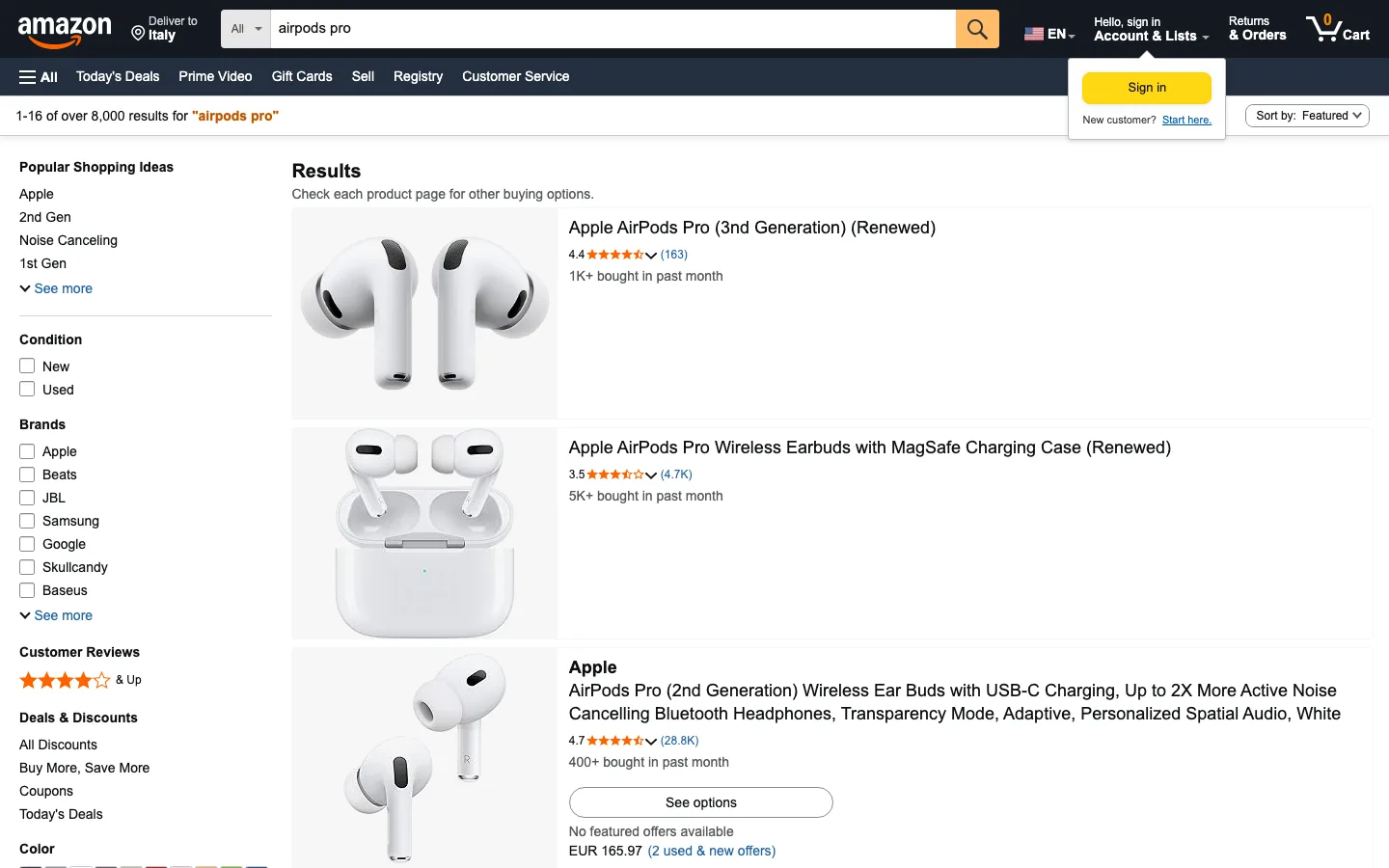
For this guide, the search target is electronics product pages with visible offer data. The prompt is intentionally narrow because the output should be usable by a backend job, not just readable by a human:
from pydantic import BaseModel, Field
from scrapegraph_py import ScrapeGraphAI


class ProductLink(BaseModel):
    retailer: str = Field(description="Retailer name, for example Amazon")
    domain: str = Field(description="Retailer domain")
    product_url: str = Field(description="Direct product detail page URL")
    match_reason: str = Field(description="Why this URL matches the requested product")


class ProductLinkSet(BaseModel):
    products: list[ProductLink] = Field(description="One product page per requested retailer")

sgai = ScrapeGraphAI(api_key="sgai-your-api-key")

search_res = sgai.search(
    "electronics product detail page with visible price Amazon Best Buy Walmart",
    num_results=10,
    prompt=(
        "Return exactly one live product detail page from each retailer: Amazon, "
        "Best Buy, and Walmart. Prefer electronics products with visible price, "
        "seller, condition, and product URL. Do not "
        "return category pages, review pages, support pages, search pages, or "
        "accessory-only pages. Return retailer, domain, product_url, and match_reason."
    ),
    schema=ProductLinkSet.model_json_schema(),
)

if search_res.status != "success":
    raise RuntimeError(search_res.error)

links = ProductLinkSet.model_validate(search_res.data.json_data)
print(links.model_dump())During a live ScrapeGraphAI extraction test on July 1, 2026, the verified URLs used for this article were:
{
  "products": [
    {
      "retailer": "Amazon",
      "domain": "amazon.com",
      "product_url": "https://www.amazon.com/s?k=airpods+pro&crid=1FZZP8I3XYB10&sprefix=airpods+pr%2Caps%2C278&ref=nb_sb_noss_2",
      "match_reason": "Amazon search results page for AirPods Pro with visible offers"
    },
    {
      "retailer": "Best Buy",
      "domain": "bestbuy.com",
      "product_url": "https://www.bestbuy.com/product/apple-airpods-pro-2-wireless-active-noise-cancelling-earbuds-with-hearing-aid-feature-white/JJGCQ88C8X",
      "match_reason": "Best Buy product detail page for Apple AirPods Pro 2"
    },
    {
      "retailer": "Walmart",
      "domain": "walmart.com",
      "product_url": "https://www.walmart.com/ip/AirPods-Pro-2nd-generation-with-MagSafe-Case-USB-C/5689919121",
      "match_reason": "Walmart product detail page for AirPods Pro 2 with MagSafe USB-C case"
    }
  ]
}
The exact search results can change because retailers update URLs and search engines reorder pages. The important rule is stricter: use URLs that expose all fields your schema requires. In live tests, individual Amazon product pages intermittently hid price behind delivery-location handling, so the verified Amazon link below uses an Amazon search results page for AirPods Pro, from which extraction pulls the top visible offer.
Extract the Same Schema from Amazon, Best Buy, and Walmart
Once you have the URLs, the extraction code does not need one custom parser per site. Use one schema for the fields your pricing system needs, then pass each URL to ScrapeGraphAI.
from pydantic import BaseModel, Field
from scrapegraph_py import ScrapeGraphAI


class ProductOffer(BaseModel):
    retailer: str = Field(description="Retailer name")
    product_name: str = Field(description="Visible product title")
    brand: str = Field(description="Product brand")
    current_price: str = Field(description="Current visible offer price")
    currency: str = Field(description="Currency code or symbol")
    seller: str = Field(description="Seller, merchant, retailer, or sold-by value")
    condition: str = Field(description="New, open box, refurbished, or used")

sgai = ScrapeGraphAI(api_key="sgai-your-api-key")

targets = [
    {
        "retailer": "Amazon",
        "url": "https://www.amazon.com/s?k=airpods+pro&crid=1FZZP8I3XYB10&sprefix=airpods+pr%2Caps%2C278&ref=nb_sb_noss_2",
    },
    {
        "retailer": "Best Buy",
        "url": "https://www.bestbuy.com/product/apple-airpods-pro-2-wireless-active-noise-cancelling-earbuds-with-hearing-aid-feature-white/JJGCQ88C8X",
    },
    {
        "retailer": "Walmart",
        "url": "https://www.walmart.com/ip/AirPods-Pro-2nd-generation-with-MagSafe-Case-USB-C/5689919121",
    },
]

prompt = (
    "Extract the default visible ecommerce product offer from this product page. "
    "Return retailer, product_name, brand, current_price, currency, seller, "
    "and condition. Every field is required. "
    "Extract the visible offer price into current_price and its currency into currency. "
    "Do not return null, empty strings, No content available, unknown, or placeholders. "
    "For seller, use visible seller, merchant, sold-by value, or retailer name when "
    "the retailer is the seller. For condition, use visible condition, or New "
    "when the page presents a new retail offer. Return only the default buy "
    "box or main offer, no review rating or review count."
)

records = []

for target in targets:
    res = sgai.extract(
        prompt,
        url=target["url"],
        schema=ProductOffer.model_json_schema(),
    )

    if res.status != "success":
        raise RuntimeError(f"{target['retailer']}: {res.error}")

    records.append({
        "retailer": target["retailer"],
        "url": target["url"],
        "data": res.data.json_data,
    })

print(records)
During the live test, ScrapeGraphAI returned the API JSON directly for all three retailers. The source URL stays beside the extracted data, because your crawler already knows which URL it sent to the API.
[
  {
    "retailer": "Amazon",
    "url": "https://www.amazon.com/s?k=airpods+pro&crid=1FZZP8I3XYB10&sprefix=airpods+pr%2Caps%2C278&ref=nb_sb_noss_2",
    "data": {
      "retailer": "Amazon",
      "product_name": "AirPods Pro (2nd Generation) Wireless Ear Buds with USB-C Charging, Up to 2X More Active Noise Cancelling Bluetooth Headphones, Transparency Mode, Adaptive, Personalized Spatial Audio, White",
      "brand": "Apple",
      "current_price": "165.97",
      "currency": "EUR",
      "seller": "Amazon",
      "condition": "New"
    }
  },
  {
    "retailer": "Best Buy",
    "url": "https://www.bestbuy.com/product/apple-airpods-pro-2-wireless-active-noise-cancelling-earbuds-with-hearing-aid-feature-white/JJGCQ88C8X",
    "data": {
      "retailer": "Best Buy",
      "product_name": "Apple - AirPods Pro 2, Wireless Active Noise Cancelling Earbuds with Hearing Aid Feature - White",
      "brand": "Apple",
      "current_price": "239.99",
      "currency": "$",
      "seller": "UNITED TECHNOLOGY",
      "condition": "New"
    }
  },
  {
    "retailer": "Walmart",
    "url": "https://www.walmart.com/ip/AirPods-Pro-2nd-generation-with-MagSafe-Case-USB-C/5689919121",
    "data": {
      "retailer": "Walmart",
      "product_name": "Apple, AirPods Pro, Wireless Earbuds with MagSafe Case (USB-C), (2nd Generation), White, 1",
      "brand": "Apple",
      "current_price": "199",
      "currency": "USD",
      "seller": "Walmart.com",
      "condition": "New"
    }
  }
]
Each record above comes straight from a live retailer product page. The same schema normalizes very different layouts:
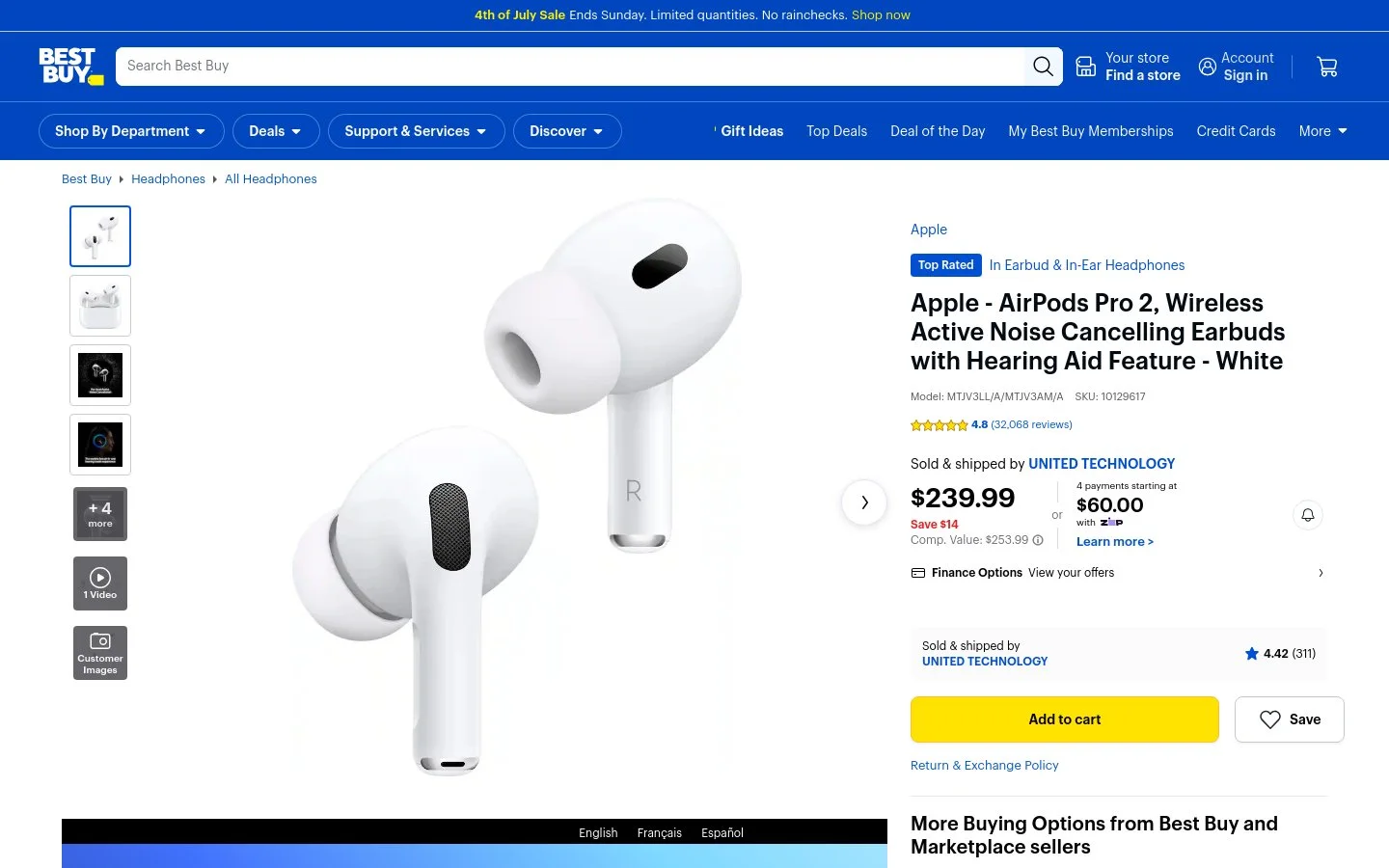
Best Buy product page for the AirPods Pro 2: the buy box, price, and sold-by seller become the Best Buy offer record.
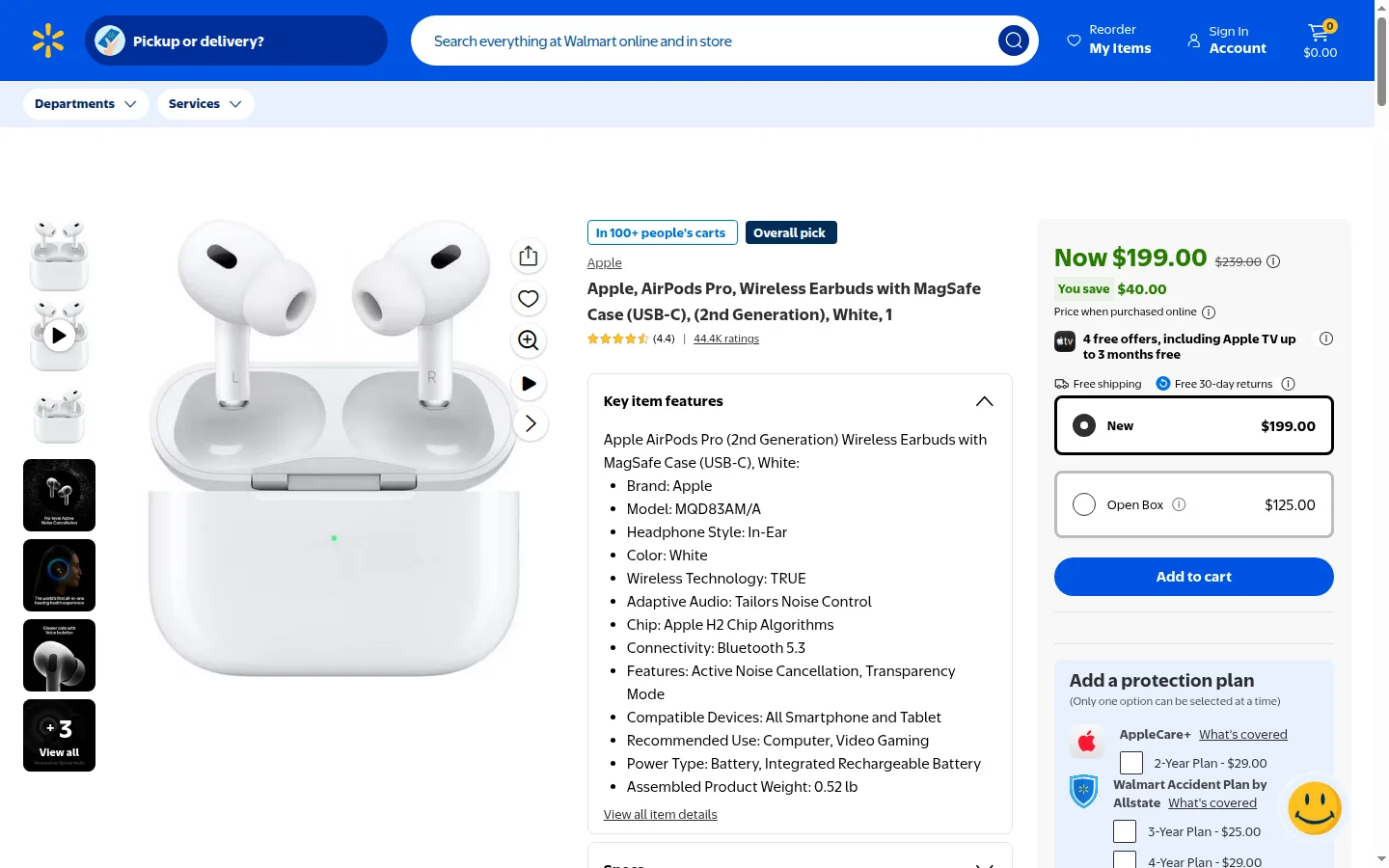
Walmart product page for the AirPods Pro 2 (MagSafe USB-C): New and Open Box offers sit side by side, which is why the schema stores seller and condition.
This is already usable output. You can save it into Postgres, BigQuery, Snowflake, a warehouse table, a CSV, or an Excel export. You can also scale the same loop to any number of product URLs by putting the targets in a queue and writing each normalized offer record after validation.
This example is intentionally direct: one request per product URL, then print the JSON returned by ScrapeGraphAI. In production, add validation, retries, storage, and optional fetch configuration after this step. Keep the first script small so a developer can see the API response before adding pipeline logic.
Skip Search When You Already Have URLs
Search is useful for discovery. It is not required when your system already knows what to scrape.
If you have a list of a thousand, a hundred thousand, or even millions of product URLs, skip the search API entirely. Send those URLs directly to extract, keep the same schema, and use your own queue or job runner to control batching, retries, and storage.
Good sources for known URLs include:
- your internal catalog mapped to competitor URLs
- marketplace exports from a prior discovery job
- supplier feeds
- product sitemaps
- manually approved URLs for the top SKUs
- URLs found by search and then reviewed once
The extraction schema should stay stable. The URL source can change.
Blocks and Proxies Are Part of the Problem
Amazon, Best Buy, Walmart, and other ecommerce sites can rate-limit requests, return bot checks, serve partial HTML, vary content by region, or hide the final offer until JavaScript renders the page. A simple requests.get() script may work once, then fail when you run it across hundreds of product URLs.
The usual fix is infrastructure work: rotating residential or datacenter proxies, browser rendering, retries, backoff, session handling, user-agent management, and monitoring for blocked responses. That setup is expensive to buy and time-consuming to maintain.
ScrapeGraphAI includes automatic proxy handling behind the API. For harder targets, the documented proxy and fetch configuration lets you enable JavaScript rendering, stealth mode, wait time, scrolls, and country routing. In the ScrapeGraphAI docs, stealth=True uses the anti-bot path with residential proxies and anti-bot headers, and country="us" routes through US proxies when regional pricing matters.
curl -X POST https://v2-api.scrapegraphai.com/api/extract \
  -H "Content-Type: application/json" \
  -H "SGAI-APIKEY: sgai-your-api-key" \
  -d '{
    "url": "https://www.walmart.com/ip/AirPods-Pro-2nd-generation-with-MagSafe-Case-USB-C/5689919121",
    "prompt": "Extract the default visible ecommerce product offer. Return retailer, product_name, brand, current_price, currency, seller, condition, and product_url. Every field is required. Do not return null, empty strings, No content available, unknown, or placeholders.",
    "fetchConfig": {
      "mode": "fast",
      "wait": 1000,
      "country": "us"
    },
    "schema": {
      "type": "object",
      "properties": {
        "retailer": {"type": "string"},
        "product_name": {"type": "string"},
        "brand": {"type": "string"},
        "current_price": {"type": "string"},
        "currency": {"type": "string"},
        "seller": {"type": "string"},
        "condition": {"type": "string"},
        "product_url": {"type": "string"}
      },
      "required": ["retailer", "product_name", "brand", "current_price", "currency", "seller", "condition", "product_url"]
    }
  }'
You still need to scrape responsibly, respect site rules, avoid private account pages, and keep request rates reasonable. The business value is that you can build the ecommerce scraper, price monitor, or competitor pricing workflow first, instead of spending the first week wiring a separate proxy stack.
What Makes an Ecommerce Price Record Trustworthy
A price monitor should store more than one number. The price is only useful if you can explain what offer it came from.
| Field | Why it matters |
|---|---|
product_name |
Confirms the page is the expected product |
brand |
Helps product matching across retailers |
current_price |
The visible customer-facing offer price |
currency |
Prevents mixed-currency comparisons |
seller |
Critical for Walmart, Amazon, and other marketplaces |
condition |
Prevents comparing open-box or refurbished items against new items |
product_url |
Makes the record auditable |
collected_at |
Lets you build price history and debug changes |
This is why a simple selector like .price is not enough for competitor price scraping. A marketplace can show a cheap open-box offer beside a new offer, or a third-party seller beside a first-party listing. If you only store the number, your pricing rule may react to the wrong offer.
Product Pages vs Category Pages
Use search and category pages for discovery. Use product pages for price monitoring.
Product pages should return one offer record. The schema should be strict because downstream systems expect one product, one visible price, one seller, one condition, and one source URL.
Search should return candidate product URLs across the web. Category pages should return a list of product cards from one store. Both are useful for discovery, but neither should be the final price source.
Category cards often omit seller, condition, coupons, membership pricing, and variant-specific prices.
The reliable pattern is:
- Scrape category pages to discover product URLs.
- Use search when you need product URLs across Amazon, Best Buy, Walmart, and other retailers.
- Save only relevant product URLs.
- Scrape product pages for the final price records.
- Alert only from product-page records, not category-card prices.
This avoids a common mistake: using a category-card price as if it were the full customer-facing offer.
One Prompt and Schema Across Ecommerce Sites
The main advantage of ScrapeGraphAI is that you do not maintain a separate scraper for every ecommerce site. Use one prompt, one schema, and a list of product URLs.
That is the difference between AI extraction and ad hoc scraping. With selector-based scraping, every retailer becomes a maintenance problem: one parser for Amazon, one parser for Walmart, one parser for Best Buy, and another parser when a theme or product template changes. With ScrapeGraphAI, the instruction stays the same: extract the default visible product offer into the same fields.
The same ProductOffer schema above works for marketplace pages, direct retail pages, and ordinary ecommerce product pages because it describes the business record you need, not the HTML structure of one website. Amazon may call it a buy box, Walmart may show a marketplace seller, and Shopify may expose a variant price. Your downstream system still receives product name, brand, price, currency, seller, condition, and source URL.
This is why the example uses Amazon, Best Buy, and Walmart together. They are different sites with different markup, but the code does not branch by retailer. Add another URL to targets, run the same sgai.extract() call, and store the same JSON shape.
The mistake to avoid is building a new custom scraper every time a retailer changes. Programmatic ecommerce scraping should be one prompt, one schema, many URLs.
Recommended Architecture
You do not need a massive crawler to start. A small price monitoring pipeline is enough.
- Store target URLs with internal SKU, expected brand, competitor, and desired condition.
- Schedule extraction based on product value and price volatility.
- Extract one normalized offer with ScrapeGraphAI.
- Validate price, currency, seller, condition, and product match.
- Save the normalized record and raw extraction response.
- Compare against the last valid record for the same SKU and competitor.
Common Failure Modes
The extraction layer is only one part of the system. Build guardrails for the failures that hurt pricing decisions.
Wrong product. The URL redirects, the product is replaced, or a marketplace shows a similar item. Check title, brand, SKU, UPC, ASIN, or model number before saving the record.
Wrong offer. The page shows open-box, used, refurbished, or third-party seller pricing. Store condition and seller, then decide which offers are valid for your benchmark.
Missing price. The page hides the offer behind a region selector, login state, or variant choice. Reject the run and retry later instead of carrying forward stale data.
Promo confusion. A coupon, financing module, or membership price can look like the main offer. Keep promotion text separate if your team uses discounts in pricing decisions.
Unavailable item price. A stale number may remain visible after the product can no longer be bought. Flag that run for review instead of triggering an automated pricing action from stale data.
For a broader production checklist, read Master Production Web Scraping Best Practices.
What Should the First Dashboard Show?
Don't start with charts for every product. Start with a price monitoring review queue. For each run, show the internal SKU, competitor, current extracted offer, last valid offer, percent change, seller, and condition.
That view tells the operator what needs review. Is the competitor actually cheaper, or did the page switch to an open-box seller? Did the price move, or did the offer condition change? Is the product page still the right match? A dashboard that answers those questions is more useful than a generic line chart on day one.
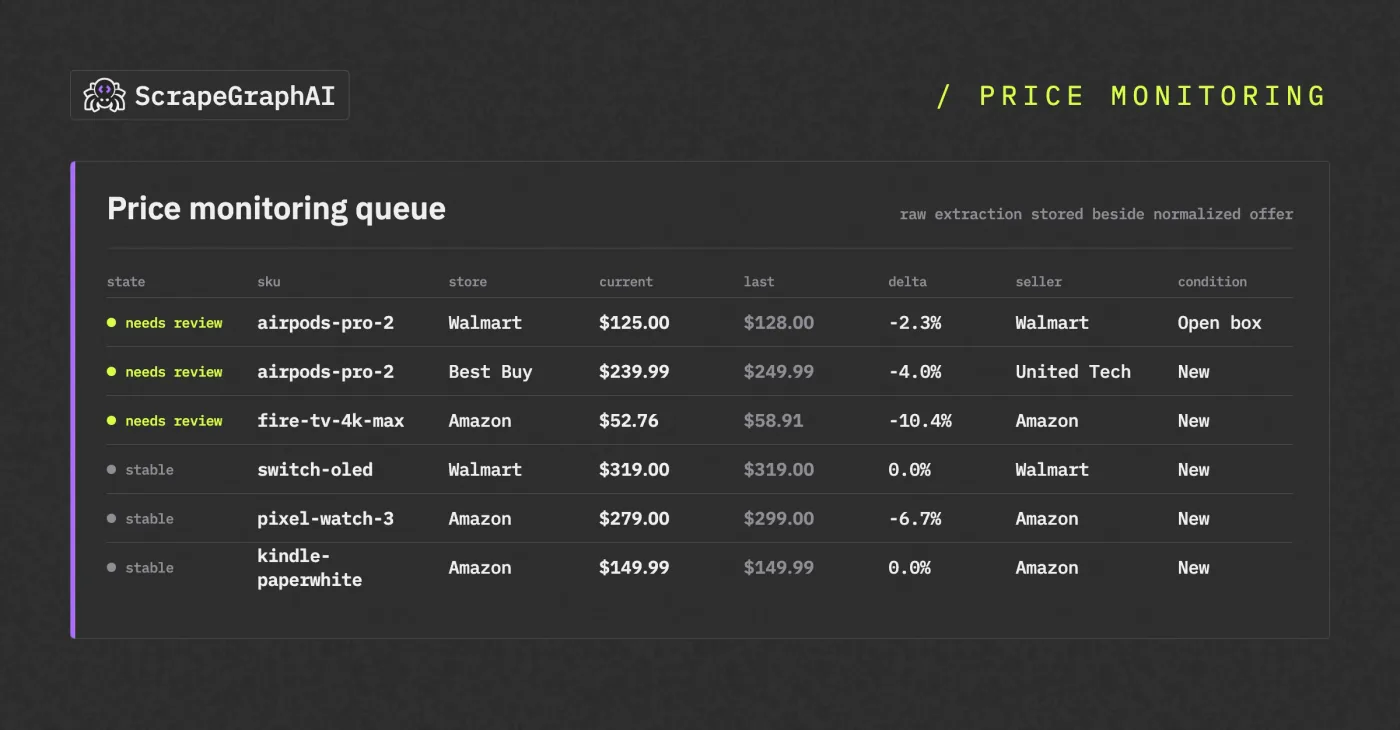
A price monitoring dashboard that surfaces the rows needing review first and keeps the raw extraction beside each normalized offer.
Compliance and Responsible Scraping
Focus on public product and offer data. Avoid private account pages, personal data, checkout flows, and any collection your team is not allowed to perform.
Keep request rates reasonable, cache when possible, and store audit logs for every price used in a business decision. If a price change affects revenue, a human should be able to trace it back to the source URL, timestamp, seller, condition, and raw extraction response.
For legal context, read Is Web Scraping Legal?.
Start with a Small Production Slice
The best first project is a narrow competitor price monitor:
- 20 to 50 important SKUs
- two or three competitor URLs per SKU
- one strict product-offer schema
- daily extraction
- manual review of invalid records
- alerts only after two weeks of clean history
That gets you from ecommerce scraper prototype to usable competitor price intelligence without pretending marketplace pages are simple.
Related Articles
- eBay Product Research: Tools, Terapeak, and Raw Data
- Price Scraping Guide for Competitive Pricing Data
- Amazon ASIN API: Product Data by ASIN in 2026
- Build a Price Monitoring Bot with AI Web Scraping
- Amazon Price Monitoring: The Complete Guide
- 7 Best Walmart Scrapers for Product Data
- How to Scrape E-Commerce Product Data with AI Agents