


TL;DR
scrapegraph-js is the official JavaScript and TypeScript client for ScrapeGraphAI. Promise-based, fully typed, ESM-native.
- Install:
npm i scrapegraph-js@latest(Node 22 or newer, ESM only). - Authenticate: set
SGAI_API_KEY, or pass{ apiKey }to the client. - Call:
scrape,extract,search, pluscrawl.*andmonitor.*namespaces. - Typed: ships its own TypeScript definitions; every call resolves to an
ApiResult<T>.
Built for modern Node
If your stack is JavaScript or TypeScript, this is the package you want. It exposes the full ScrapeGraphAI engine through async methods that read like the rest of your codebase: await sgai.extract(...), branch on the result, move on.
A couple of constraints worth knowing up front. The SDK targets Node 22 and above, and it's ESM only. That means import syntax, not require. On a current Node project this is a non-issue; on an older CommonJS codebase you'll want to plan the import style.
Installation and keys
npm i scrapegraph-js@latestSet your key in the environment and the client picks it up automatically:
export SGAI_API_KEY="your-key"import { ScrapeGraphAI } from "scrapegraph-js";
const sgai = ScrapeGraphAI(); // reads SGAI_API_KEY from envOr pass it explicitly when env vars aren't convenient:
const sgai = ScrapeGraphAI({ apiKey: "your-key" });Keys come from the dashboard.
Scraping a page
scrape returns page content in the formats you ask for. It also accepts a fetchConfig for the tricky pages: JavaScript rendering, stealth mode, custom timeouts.
const res = await sgai.scrape({
  url: "https://example.com",
  formats: [{ type: "markdown", mode: "reader" }],
  fetchConfig: { mode: "js", stealth: true, timeout: 60000 },
});That fetchConfig block is what gets you past client-rendered single-page apps and bot checks that would defeat a plain fetch.
Extracting structured data
When you know the shape you want, extract skips the parsing step entirely. Give it a prompt and a schema:
const res = await sgai.extract({
  url: "https://example.com",
  prompt: "Extract the main heading",
  schema: { type: "object", properties: { title: { type: "string" } } },
});
The model reads the page and returns JSON that matches your schema. No selectors, no DOM walking.
Searching the web
search runs a query and can extract from the results in the same call:
const res = await sgai.search({
  query: "best practices",
  numResults: 5,
  prompt: "Extract tips",
});
Crawling and monitoring
Longer-running work lives under its own namespaces. Crawls are jobs you start and then check on:
const start = await sgai.crawl.start({ url: "https://example.com", maxPages: 50 });
await sgai.crawl.get(start.data.id);
await sgai.crawl.stop(start.data.id);
Monitors run on a schedule, expressed as cron:
const res = await sgai.monitor.create({
  url: "https://example.com",
  interval: "0 * * * *",
});
await sgai.monitor.activity(res.data.id, { limit: 20 });
Two utility calls round things out: await sgai.credits() for your remaining balance and await sgai.healthy() for an API health check.
One response shape, everywhere
Every method resolves to the same envelope, so your error handling looks the same across the SDK:
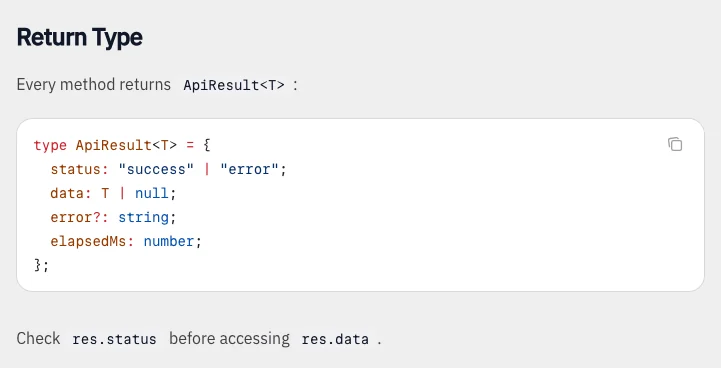 The shared response type keeps status, data and timing in one object. Source: JavaScript SDK documentation.
type ApiResult<T> = {
  status: "success" | "error";
  data: T | null;
  error?: string;
  elapsedMs: number;
};
In practice:
const res = await sgai.extract({ url, prompt: "Get the title" });
if (res.status === "error") {
  console.error(res.error);
} else {
  console.log(res.data);
}
A note for TypeScript users upgrading from older versions: as of 2.1.0 the type names dropped their Api prefix, so ApiScrapeRequest is now just ScrapeRequest. Update your imports if you pinned to the old names.
Wrapping up
The JavaScript SDK puts the whole ScrapeGraphAI engine one await away. Install it, set a key, and you have scraping, extraction, search, crawling, and scheduled monitoring with full type safety. Reach for fetchConfig when pages fight back, lean on extract plus a schema when you know your output shape, and check status on every result so failures stay explicit.
Related Articles
- ScrapeGraphAI Python SDK: Scrape, Extract, Crawl - The same engine for Python projects.
- ScrapeGraphAI + Vercel AI SDK: Web Tools for Agents - Turn these methods into tools your agent can call.
- ScrapeGraphAI CLI: Web Scraping From Your Terminal - Prototype before you wire the SDK into an app.
- ScrapeGraphAI MCP Server: Give Your AI the Web - The same capabilities inside Claude and Cursor.