


TL;DR
LlamaIndex is built for connecting LLMs to data. ScrapeGraphAI is one of the cleanest data sources you can hand it: any URL, turned into structured content.
- Install:
pip install -U llama-indexandpip install "scrapegraph-py>=2.0.1". - Key: set
SGAI_API_KEY. - Wrap: turn an SDK call into a tool with
FunctionTool.from_defaults(fn=...). - Run: hand the tool to a
FunctionAgentorReActAgentand let it scrape on demand.
Where this fits
LlamaIndex spends most of its time helping you index and query data you already have. But a lot of the data you actually want lives on the open web and changes daily. Pulling it in by hand, page by page, defeats the point of an agent.
ScrapeGraphAI closes that loop. You expose its methods as LlamaIndex tools, and your agent can fetch a page, extract structured fields, or run a search whenever a query calls for fresh information. The agent decides; you just provide the capability.
Installation
Two installs: LlamaIndex itself and the ScrapeGraphAI SDK.
pip install -U llama-index
pip install "scrapegraph-py>=2.0.1"
Set your key:
export SGAI_API_KEY="your-api-key"Wrapping a scrape as a tool
The bridge between the two libraries is FunctionTool.from_defaults(). You write a normal Python function, wrap it, and LlamaIndex exposes it to the agent. Here's the full picture, from client to agent:
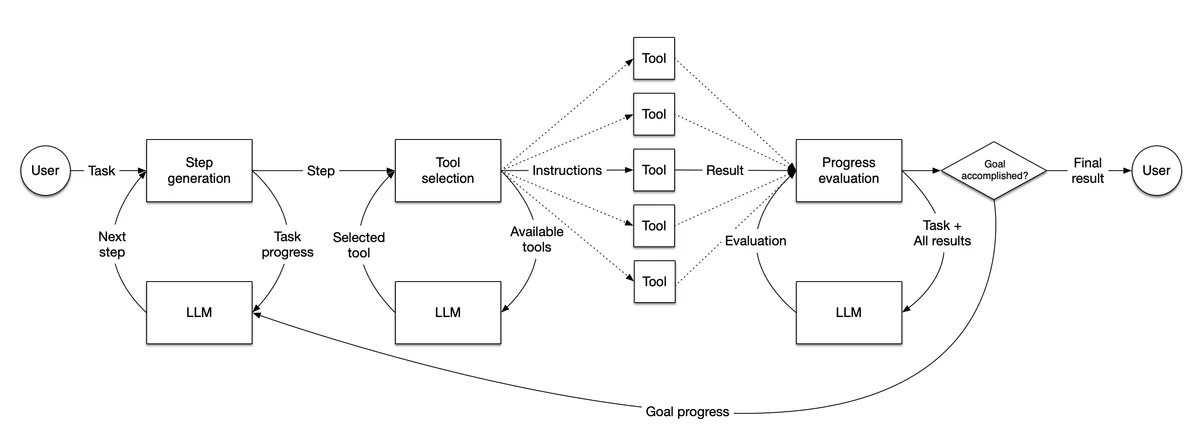 Tool calls give an agent access to information beyond the initial message. Source: LlamaIndex’s agent guide.
from scrapegraph_py import ScrapeGraphAI
from llama_index.core.tools import FunctionTool
from llama_index.core.agent.workflow import FunctionAgent
from llama_index.llms.openai import OpenAI

sgai = ScrapeGraphAI()

def scrape(url: str) -> str:
    """Fetch a page and return its markdown content."""
    result = sgai.scrape(url)
    if result.status == "error":
        raise RuntimeError(result.error)
    return result.data.results.get("markdown", {}).get("data", [""])[0]

agent = FunctionAgent(
    tools=[FunctionTool.from_defaults(fn=scrape)],
    llm=OpenAI(model="gpt-4o"),
)
The function's docstring becomes the tool description the model reads, so keep it accurate. Notice this version raises on error rather than returning a string; inside an agent loop, a raised exception is something the framework can catch and surface, so pick whichever style fits your error handling.
More than scraping
The same wrapping pattern works for every part of the SDK. Each method becomes a candidate tool:
- scrape:
sgai.scrape(url, ...)for page content. - extract:
sgai.extract(prompt, url=..., ...)for structured fields. - search:
sgai.search(query, ...)for web search. - crawl:
sgai.crawl.start(url, ...), then poll with.get(id). - monitor:
sgai.monitor.create(url, interval, ...)for scheduled jobs.
Give an agent two or three of these and it can chain them: search for sources, scrape the promising ones, extract the fields you asked for. Each call returns an ApiResult with status, data, and error, so your tool functions all unwrap the same way.
FunctionAgent or ReActAgent
LlamaIndex offers more than one agent style. FunctionAgent leans on the model's native function-calling and tends to be the smoother choice with current OpenAI models. ReActAgent follows the explicit reason-act-observe loop, which is handy when you want the reasoning trace visible or you're on a model without strong tool-calling. Both accept the same FunctionTool list, so you can swap between them without rewriting your tools.
Wrapping up
LlamaIndex already knows how to reason over data. ScrapeGraphAI gives it data worth reasoning over, fetched live and structured on the way in. Wrap the SDK methods with FunctionTool.from_defaults, pick FunctionAgent or ReActAgent, and your retrieval workflows stop being limited to what you indexed last week. Start with a single scrape tool, then add extract and search as your agent takes on bigger questions.
Related Articles
- ScrapeGraphAI Python SDK: Scrape, Extract, Crawl - The client and methods behind every tool here.
- ScrapeGraphAI + LangChain: Web Tools for Your Agents - The same idea in a different agent framework.
- ScrapeGraphAI + CrewAI: Build Data Collection Agents - Multi-agent crews with the same scraping tools.
- ScrapeGraphAI + Agno: Fast Agents With Web Access - A lightweight toolkit-based alternative.