


TL;DR
json.dumpsconverts a Python object to a JSON string,json.loadsdoes the reverse, anddump/load(nos) do the same with files. Read files withencoding="utf-8", write withindent=2, ensure_ascii=False, catchjson.JSONDecodeErroron anything you did not produce yourself, and use JSON Lines for pipeline output. When the JSON you need is trapped inside a web page, an extraction API returns it schema-validated instead of leaving you to parse HTML.
Every Python developer ends up on this page eventually, usually with an API response in one hand and a TypeError: Object of type datetime is not JSON serializable in the other. The json module ships with Python, has exactly four functions you care about, and still manages to confuse people daily because two of those functions differ by one letter.
Here is the short version: json.dumps turns a Python object into a JSON string, json.loads turns a JSON string back into a Python object, and the versions without the s do the same thing with files. The s stands for string. That one sentence resolves about half the Stack Overflow traffic on the topic.
The rest of this guide covers the other half: reading and writing JSON files without encoding surprises, the dumps options worth memorizing, the parse errors you will actually hit, and what to do when the JSON you need lives inside a web page instead of a friendly API.
json.dumps, loads, dump, and load: which one you want
| Function | From | To | Typical line |
|---|---|---|---|
json.dumps |
Python object | JSON string | s = json.dumps(data) |
json.loads |
JSON string | Python object | data = json.loads(s) |
json.dump |
Python object | file | json.dump(data, f) |
json.load |
file | Python object | data = json.load(f) |
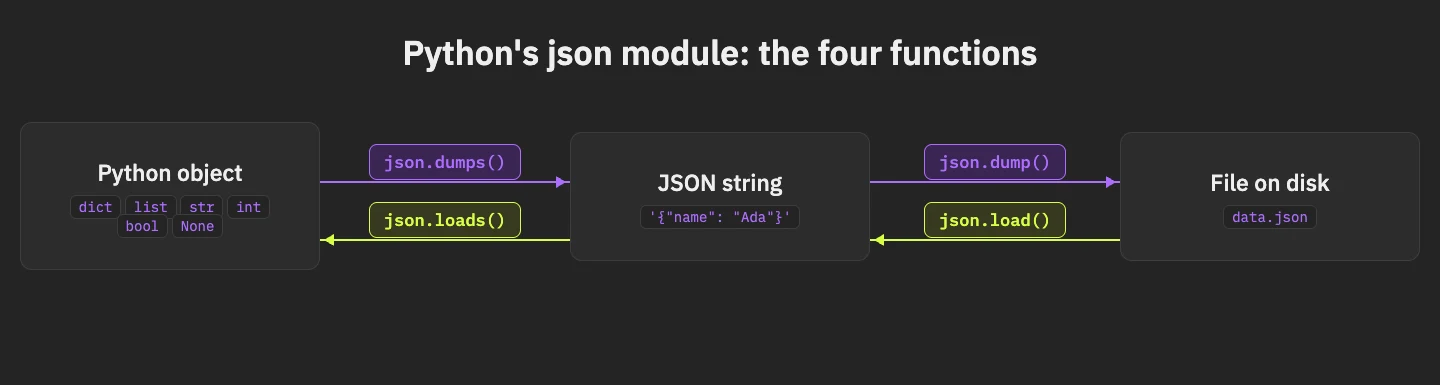
A round trip looks like this:
import json

user = {"name": "Ada", "logins": 42, "active": True}

as_text = json.dumps(user)
print(as_text)          # {"name": "Ada", "logins": 42, "active": true}
print(type(as_text))    # <class 'str'>

back = json.loads(as_text)
print(back["logins"])   # 42
Notice what happened to True: it became true. The module maps Python types to JSON types on the way out (dict to object, list to array, None to null) and reverses the mapping on the way in. Tuples become arrays and come back as lists, which occasionally surprises people who round-trip their data and compare with ==.
How to read a JSON file in Python
Open the file, hand it to json.load, done:
import json

with open("config.json", encoding="utf-8") as f:
    config = json.load(f)

print(config["api_key"])
Two details in that snippet earn their place. The with block closes the file even if parsing blows up. And encoding="utf-8" matters because JSON files are UTF-8 by spec, while open() still defaults to your platform's locale encoding; on Windows that mismatch produces mojibake or a UnicodeDecodeError at the worst possible moment.
If the file might not exist or might contain garbage, wrap the two failure modes separately:
import json
from pathlib import Path

path = Path("config.json")

try:
    config = json.loads(path.read_text(encoding="utf-8"))
except FileNotFoundError:
    config = {}
except json.JSONDecodeError as err:
raise SystemExit(f"config.json is not valid JSON: {err}")Path.read_text plus json.loads is equivalent to open plus json.load and reads nicer once you use pathlib everywhere else anyway.
How to write JSON to a file
json.dump with a couple of arguments you should treat as defaults:
import json

results = {"city": "Torino", "note": "caffè al volo", "temp_c": 31.5}

with open("results.json", "w", encoding="utf-8") as f:
    json.dump(results, f, indent=2, ensure_ascii=False)
indent=2 makes the file diffable and reviewable. ensure_ascii=False writes caffè as caffè instead of caff\u00e8; the default True escapes every non-ASCII character for ancient transport reasons and mostly makes files ugly.
One habit worth stealing from production codebases: write to a temporary file and rename it into place, so a crash mid-write never leaves a half-written JSON file behind.
import json
import os

def save_json(path, data):
    tmp = f"{path}.tmp"
    with open(tmp, "w", encoding="utf-8") as f:
        json.dump(data, f, indent=2, ensure_ascii=False)
    os.replace(tmp, path)

save_json("results.json", results)
os.replace is atomic on the same filesystem. Your scheduler can kill the process at any line and results.json is either the old complete version or the new complete version, never a fragment.
The json.dumps options people actually use
The signature has a dozen parameters. Four of them do almost all the work.
import json
from datetime import datetime

record = {
    "id": 7,
    "b_field": "sorts second",
    "a_field": "sorts first",
    "captured_at": datetime(2026, 7, 16, 9, 30),
}

print(json.dumps(record, indent=2, sort_keys=True, default=str, ensure_ascii=False))indentpretty-prints. Use2for humans, omit it for network payloads where compact wins.sort_keys=Truegives you deterministic output, which makes diffs and cache keys stable.default=stris the pragmatic fix for the famousnot JSON serializableerror: anything the encoder does not recognize gets passed throughstr(). Datetimes become ISO-ish strings and your script keeps running. It is a blunt instrument, and for quick scripts that is exactly what you want.ensure_ascii=Falsekeeps real characters real, same reasoning as in the file-writing section.
When default=str is too blunt, subclass the encoder and decide per type:
import json
from datetime import datetime
from decimal import Decimal

class SmartEncoder(json.JSONEncoder):
    def default(self, obj):
        if isinstance(obj, datetime):
            return obj.isoformat()
        if isinstance(obj, Decimal):
            return float(obj)
        return super().default(obj)

payload = {"price": Decimal("19.99"), "at": datetime(2026, 7, 16)}
print(json.dumps(payload, cls=SmartEncoder))
Anything else falls through to the parent class, which raises the usual TypeError and tells you exactly which type you forgot to handle.
Parsing JSON strings, and the errors you will hit
json.loads is strict, and the strictness is the point. The errors follow a pattern once you have seen them:
import json

broken = [
    "{'name': 'Ada'}",          # single quotes
    '{"name": "Ada",}',          # trailing comma
    '{"name": "Ada"} extra',     # trailing garbage
    '',                          # empty string
]

for s in broken:
    try:
        json.loads(s)
    except json.JSONDecodeError as err:
        print(f"{s[:25]!r:30} -> {err.msg} (pos {err.pos})")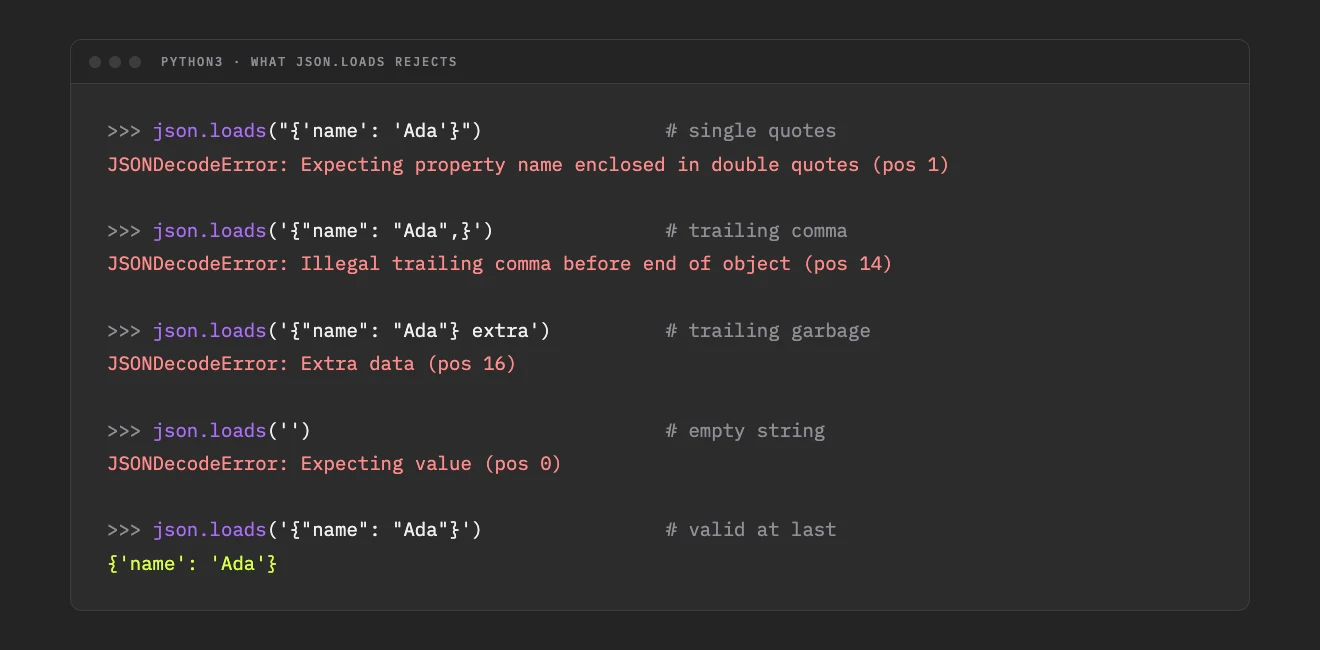
The single-quotes case deserves a special mention because it usually means the "JSON" you received is actually the repr() of a Python dict, printed by some upstream script. If you control that script, fix it there. If you do not, ast.literal_eval parses Python-literal syntax safely; do not reach for eval.
Two more parse-time facts that save debugging sessions. json.loads happily accepts bytes in UTF-8, UTF-16, or UTF-32, so json.loads(response_bytes) works without a manual .decode(). And nonstandard values like NaN and Infinity are accepted by default because the parser is lenient about them; pass parse_constant if you need to reject or convert them.
The error-handling shape that holds up in real pipelines is boring and short:
def parse_or_none(raw: str):
    try:
        return json.loads(raw)
    except json.JSONDecodeError:
        return None
Log the failure, keep the raw string somewhere, move on. A scraper or ingestion job that dies on the first malformed record is a job you restart every night.
Getting JSON out of APIs and web pages
For a well-behaved API, the requests library already does the parsing (if you prefer the shell, the curl guide shows the same calls with curl and jq):
# pip install requests
import requests

resp = requests.get("https://api.example.com/products", timeout=30)
resp.raise_for_status()
products = resp.json()   # json.loads happens under the hood
The interesting problem is the other case: the data you want is on a web page that renders HTML, and nobody gave you an endpoint. You could hunt for the site's internal XHR calls in DevTools, and when that works it is the cleanest source. When it does not, an AI extraction API turns the page itself into JSON. This is literally what we built ScrapeGraphAI for; every response from the extract endpoint is JSON shaped by a schema you define:
# pip install scrapegraph-py pydantic
from pydantic import BaseModel
from scrapegraph_py import ScrapeGraphAI

class Product(BaseModel):
    name: str
    price: float
    in_stock: bool

class Catalog(BaseModel):
    products: list[Product]

sgai = ScrapeGraphAI()  # reads SGAI_API_KEY from the environment

res = sgai.extract(
    "Extract every product with name, price, and stock status",
    url="https://store.example.com/products",
    schema=Catalog,
)

print(res.data.json_data)
The schema is the part that matters for this guide: the response is validated against the Pydantic model before it reaches you, so the parsing techniques above stop being defensive code and become a formality. Everything downstream (json.dump to a file, a DataFrame, a database insert) receives fields with known names and types. We covered the storage side of that pipeline in the export guide, and how the extraction tools compare in the web scraping API overview.
JSON Lines: the variant your pipelines want
A 2 GB file containing one giant JSON array is a trap: you cannot parse it without loading all of it, and you cannot append to it without rewriting it. JSON Lines (.jsonl) fixes both problems by putting one complete JSON object on each line, with no surrounding array and no commas between records.
import json

records = [{"url": "https://a.example", "status": 200},
           {"url": "https://b.example", "status": 404}]

# append records as they arrive
with open("pages.jsonl", "a", encoding="utf-8") as f:
    for rec in records:
        f.write(json.dumps(rec, ensure_ascii=False) + "\n")

# read it back one line at a time
with open("pages.jsonl", encoding="utf-8") as f:
    rows = [json.loads(line) for line in f if line.strip()]
Every scraping or ingestion pipeline I have seen at scale ends up here. A crashed run leaves a readable file with complete records up to the crash. Appending is one write. Streaming a million records needs memory for exactly one of them at a time. If a corrupt line sneaks in, the parse_or_none pattern from earlier skips it without losing the rest of the file, which is exactly the failure behavior you want at three in the morning.
When the stdlib is too slow
For most scripts it never is, and reaching for a faster parser before profiling is a classic waste of an afternoon. The honest numbers: the stdlib json module parses tens of megabytes per second, which covers config files, API responses, and almost every scraping job.
When JSON handling genuinely dominates your profile (streaming ingestion, big JSONL replays), orjson is the drop-in that matters. It is several times faster in both directions, with two surprises to know up front: orjson.dumps returns bytes rather than str, and it handles datetimes natively, so the default=str trick becomes unnecessary. Swap it behind a small wrapper function and the rest of your code never notices.
Flattening nested JSON with pandas
Real-world JSON nests. Analysts want columns. pandas.json_normalize bridges the two:
# pip install pandas
import pandas as pd

orders = [
    {"id": 1, "customer": {"name": "Ada", "country": "IT"}, "total": 99.0},
    {"id": 2, "customer": {"name": "Grace", "country": "US"}, "total": 45.5},
]

df = pd.json_normalize(orders)
print(df.columns.tolist())
# ['id', 'total', 'customer.name', 'customer.country']
Nested keys become dotted column names. For lists-inside-objects, the record_path and meta parameters handle the unrolling; past two levels of nesting, consider whether the schema should have been flatter at extraction time instead.
Quick answers
How do you parse JSON in Python?
Call json.loads(text) for a string or json.load(file_object) for a file. Both return regular Python objects: dicts, lists, strings, numbers, booleans, and None. Catch json.JSONDecodeError for input you do not control.
What is the best way to read a JSON file in Python?
Open it with encoding="utf-8" and pass the handle to json.load, or use json.loads(Path("file.json").read_text(encoding="utf-8")). Both give you the same result; pick the one that matches the rest of your codebase.
How do you convert a Python string to JSON?
Be precise about direction. A string containing JSON becomes a Python object with json.loads. A Python object becomes a JSON string with json.dumps. If your "JSON" has single quotes, it is a Python literal, and ast.literal_eval is the safe parser for it.
Can Python pretty-print JSON without extra code?
print(json.dumps(data, indent=2, ensure_ascii=False)). From a terminal, python -m json.tool file.json does it without writing any code.
What about scraping JSON data from a website?
First check DevTools for an internal API returning JSON and call it directly with requests. If the data only exists in rendered HTML, use an extraction API such as ScrapeGraphAI's extract, which returns schema-validated JSON from a prompt instead of leaving you to parse markup.
Related Articles
- Export Scraped Data to CSV, JSON, and Databases - Where your parsed JSON goes next: files, DataFrames, and database inserts
- Web Scraping API: How to Choose One in 2026 - How JSON-first extraction APIs differ from raw-HTML scrapers
- ScrapeGraphAI Python SDK: Scrape, Extract, Crawl - The five SDK methods behind the extract example above
- AI Web Scraping with Python: Developer's Guide - The wider Python scraping workflow this guide plugs into