


TL;DR
Similarweb API pricing has no public price list. Access is sold through sales as a subscription add-on or a standalone package, and usage is metered in data credits where one request can burn anywhere from 6 to 576 credits depending on granularity, countries, and time range. Pay it if you need Similarweb's proprietary traffic estimates. If you need public competitor data (pricing pages, SERPs, marketplaces, docs) extracted into your own JSON schema, ScrapeGraphAI is self-serve, one credit per call, and every code block below ran live on July 9, 2026. You can run the same workflow in the companion Google Colab without installing anything.
Search for "similarweb api pricing" and you will not find a number. Not on the packages page, not on the developer portal, not in the docs. I checked all of them while writing this, then pointed an extraction API at the same pages to see what a machine would conclude. Same answer: pricing is sales-led and not publicly fixed.
That is not a scandal. It is how market intelligence vendors sell. But it means the real question for a developer is not "what does the Similarweb API cost" but "what am I actually buying, and is there a cheaper path to the data I need". This article answers both, with the credit math from Similarweb's own docs and tested Python code for the alternative.
The whole workflow also runs in the browser. Open the notebook, paste your API key, and press run:

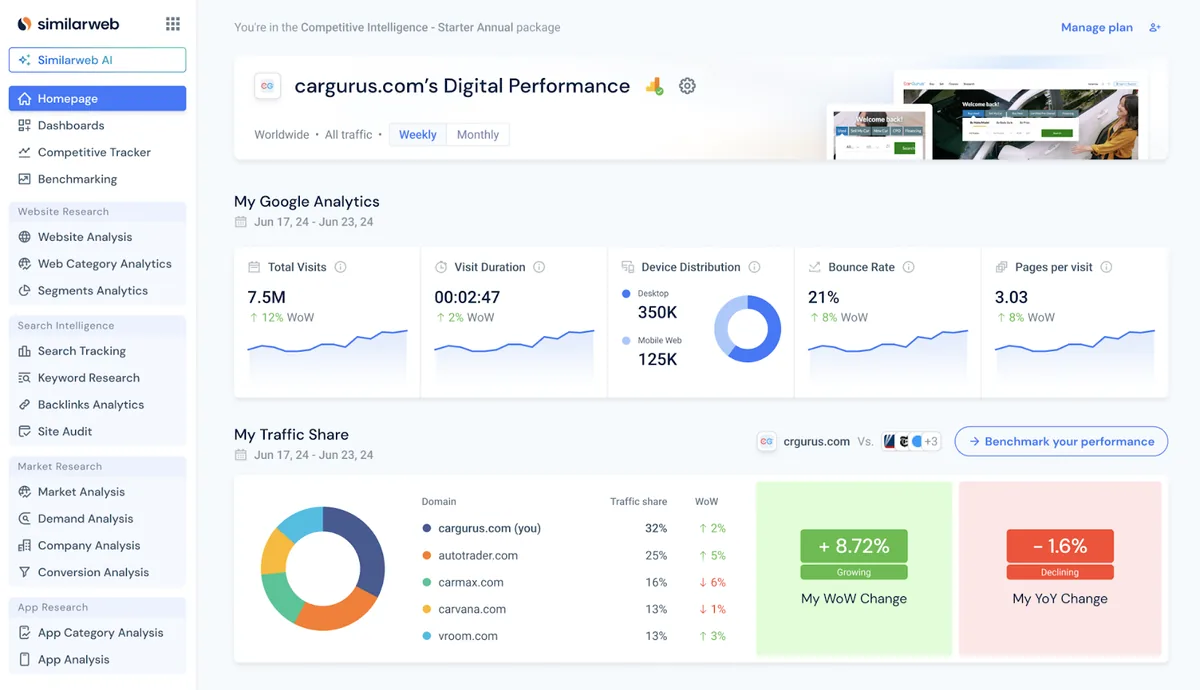
Here is the kind of Similarweb competitive intelligence surface this article is talking about: traffic, engagement, device split, bounce rate, pages per visit, and traffic share in one market view.
What Similarweb API Pricing Actually Means
The Similarweb API is not a product you check out with a credit card. The developer docs say it plainly: the API is a subscription add-on, and to start accessing data you speak to your Similarweb Account Manager. You can also buy the API as a standalone package without the full platform, but that conversation still goes through sales.
Once you have a contract, usage is metered in Similarweb data credits. The official credit documentation gives the formula:
Total Credits = Domains x Endpoint Base Cost x Granularity Multiplier
              x Country Filters x Time Range x Results per Domain
Similarweb's own examples show how quickly this multiplies:
- Visits for amazon.com in the US, 6 months, monthly granularity: 1 domain x 6 months x 1 country x 1 result = 6 credits
- Traffic sources for walmart.com in US and CA, 3 months, weekly granularity: 8 results x 1 domain x 2 countries x 3 months x 12 weeks = 576 credits
Two requests that look similar in code differ by two orders of magnitude in cost. Most endpoints charge 1 credit per data point. Keyword endpoints are discounted at 100 results per credit. Credits reset monthly, unused credits do not roll over, and once you exceed your allowance the API answers with 429 errors until you call your Account Manager again.
The one genuinely developer-friendly detail: you are not charged for error responses or for domains with no data, and the Batch API has a validate endpoint that estimates credit cost before you run a big report.
Why Similarweb API Pricing Is Hard to Compare
Three things make the Similarweb API cost difficult to stack against per-call tools.
First, the contract price is opaque. The number that matters, dollars per month for your credit allowance, only exists inside a sales quote. Public reports of Similarweb pricing for the platform tiers float around the internet, but the API add-on is quoted per deal. Any comparison table you find with a fixed Similarweb API price is guessing.
Second, the credit multipliers punish exploration. The walmart.com example above is not an edge case. Switch a dashboard from monthly to daily granularity and your credit burn grows roughly 30x. Add three countries, another 3x. A developer prototyping queries can torch a month of credits in an afternoon without shipping anything.
Third, credits expire. A per-call API lets you buy capacity and use it when traffic demands it. A monthly allowance that resets means you pay for your peak month all year, or you spread large historical pulls across billing cycles to stay under the cap. Similarweb data credits behave like a gym membership, not like a pay-as-you-go meter.
None of this makes Similarweb overpriced. Its panel-based traffic estimates literally do not exist anywhere else, and for some teams that data is worth every credit. It just means you should walk into the sales call knowing your query shape, because granularity and country filters, not request count, decide what you pay.
If you want to see how self-serve scraping vendors price the same developer, I have broken down scraper API costs across the major services, Firecrawl pricing, and Browserbase pricing with the same skepticism.
Similarweb API vs ScrapeGraphAI
The comparison only makes sense once you separate two jobs that both get called "competitive intelligence".
Job one: estimating things you cannot see. Traffic volume, engagement, audience demographics, market share. Similarweb models these from a proprietary panel. No scraper can replicate that, because the data is not on any public page. ScrapeGraphAI does not replace it and I will not pretend otherwise.
Job two: extracting things anyone can see. Competitor pricing pages, product catalogs, SERP results, documentation, marketplaces, directories. This is a web traffic API problem only in the sense that you need reliable fetching. What you really need is structured extraction into your own schema, and paying market intelligence rates for it is waste.
| Similarweb API | ScrapeGraphAI | Raw SERP/search APIs | Manual scraping / browser automation | |
|---|---|---|---|---|
| What you buy | Proprietary traffic and market estimates | AI extraction of any public page into your JSON schema | Search result URLs and snippets | Infrastructure, you build the rest |
| Data source | Panel plus model | Live public pages | Search engines | Live public pages |
| Pricing model | Annual contract, data credits | Self-serve credits, 1 request = 1 predictable cost | Per 1k queries | Your engineering time plus proxies |
| Public price list | No, sales-led | Yes, free tier included | Yes | n/a |
| Custom schema output | No, fixed endpoints | Yes, pydantic or JSON Schema | No, fixed format | Yes, hand-written parsers |
| Historical estimates | Up to 7 years | No, present state of pages | No | No |
| Time to first result | Days to weeks (sales cycle) | Minutes | Minutes | Days of coding |
| Maintenance | None | None | Low | Constant, breaks on redesigns |
Raw SERP APIs give you URLs but leave extraction to you. Manual scraping with Playwright or Selenium gives you full control and a permanent maintenance bill, a tradeoff I measured in ScrapeGraph vs Browserbase. ScrapeGraphAI sits in the middle: you describe fields, it returns validated JSON, and one call costs one predictable unit whether the page is simple or JavaScript-heavy.
When Similarweb API Makes Sense
Buy the Similarweb API when the value is in the estimates, not the pages:
- Traffic and engagement benchmarks. You need visits, bounce rate, or market share for domains you do not own. Nothing public exposes this.
- Audience and demographics data. Panel-based numbers on who visits a site.
- Long historical series. Up to 7 years of history for trend analysis, ready on day one.
- A market intelligence API for products. If you resell insights (investment research, ad tech, due diligence), Similarweb's OEM licensing and Batch API delivery into Snowflake or S3 are built for exactly that.
- Budget and patience for procurement. The sales cycle is real. So is the annual commitment.
For these jobs, "similarweb alternative" searches mostly lead to other panel vendors, not to scrapers. The data is the moat.
When ScrapeGraphAI Makes More Sense
Choose ScrapeGraphAI when the input is visible public pages and the output should live in your database:
- Competitor pricing and packaging pages. Extract plans, prices, and limits into one schema across every vendor you track. That is exactly what the code below builds: a live pricing matrix for a whole market.
- SERP monitoring. Track who ranks for your keywords, the workflow from my rank tracking API guide, or scrape the results themselves as in scraping Google search results.
- Marketplaces and catalogs. Product data and price monitoring at scale, covered in the ecommerce price scraping guide.
- Docs, directories, and changelogs. Anything competitors publish that you want diffed over time.
- Prototyping this afternoon. Sign up, grab a key, first extraction in five minutes. No Account Manager involved.
The honest framing: ScrapeGraphAI is a Similarweb API alternative for public-web competitive intelligence workflows, not for panel-based traffic estimation. Plenty of teams discover that 80 percent of what they wanted from a competitive intelligence API was actually job two.
Extract Public Competitive Data with ScrapeGraphAI
The rest of this article builds the part of Similarweb most teams actually use: a competitor watchlist and a live pricing matrix for your market. The example market is project management software, because everyone knows Asana and monday.com well enough to sanity-check the numbers. The pipeline is two calls and two small schemas. Swap the search query and the URLs and it works for your category.
Get an API key from the dashboard (free tier, no card), export it as SGAI_API_KEY in your shell, and install the SDK:
pip install "scrapegraph-py>=2" pydanticEverything below uses the Python SDK. The same endpoints are available from the JavaScript/TypeScript SDK and plain curl against https://v2-api.scrapegraphai.com/api/extract, so the schemas transfer unchanged to a Node worker or a shell script.
Discover Competitors with One Search Call
First problem: who is even in your market, and where do they publish pricing? This is the question people pay Similarweb's competitor analysis to answer. For the public-web half of it, one search call returns a typed watchlist instead of a list of blue links.
import os

from pydantic import BaseModel, Field
from scrapegraph_py import ScrapeGraphAI


class Competitor(BaseModel):
    name: str = Field(description="Company or product name")
    homepage: str = Field(description="Official homepage URL")
    pricing_page: str = Field(description="Pricing page URL, or 'unknown'")
    positioning: str = Field(description="One-line summary of how they position themselves")


class CompetitorList(BaseModel):
    competitors: list[Competitor]


sgai = ScrapeGraphAI(api_key=os.environ["SGAI_API_KEY"])

res = sgai.search(
    "project management software for teams",
    num_results=10,
    prompt=(
        "Return the companies competing in the project management software "
        "market. For each one give the official homepage, the pricing page "
        "URL if you can see it, and a one-line positioning summary."
    ),
    schema=CompetitorList.model_json_schema(),
)

if res.status != "success":
    raise RuntimeError(res.error)

market = CompetitorList.model_validate(res.data.json_data)

watchlist = {}
for c in market.competitors:
    if c.pricing_page.startswith("http") and c.name.lower() not in watchlist:
        watchlist[c.name.lower()] = c

for c in watchlist.values():
    print(f"{c.name:12} {c.pricing_page}")
    print(f"{'':12} {c.positioning}")
The search aggregates the whole SERP, comparison posts included, so vendors show up more than once. The three-line dict dedupes by name and keeps only entries with a real pricing URL. Live output from July 9, 2026, trimmed:
ClickUp      https://clickup.com/lp/pricing
             All-in-one work platform offering multiple views and AI features...
Trello       https://trello.com/pricing
             Simple board-based task manager with templates and automation...
Asana        https://asana.com/pricing
             Straightforward task and project tracker focused on ease of use...
Monday.com   https://monday.com/pricing
             Customizable work OS that visualizes tasks in tables and boards...
Notion       https://www.notion.so/pricing
             All-purpose workspace combining notes, databases, and kanban boards...
Eight vendors came back deduplicated, each with a live pricing page URL and a positioning line. That is a competitor watchlist with zero manual research, and rerunning it monthly catches new entrants automatically.
Extract the Same Schema from Multiple Pages
Second problem: turning those pricing pages into comparable rows. Pricing pages are the worst kind of scraping target, all custom layouts, toggle switches, and JavaScript, which is why most teams compare competitors in a spreadsheet updated by hand twice a year. Define the schema once, loop over the URLs. If you already know your competitor URLs, skip the search step entirely and start here.
import os

from pydantic import BaseModel, Field
from scrapegraph_py import ScrapeGraphAI


class Plan(BaseModel):
    plan_name: str = Field(description="Name of the plan or tier")
    monthly_price: str = Field(description="Monthly price as shown, or 'custom'")
    included_usage: str = Field(description="Credits, requests, or units included")
    key_limits: str = Field(description="Rate limits, concurrency, or other caps")


class VendorPricing(BaseModel):
    vendor: str = Field(description="Vendor name")
    source_url: str = Field(description="URL the data came from")
    free_tier: str = Field(description="What the free tier includes, or 'none'")
    plans: list[Plan]


urls = [
    "https://asana.com/pricing",
    "https://monday.com/pricing",
    "https://clickup.com/pricing",
]

sgai = ScrapeGraphAI(api_key=os.environ["SGAI_API_KEY"])

matrix = []
for url in urls:
    res = sgai.extract(
        prompt=(
            "Extract every pricing plan visible on this page: plan name, "
            "monthly price, included usage, and key limits. Report only what "
            "the page shows. If a plan has no public price, use 'custom'."
        ),
        url=url,
        schema=VendorPricing.model_json_schema(),
    )
    if res.status != "success":
        print(f"skipping {url}: {res.error}")
        continue
    matrix.append(VendorPricing.model_validate(res.data.json_data))

for vendor in matrix:
    print(f"\n{vendor.vendor} (free tier: {vendor.free_tier})")
    for plan in vendor.plans:
        print(f"  {plan.plan_name:12} {plan.monthly_price:10} {plan.included_usage}")
Three heavy, JavaScript-rendered pricing pages, one schema, zero parsers. Live output from July 9, 2026, trimmed:
Asana (free tier: Personal plan, free forever, up to 2 users)
  Starter      $10.99     AI Studio Basic with 50K credits per month
  Advanced     $24.99     AI Studio Basic with 75K credits per month
  Enterprise   custom     AI Studio Basic with 200K credits per month

monday.com (free tier: up to 2 seats, up to 3 boards)
  Basic        €9         1,000 AI credits per month, 1 custom dashboard
  Standard     €12        Timeline and Gantt views, automations (250 actions/month)
  Pro          €19        Time tracking, automations (25,000 actions/month)

ClickUp (free tier: Free Forever, unlimited tasks and members)
  Unlimited    $7         Unlimited storage, Gantt charts, integrations
  Business     $12        Unlimited dashboards, 5K automations per month
  Enterprise   custom     SAML SSO, audit log, 250K automations per month
That is a live pricing matrix for three competitors whose pages share nothing structurally. Two details worth noticing. The Enterprise tiers came back as "custom" instead of an invented number, because the prompt said to report only what the page shows, which is the property you need before this data touches a dashboard anyone trusts. And monday.com answered in euros: its pricing page localizes by visitor geography, so if you need one currency across vendors, pin the fetch country with the fetch_config country parameter.
Store the Output in Your Database or CSV
The records are pydantic models, so flattening the matrix into one row per plan is a comprehension away:
import csv

rows = [
    {"vendor": vendor.vendor, **plan.model_dump()}
    for vendor in matrix
    for plan in vendor.plans
]

with open("pricing_matrix.csv", "w", newline="") as fh:
    writer = csv.DictWriter(fh, fieldnames=list(rows[0]))
    writer.writeheader()
    writer.writerows(rows)
Swap the CSV writer for a Postgres upsert, a spreadsheet append, or a row in your internal competitive intelligence dashboard. Because the schema is fixed, every vendor you add lands in the same columns, and a nightly diff against yesterday's rows is a five-line query. When Asana moves a tier or ClickUp changes what Business includes, you know the next morning instead of at renewal time.
Recommended Production Architecture
The setup I run for this kind of monitoring is deliberately boring:
- A URL registry. One table of competitor URLs with a vendor tag. The search call from the discovery step refreshes it monthly to catch new entrants.
- A scheduled extractor. A cron job or worker loops the registry through
extract()with the shared schema, three retries on transient errors. - Validation at the boundary.
model_validaterejects malformed rows before they touch storage, so a page redesign shows up as a validation error, not silent garbage. - Upsert plus diff. New rows land keyed on URL and date. A diff query flags changed prices and new plans, and that alert goes to Slack.
No proxy pools, no headless browser fleet, no parser maintenance. The stealth fetching and rendering live behind the API, which is the entire point of paying per request instead of per engineer.
Final Recommendation
If your product or analysis depends on traffic estimates, audience data, or years of market history, negotiate the Similarweb API contract. Walk in knowing the credit formula, fix your granularity and country list before the call, and use the validate endpoint before every large batch. The data is proprietary and the price reflects it.
Compare that boundary with ZoomInfo's licensed enrichment and public-web options. The PitchBook API guide applies the same proprietary-data boundary to private-market research.
If what you actually need is public competitor data, pricing pages, SERPs, catalogs, and docs, delivered as JSON in a schema you control, you do not need a sales cycle. Sign up, export SGAI_API_KEY, and the two scripts above are a working competitive intelligence pipeline before the Similarweb demo call would have started.
Related Articles
- Scraper API Services: 2026 Comparison - The same credit-math skepticism applied across the major scraper APIs
- Firecrawl Pricing: Plans, Credits, and Costs - How Firecrawl's credit multipliers change the real cost of AI extraction
- Browserbase Pricing: Plans, Sessions, and Costs - What browser-session pricing means for scraping workloads
- Rank Tracking API for Developers - Build SERP position monitoring on the same search endpoint used here
- Ecommerce Price Scraping API for Developers - Extend the same extract-and-diff pattern to product catalogs