


TL;DR
Apify's plans in 2026 run $0, $29, $199, and $999 per month. The fee is prepaid platform usage, not a flat subscription: compute units, proxies, and storage burn it down, and overage bills as pay as you go.
- Compute units cost $0.2 to $0.13 each depending on plan
- Store Actors now charge pay per event or pay per usage; the old rental model retires on October 1, 2026
- Unused prepaid credit expires at the end of each billing cycle
How much does Apify cost? As of July 2026, the published plans are Free ($0 with $5 of monthly usage), Starter at $29, Scale at $199, and Business at $999 per month, with custom Enterprise pricing above them. Those numbers come straight from apify.com/pricing, but the headline price is the least interesting part. Every plan fee is a prepaid usage budget. Compute units, proxy bandwidth, storage operations, and Actor fees all draw it down, and once the budget is gone, paid plans keep running on pay-as-you-go overage that lands on your next invoice.
This breakdown covers the plans, the compute unit meter, the new pay-per-event model that replaced Actor rentals, the proxy and storage rates most people skip, and what a real job costs. At the end there is an honest comparison with the flat credit model we use at ScrapeGraphAI, because the two philosophies suit different teams.
Apify Pricing Plans in 2026
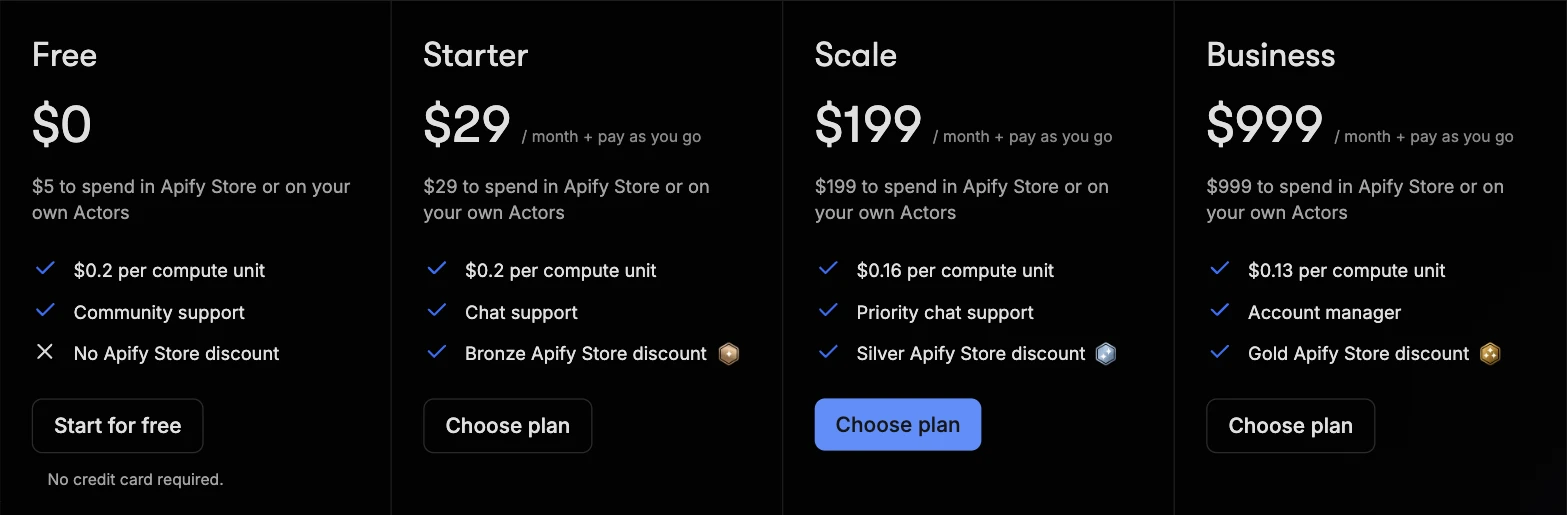
The plan table on Apify's pricing page, as of July 2026:
| Plan | Monthly price | Prepaid usage | Compute unit rate | Actor RAM | Concurrent runs | Support |
|---|---|---|---|---|---|---|
| Free | $0 | $5 | $0.20 | 16 GB | 25 | Community |
| Starter | $29 + pay as you go | $29 | $0.20 | 64 GB | 32 | Chat |
| Scale | $199 + pay as you go | $199 | $0.16 | 256 GB | 128 | Priority chat |
| Business | $999 + pay as you go | $999 | $0.13 | 512 GB | 256 | Account manager |
| Enterprise | Custom | Custom | Custom | Custom | Custom | Custom |
Three details worth catching before you pick a tier:
- The prepaid usage equals the plan price. A $29 Starter subscription gives you exactly $29 to spend on the platform or in Apify Store. You are pre-committing a budget, not buying features.
- Annual billing takes 10% off. Students get 30% off Starter and Scale, startups get 30% off Scale, and nonprofits can negotiate a discount.
- Higher tiers buy better rates, not just bigger budgets. A compute unit costs $0.20 on Starter but $0.13 on Business, and the same pattern applies to proxies and storage.
That last point shapes the economics: steady, high-volume usage gets rewarded, while light or spiky usage pays the worst rates on the smallest plans.
How the Prepaid Budget and Pay As You Go Work
Every metered service on the platform draws from the same prepaid pool. When the pool runs out mid-cycle, what happens depends on your plan. Paying customers keep running, and the excess usage is added to the next invoice as pay-as-you-go overage, up to a spending limit you can configure in billing settings. Free users are blocked until the next monthly cycle.
The part that surprises people: unused prepaid usage expires at the end of every billing cycle. Apify's own pricing FAQ is explicit that credits do not roll over. If you pay $199 for Scale and consume $120 of usage, the remaining $79 is gone. Sizing your plan to your real monthly volume matters more here than on platforms where credit banks up.
Compute Units: the Core Meter
A compute unit (CU) is 1 GB of Actor RAM for one hour. The meter is memory multiplied by time, so the same scrape costs more if the Actor requests more memory or runs longer.
The math is simple enough to do on a napkin. An Actor allocated 4 GB that runs for 30 minutes consumes 2 CU. On Starter that is $0.40 of your budget; on Business it is $0.26. An inefficient Actor that needs 8 GB and twice the runtime quadruples that cost without producing a single extra result.
This is why two Actors that scrape the same site can produce very different bills. Before committing to a large run, Apify's own docs recommend testing on a small scope and reading the consumption off the run detail page. It is good advice, and it is also an admission: you find out what a job costs by running it, not by reading the pricing page.
How Store Actors Charge: Pay Per Event and the End of Rentals
Most people do not write their own Actors. They rent capability from Apify Store, where thousands of pre-built scrapers are published by third-party developers with their own pricing. As of 2026, Apify's docs describe three models, and one of them is on the way out:
Pay per event. You pay for specific events the Actor's developer defines: producing a result, uploading a file, or starting a run. Prices are listed on each Actor's page. Most pay-per-event Actors include platform usage in the event price, but some charge it separately, so the Actor's pricing tab is the only source of truth. You can set a maximum charge limit when starting a run, and Apify guarantees you are never billed for events over that limit.
Pay per usage. The developer charges nothing. You pay only for the platform resources the runs consume: compute units, storage operations, proxy traffic. Cheap if the Actor is efficient, unpredictable until you have measured it.
Rental, retiring in 2026. The old model where you paid the developer a flat monthly fee on top of platform usage is being sunset. Since April 1, 2026, no new rental Actors can be published, and on October 1, 2026 rentals are fully retired, with remaining Actors migrated to pay-per-usage. If a cost estimate you are working from mentions Actor rental fees, it is already out of date.
For popular Actors, per-event pricing has a real advantage over the old stack of rental plus usage: the number on the Actor page is closer to the number on your invoice. The trade is that every Actor prices differently, so comparing two similar scrapers still means reading two pricing tabs.
Proxies, Storage, and the Meters Nobody Reads
The plan fee and the CU rate get all the attention, but three other meters draw from the same budget. Rates below are from the pricing page as of July 2026.
| Meter | Free | Starter | Scale | Business |
|---|---|---|---|---|
| Residential proxies (per GB) | $8 | $8 | $7.50 | $7 |
| Datacenter proxies included | 5 IPs | 30 IPs, then $1/IP | 200 IPs, then $0.80/IP | 500 IPs, then $0.60/IP |
| SERPs proxy (per 1,000) | $2.50 | $2.50 | $2 | $1.70 |
| Dataset storage (per 1,000 GB-hours) | $1 | $1 | $0.90 | $0.80 |
| External data transfer (per GB) | $0.20 | $0.20 | $0.19 | $0.18 |
Residential proxy bandwidth is the classic budget killer. At $8 per GB, scraping image-heavy pages through residential IPs drains a Starter budget fast; the $29 covers less than 4 GB of traffic if proxies are all you spend on. Datacenter proxies are close to free by comparison, so the practical rule is to reserve residential IPs for targets that actually block datacenter ranges.
Storage is small but not zero: request queues bill at $4 per 1,000 GB-hours, four times the dataset rate, and post-run reads and writes are billed under every pricing model, including pay per event. Add-ons exist too, at $5 per extra concurrent run and $1 per extra GB of Actor RAM.
What a 10,000-Page Job Costs
An illustration with the published rates, not a benchmark. Say you scrape 10,000 product pages with an Actor allocated 4 GB that processes roughly 3,000 pages per hour:
- Runtime is about 3.3 hours, so 4 GB x 3.3 h is roughly 13 CU: $2.60 on Starter, $1.70 on Business.
- On datacenter proxies within your included IPs, proxy cost is $0.
- The same job pulling 2 GB through residential proxies adds $16, six times the compute cost.
- If it is a pay-per-event Store Actor at, say, $1 per 1,000 results, the developer's fee adds $10, and platform usage may or may not be inside that price.
The spread between the best case and the worst case is nearly an order of magnitude for identical output. That is the honest summary of Apify pricing: powerful if you control the variables, hard to forecast if you do not. Run a 100-page test, read the run detail page, then multiply.
Hidden Costs and Gotchas
- Residential proxy bandwidth. Billed per GB, driven by page weight you do not control. The most common surprise line on real invoices.
- Memory-hungry Actors. CUs are memory times hours, so an Actor that defaults to 8 GB burns twice the budget of a 4 GB one at identical speed.
- "Includes platform usage" is per Actor, not per platform. Most pay-per-event Actors bundle usage into the event price, some do not. Two similar Actors can differ on this exact line.
- Credit expires monthly. No rollover. A plan sized for your peak month overpays in every other month.
- Concurrency caps by tier. 32 simultaneous runs on Starter, 128 on Scale, 256 on Business. Time-sensitive batch jobs hit this wall before they hit the budget.
Apify vs ScrapeGraphAI: Two Billing Philosophies
Apify and ScrapeGraphAI overlap on data extraction but price it in opposite ways. Apify meters the machinery: memory, hours, bandwidth, events. ScrapeGraphAI meters the outcome: one API call costs a fixed number of credits regardless of page size, runtime, or proxy path.
| Apify | ScrapeGraphAI | |
|---|---|---|
| Model | Actor platform and marketplace | AI extraction API |
| Pricing unit | CUs, proxies, storage, Actor events | Credits per API call |
| Free tier | $5 usage per month | 500 credits, one time |
| Entry paid plan | $29/month prepaid usage | $20/month, 10,000 credits |
| Cost predictability | Measure per Actor, then forecast | Fixed per call |
| AI extraction | Depends on the Actor | Native, prompt or schema driven |
On ScrapeGraphAI, markdown conversion is 1 credit, AI structured extraction is 5 credits, and that number does not move with page weight or runtime:
from scrapegraph_py import ScrapeGraphAI

sgai = ScrapeGraphAI(api_key="sgai-...")

response = sgai.extract(
    "Extract the product name, price, and currency",
    url="https://example.com/products",
)

data = response.data.json_data
A 10,000-page structured extraction is 50,000 credits, which fits the $100 Growth plan with room to spare, whatever the pages weigh. To model your own scrape, search, and crawl mix, use the ScrapeGraphAI price calculator.
To be fair in the other direction: a well-tuned pay-per-usage Actor on datacenter proxies can undercut a flat per-call price on very large, simple crawls. The comparison flips on workloads that need residential bandwidth or heavy Actor memory.
When Apify Pricing Works in Your Favor
Apify's model rewards teams that treat scraping as an engineering discipline. If you build your own Actors, tune their memory, stay on datacenter proxies, and run steady volume every month, the effective rates on Scale and Business are genuinely competitive, and the platform throws in scheduling, storage, and a marketplace of ready-made scrapers. Students and startups knocking 30% off with the discount programs do even better.
The model works against you when usage is spiky, when targets force residential proxies, or when you just want structured data out of a known set of URLs without owning the infrastructure. In that case the machinery you are metered on is machinery you never wanted to think about, and a flat per-call API is the simpler bill to explain to your team.
Plenty of teams land on both: Apify for broad crawling and orchestration, ScrapeGraphAI for the extraction step where a fixed credit per call keeps the forecast honest.
FAQ
How much does Apify cost in 2026?
The published plans are Free ($0 with $5 of monthly usage), Starter at $29 per month, Scale at $199, and Business at $999, each doubling as a prepaid usage budget, with pay-as-you-go overage beyond it and custom Enterprise pricing above. Annual billing is 10% cheaper.
What is a compute unit in Apify?
One compute unit is 1 GB of Actor RAM used for one hour. It costs $0.20 on Free and Starter, $0.16 on Scale, and $0.13 on Business. Because the meter is memory multiplied by time, an Actor that uses more RAM or runs longer costs proportionally more for the same output.
What is pay per event in Apify?
Pay per event is the Store pricing model where you pay for actions the Actor's developer defines, such as one result or one started run, at prices listed on the Actor's page. Most pay-per-event Actors include platform usage in the event price, some bill it separately, and you can set a maximum charge limit per run that Apify will not exceed.
Do unused Apify credits roll over?
No. Prepaid platform usage expires at the end of each billing cycle, per Apify's pricing FAQ. Overage works in the other direction: paid plans keep running past the budget and bill the excess on the next invoice.
Is ScrapeGraphAI cheaper than Apify?
For AI structured extraction on known URLs, usually yes, and it is always easier to forecast: every call costs a fixed number of credits regardless of page size, runtime, or proxies. An efficient pay-per-usage Actor on datacenter proxies can be cheaper for very large simple crawls. The honest answer depends on whether your workload is machinery-shaped or call-shaped.