


TL;DR
Compare ScrapeGraphAI and Apify on AI extraction, pricing, ease of use, and scraping workflows to choose the right platform.
ScrapeGraphAI and Apify are both excellent web scraping platforms — but they're built around fundamentally different philosophies.
ScrapeGraphAI is an AI-native scraper: you describe what you want in plain English, and the API returns structured JSON. No selectors, no Actors, no pre-built scripts — just a prompt and a schema. Apify is a full-featured scraping marketplace and cloud platform: thousands of pre-built "Actors" covering popular websites, plus infrastructure for running custom scrapers at enterprise scale.
If you're a developer who wants to extract precise, structured data from any website immediately → ScrapeGraphAI.
If you need a pre-built scraper for a specific platform (Amazon, LinkedIn, Instagram) or you're running complex multi-step automations → Apify.
Let's go deeper.
What is ScrapeGraphAI?
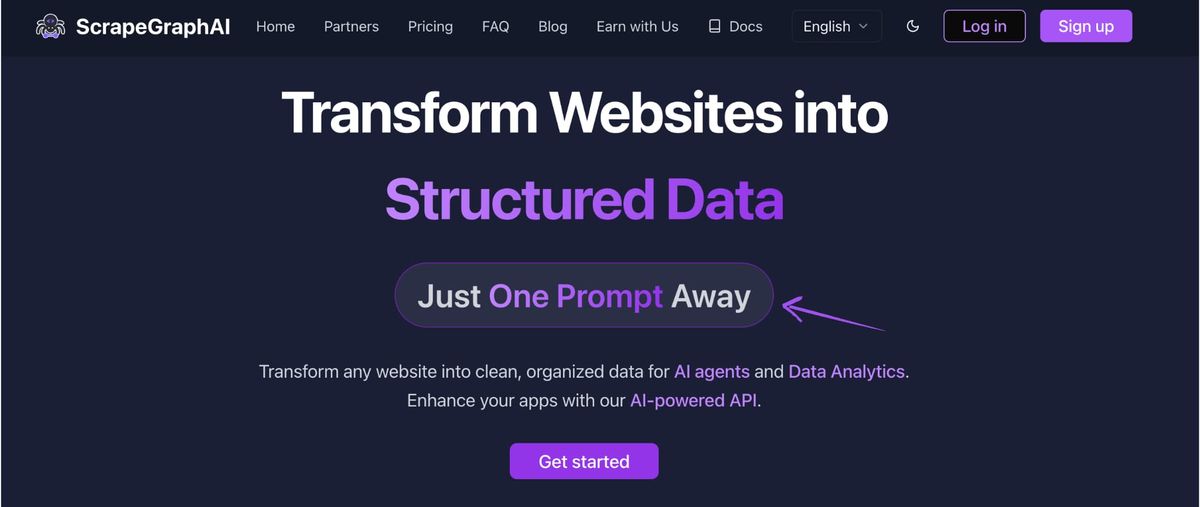
ScrapeGraphAI is an AI-powered web scraping API that uses large language models to extract structured data from any website. The core idea is simple: instead of writing CSS selectors, XPath expressions, or custom parsing code, you write a natural language prompt describing what you want.
The API processes the page with an LLM, extracts the requested fields, and returns validated, typed JSON. Optionally, you define a Pydantic schema for guaranteed output structure.
This approach means ScrapeGraphAI works on any website, immediately — no configuration, no training, no pre-built Actor to find. It also means the scraper adapts automatically when websites change their layout, because it understands content semantically rather than structurally.
Key Capabilities
- Extract — extract structured JSON from any URL using a natural language prompt
- Search — search the web and extract from the top results in one call
scrapewithmarkdownformat — convert any page to clean, LLM-ready Markdown- Pydantic schema support — define exact output types for validated, type-safe data
- LangChain & LangGraph tools — first-class AI agent integration
- Python and JavaScript SDKs
- OpenAI, Anthropic, and local LLM support in the open-source library
How to Use ScrapeGraphAI
Basic extraction with a natural language prompt:
from scrapegraph_py import ScrapeGraphAI

sgai = ScrapeGraphAI()  # uses SGAI_API_KEY env var

response = sgai.extract(
    url="https://apify.com/pricing",
    prompt="Extract all pricing plan names, monthly prices, and included features",
)

print(response.data.json_data)
Schema-based extraction for type-safe output:
from pydantic import BaseModel, Field
from typing import List, Optional
from scrapegraph_py import ScrapeGraphAI

class PricingPlan(BaseModel):
    name: str = Field(description="Plan name (e.g. Starter, Pro, Enterprise)")
    price_monthly: Optional[float] = Field(description="Monthly price in USD, None if custom")
    included_credits: Optional[str] = Field(description="Credits or usage limit included")
    features: List[str] = Field(description="List of key features")

class PricingPage(BaseModel):
    plans: List[PricingPlan]
    currency: str = Field(description="Currency code, e.g. USD")

sgai = ScrapeGraphAI()  # uses SGAI_API_KEY env var

response = sgai.extract(
    url="https://example.com/pricing",
    prompt="Extract all pricing plans with their features and monthly prices",
    schema=PricingPage.model_json_schema(),
)

for plan in response.data.json_data['plans']:
    print(f"{plan['name']}: ${plan['price_monthly']}/month")
    for feature in plan['features']:
        print(f"  • {feature}")
ScrapeGraphAI Pricing
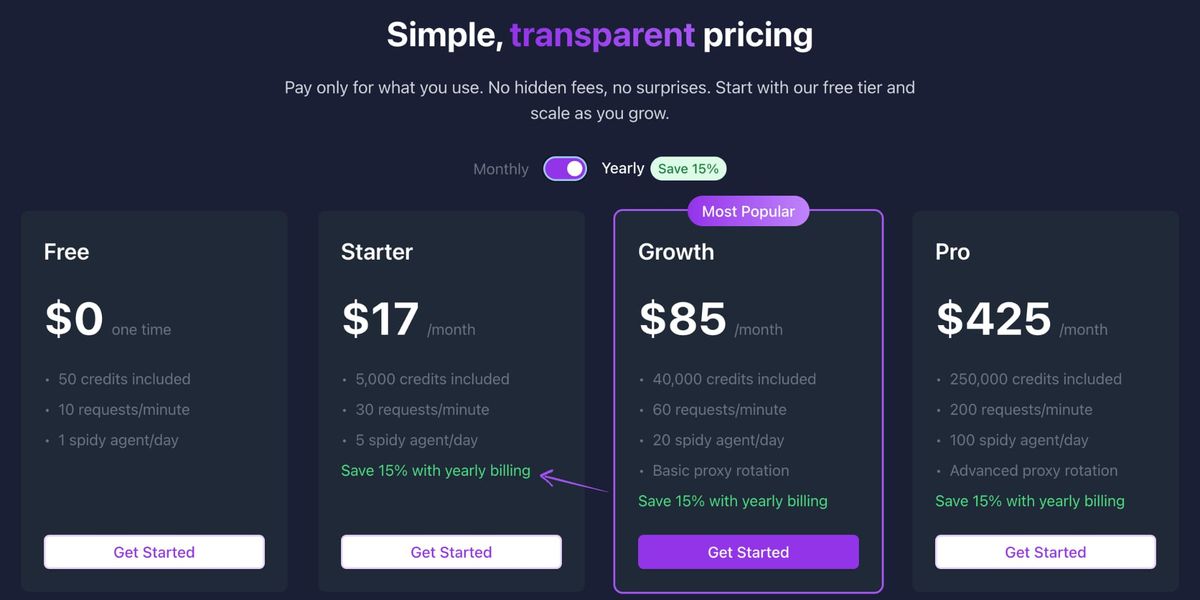
| Plan | Price | Credits/month |
|---|---|---|
| Free | $0 | 500 one-time credits |
| Starter | $20/month | 10,000 credits |
| Growth | $100/month | 100,000 credits |
| Pro | $500/month | 750,000 credits |
| Enterprise | Custom | Custom |
ScrapeGraphAI Pros and Cons
Pros:
- Works on any website without setup or pre-built scripts
- Natural language prompts — no XPath or CSS selectors
- AI adapts when websites change — zero selector maintenance
- Best-in-class structured JSON output with Pydantic schema validation
- First-class AI agent integrations (LangChain, LangGraph, CrewAI)
- Affordable entry price with a free tier Cons:
- No pre-built scrapers for popular platforms (no Actor marketplace)
- Slightly slower per-request than pre-built scrapers (LLM adds latency)
- Requires basic developer knowledge to use the SDK effectively
What is Apify?
Apify is a cloud-based web scraping and automation platform built around a marketplace of 4,000+ pre-built "Actors" — ready-to-run scrapers for specific websites and use cases. Instead of building a scraper from scratch, you find the Actor that covers your platform (Amazon Product Scraper, LinkedIn Profile Scraper, Google Maps Extractor, etc.) and run it.
For developers who need custom scrapers, Apify provides cloud infrastructure, proxy management, scheduling, and storage. You build an Actor using their JavaScript/TypeScript SDK, deploy it to their cloud, and scale it without managing servers.
Apify's platform also handles the messy parts of large-scale scraping: rotating proxies, browser fingerprinting, CAPTCHA handling, result storage, and webhook notifications.
Key Capabilities
- 4,000+ pre-built Actors covering popular websites and platforms
- Apify SDK for building custom scrapers in JavaScript/TypeScript
- Cloud infrastructure with auto-scaling, scheduling, and storage
- Proxy infrastructure with 72M+ residential IPs
- Actor marketplace — buy, rent, or publish scrapers
- Integrations with Zapier, Make, Google Sheets, webhooks
- Dataset and Key-Value Store for storing results
- Python client for running Actors from Python code
How to Use Apify
Running a pre-built Actor via the API:
import requests
import time

def run_apify_actor(actor_id, input_data, api_token):
    headers = {
        "Authorization": f"Bearer {api_token}",
        "Content-Type": "application/json"
    }

    # Start the Actor run
    run_url = f"https://api.apify.com/v2/acts/{actor_id}/runs"
    run_response = requests.post(run_url, json=input_data, headers=headers)
    run_response.raise_for_status()
    run_id = run_response.json()["data"]["id"]

    # Poll until complete
    status_url = f"https://api.apify.com/v2/actor-runs/{run_id}"
    while True:
        status = requests.get(status_url, headers=headers).json()["data"]

        if status["status"] == "SUCCEEDED":
            results_url = f"https://api.apify.com/v2/actor-runs/{run_id}/dataset/items"
            return requests.get(results_url, headers=headers).json()
        elif status["status"] == "FAILED":
            raise Exception(f"Actor failed: {status.get('statusMessage')}")

        time.sleep(3)

# Example: Run the Amazon product scraper Actor
results = run_apify_actor(
    actor_id="bebity/amazon-product-scraper",
    input_data={
        "keywords": ["wireless headphones"],
        "maxItems": 50,
        "country": "US"
    },
    api_token="your-apify-token"
)

for product in results:
    print(f"{product['title']} — ${product['price']}")
Building a custom Actor with the Apify SDK:
import { Actor } from 'apify';
import { CheerioCrawler } from 'crawlee';

await Actor.init();

const input = await Actor.getInput();
const { startUrls, maxPages } = input;

const crawler = new CheerioCrawler({
    maxRequestsPerCrawl: maxPages || 100,
    async requestHandler({ request, $, enqueueLinks, pushData }) {
        const title = $('h1').text().trim();
        const price = $('[class*="price"]').first().text().trim();

        await pushData({ url: request.url, title, price });
        await enqueueLinks({ selector: 'a[href*="/product/"]' });
    },
});

await crawler.run(startUrls.map(url => ({ url })));
await Actor.exit();
Apify Pricing
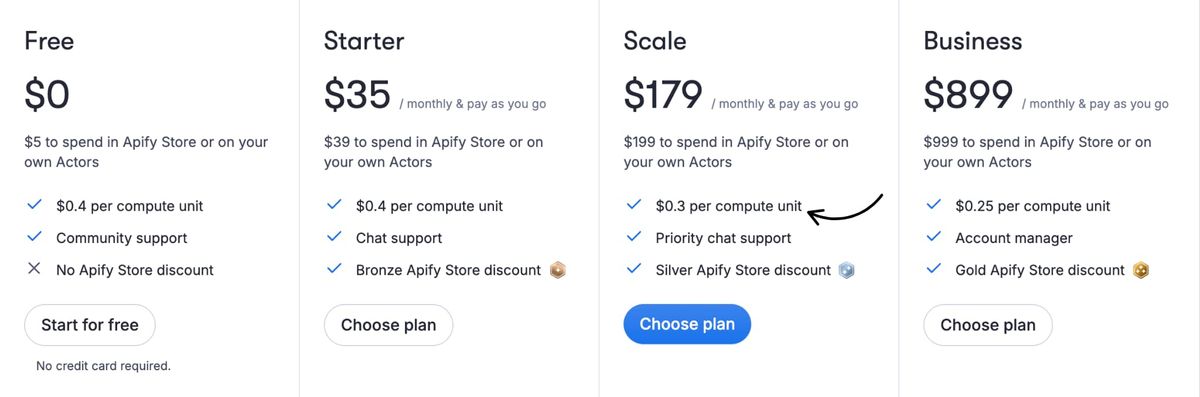
| Plan | Price | Included Usage |
|---|---|---|
| Free | $0 | $5 platform credits/month |
| Starter | $35/month | $35 platform credits |
| Scale | $179/month | $179 platform credits |
| Business | $899/month | $899 platform credits |
| Enterprise | Custom | Custom |
Note: Apify's pricing is usage-based. Your subscription provides platform credits that are consumed by Actor runs, proxy usage, and storage. Heavy proxy usage or long-running Actors can consume credits faster than expected.
Apify Pros and Cons
Pros:
- Huge marketplace of pre-built Actors for popular platforms
- Best-in-class proxy infrastructure with 72M+ IPs
- Strong cloud infrastructure — scheduling, storage, scaling built in
- No-code option for running existing Actors
- Large developer community and active Actor ecosystem
- Webhook integrations with popular tools (Zapier, Make, Google Sheets) Cons:
- No AI-native extraction — Actors use CSS selectors that break when sites change
- Actor quality varies significantly — some are poorly maintained
- Pricing model is complex; credits are consumed by multiple factors
- Building custom Actors requires JavaScript/TypeScript experience
- Expensive for high-volume custom scraping compared to API-based tools
Head-to-Head Comparison
AI-Powered Extraction
Winner: ScrapeGraphAI 🏆
ScrapeGraphAI is built from the ground up around LLM-powered extraction. You write a prompt, optionally define a schema, and get structured data back — the AI handles everything in between.
Apify's Actors use traditional CSS selectors and custom parsing code. Some Actors incorporate AI for specific tasks, but the platform itself is not AI-first. When a website changes its HTML structure, Apify Actors break and need maintenance.
Verdict: For AI-powered, maintenance-free extraction on any website — ScrapeGraphAI wins clearly.
Pre-Built Platform Coverage
Winner: Apify 🏆
If you need to scrape Amazon, LinkedIn, Instagram, TikTok, Booking.com, Google Maps, or 4,000 other specific platforms — Apify's marketplace likely has a ready-to-run Actor. This is a massive advantage when you have a specific well-known platform to target.
ScrapeGraphAI has no marketplace. For any target website, you write a prompt. That's flexible but means no out-of-the-box templates.
Verdict: For specific, popular platform coverage — Apify wins.
Maintenance and Reliability
Winner: ScrapeGraphAI 🏆
ScrapeGraphAI's AI understands page content semantically. When a website redesigns its layout, the prompt-based extraction still finds the right data. No selectors to fix.
Apify Actors use hardcoded selectors. When sites change, Actors break — silently. The quality depends on the Actor's developer actively maintaining it. Some popular Actors have frequent update lag.
Verdict: For long-running production pipelines — ScrapeGraphAI requires far less maintenance.
Scale and Infrastructure
Winner: Apify (narrow)
Apify is purpose-built for large-scale scraping infrastructure. It handles Actor orchestration, result storage (up to petabytes), proxy rotation across 72M+ IPs, and browser pool management out of the box.
ScrapeGraphAI's API can scale, but orchestrating large crawls requires more custom code on your end.
Verdict: For enterprise-scale scraping operations with complex infrastructure needs — Apify has the edge.
Ease of Use
Depends on use case.
- For non-technical users: Apify wins — just find an Actor and click Run
- For developers who want clean data fast: ScrapeGraphAI wins — write a prompt and get JSON
- For building custom scrapers: Both require coding, but ScrapeGraphAI's prompts are simpler than Apify's SDK
Pricing Value
Winner: ScrapeGraphAI (for most use cases)
ScrapeGraphAI starts at $20/month. The Starter plan includes 10,000 credits, enough for 2,000 structured extract calls before optional stealth — especially valuable because each extraction adapts to the site automatically.
Apify's $5 free credit and $35 Starter plan look cheap but burn through quickly with proxy-heavy Actors or long-running crawls. For equivalent data extraction at scale, ScrapeGraphAI typically costs less.
Verdict: ScrapeGraphAI offers better predictable pricing. Apify can be cheaper if you rely heavily on pre-built Actors for simple tasks.
Developer Integration
Winner: ScrapeGraphAI (for AI/modern stacks)
ScrapeGraphAI has first-class integrations for LangChain, LangGraph, and CrewAI — the leading AI agent frameworks. If you're building AI applications that need web data, ScrapeGraphAI plugs in as a native tool.
Apify integrates with Zapier, Make, Google Sheets, and webhooks — which is better for no-code automation workflows.
Verdict: ScrapeGraphAI for AI/LLM stacks. Apify for business automation workflows.
Feature Comparison Table
| Feature | ScrapeGraphAI | Apify |
|---|---|---|
| AI-powered extraction | ⭐⭐⭐⭐⭐ | ⭐⭐ |
| Pre-built platform scrapers | ⭐ | ⭐⭐⭐⭐⭐ |
| Schema validation (Pydantic) | ⭐⭐⭐⭐⭐ | ⭐⭐ |
| Maintenance required | Very low | Medium–High |
| Proxy infrastructure | ⭐⭐⭐ | ⭐⭐⭐⭐⭐ |
| No-code option | No | Yes (Actors) |
| LangChain/LangGraph | ⭐⭐⭐⭐⭐ | ⭐⭐ |
| Pricing (entry) | $20/month | $35/month |
| Free tier | 500 credits | $5 credit |
| JavaScript site support | ⭐⭐⭐⭐⭐ | ⭐⭐⭐⭐⭐ |
| Scale & infrastructure | ⭐⭐⭐ | ⭐⭐⭐⭐⭐ |
| Custom scraper building | API/SDK | SDK (JS/TS) |
Real-World Test Results
We tested both tools on the same set of scraping tasks:
E-Commerce Product Data (Custom Site)
- ScrapeGraphAI: 96% field accuracy, returned all 8 required fields correctly typed. Zero setup time — just wrote the prompt.
- Apify (custom Actor): Required ~2 hours to build and test a custom CheerioCrawler Actor. Accurate results once built, but brittle to future site changes. Winner: ScrapeGraphAI for speed to first result.
Amazon Product Data
- ScrapeGraphAI: Works but Amazon's anti-bot measures require careful handling. Prompt-based extraction adapts well to layout variants.
- Apify (Amazon Actor): Purpose-built Amazon Actor handles all variants, CAPTCHA bypass, and regional pricing. More reliable for high-volume Amazon-specific needs. Winner: Apify for Amazon at scale.
Any Unknown Website
- ScrapeGraphAI: Write a prompt, get data. Works on the first try for 90%+ of standard websites.
- Apify: Need to check if an Actor exists, or build one from scratch. No Actor exists for most niche websites. Winner: ScrapeGraphAI for unknown/custom websites.
AI Agent Use Case
- ScrapeGraphAI: Native LangChain tool — agents can call Extract directly with just a few lines of integration code.
- Apify: No native LangChain/LangGraph tool. Building an agent tool wrapper requires custom code. Winner: ScrapeGraphAI for AI agent workflows.
Use Case Guide: Which Tool Should You Use?
Choose ScrapeGraphAI if:
- You need to extract data from any arbitrary website without setup
- You're building AI agents that need web scraping as a tool
- You want structured JSON with schema validation on every extraction
- You need your scraper to handle website changes automatically
- You value speed to first result over pre-built coverage
- You're integrating with LangChain, LangGraph, CrewAI, or similar
- You want simple, predictable pricing without surprise credit burns
Choose Apify if:
- You need a pre-built scraper for a specific popular platform (Amazon, LinkedIn, etc.)
- You're building complex multi-step scraping workflows with scheduling
- You need enterprise-grade proxy infrastructure (72M+ IPs) built in
- Your team is JavaScript-heavy and comfortable with the Apify SDK
- You need no-code Actor execution for non-technical team members
- You're integrating results with Zapier, Make, or Google Sheets
Use Both if:
You need Apify's pre-built Actors for major platforms (Amazon, LinkedIn) AND need ScrapeGraphAI for extracting from niche or custom websites. Many data teams use both in the same pipeline.
Conclusion
ScrapeGraphAI and Apify excel at different things. The right choice depends on your primary use case:
Choose ScrapeGraphAI when you need intelligent, AI-powered extraction that works on any website without maintenance. The natural language interface, schema validation, and AI agent integrations make it the best choice for modern data pipelines and LLM-powered applications. Choose Apify when you have specific popular platforms to scrape and want pre-built, battle-tested Actors to get results immediately. Its marketplace and proxy infrastructure are unmatched for platform-specific, enterprise-scale scraping.
For most developers building new applications, ScrapeGraphAI's AI-first approach represents where web scraping is going — no more selector maintenance, no more fragile parsers, just describe what you want and get clean data back.
Frequently Asked Questions
Is ScrapeGraphAI better than Apify for AI applications?
Yes. ScrapeGraphAI has first-class integrations with LangChain, LangGraph, and CrewAI, making it trivial to use as a tool inside AI agents. Apify requires custom wrapper code for equivalent AI agent integration.
Does Apify have better proxies than ScrapeGraphAI?
Apify has a more mature proxy infrastructure with 72M+ residential IPs and advanced anti-detection features. ScrapeGraphAI handles most websites reliably, but Apify's proxy layer is stronger for very aggressive anti-bot targets.
Can ScrapeGraphAI scrape Amazon like Apify's Actor?
ScrapeGraphAI can scrape Amazon, but Apify's purpose-built Amazon Actor is specifically optimized for Amazon's anti-bot measures and handles more edge cases out of the box. For high-volume Amazon scraping, Apify's Actor is the more reliable choice.
Which is cheaper, ScrapeGraphAI or Apify?
ScrapeGraphAI's Starter at $20/month is cheaper than Apify's at $35/month. But the real cost comparison depends on usage: Apify credits are consumed by proxy usage and Actor run time, which can add up quickly. ScrapeGraphAI's credit pricing is more predictable.
Does ScrapeGraphAI work without writing code?
ScrapeGraphAI requires basic API calls and is developer-oriented. Apify offers no-code Actor execution via their web UI. For non-technical users, Apify is more accessible.
Can I use both ScrapeGraphAI and Apify together?
Absolutely. Many teams use Apify for platform-specific scraping (Amazon, LinkedIn) and ScrapeGraphAI for any other website. They complement each other well.
Which handles website changes better?
ScrapeGraphAI wins clearly. Its AI understands content semantically — when a website redesigns, the prompt-based extraction still works. Apify Actors use hardcoded selectors that break on redesigns and need manual updates.
Related Resources
- Apify Alternatives - Other platforms to consider beyond Apify
- Apify Pricing: Plans, Compute Units, and Real Costs - How Apify's compute and proxy billing really adds up
- ScrapeGraphAI vs Browse AI: AI Scraper Comparison - No-code scraping compared with API-first extraction
- Web Scraping Legality - Legal considerations before you scrape