


TL;DR
- Start with Meta's official API for professional accounts that authorize your application. Evaluate Apify or Bright Data for dedicated Instagram collection.
- Profiles, posts, Reels and comments need different collectors and output fields. Test each content type you require.
- Use ScrapeGraphAI to structure supplied content or enrich collected records with details from a business's website.
For public Instagram posts and profiles, start by evaluating a dedicated Instagram product such as Apify's Instagram Scraper or Bright Data's Instagram scrapers. For accounts your customers authorize, check Meta's official Instagram API first. Use ScrapeGraphAI for custom records from supplied content and business websites linked from those profiles.
ScrapeGraphAI publishes this article. The comparison uses linked vendor documentation to explain output fields, collection options and billing units.
Choose the data before the tool
“Instagram data” can mean a creator's biography, a Reel's play count, a post's caption or thousands of individual comments. Those are separate collection jobs. A vendor returning profile summaries has not demonstrated comment coverage.
Write down the row you need before opening a pricing page:
| Dataset | Identity to preserve | Fields to inspect | A misleading result |
|---|---|---|---|
| Profiles | Account ID when available, handle, source URL | Biography, external website, follower count, observation time | A guessed business category presented as a profile field |
| Posts | Post ID or shortcode and canonical URL | Caption, publication time, media type, visible engagement | One carousel counted as several unrelated posts |
| Reels | Reel ID and URL | Caption, duration, available play/view metrics | Different engagement measures merged into one “views” column |
| Comments | Comment ID and parent post ID | Text, timestamp, reply relationship | A preview sample described as every comment |
Store a missing value as missing. A hidden count is not zero, and an empty response is not proof that an account has no posts. Keep the source timestamp separate from the time your collector observed it.
Four options worth evaluating
Apify Instagram Scraper: packaged Instagram collection
The Apify-maintained Instagram Scraper documents collection of posts, Reels, comments, profiles, hashtags and places. Its result type and input URL determine the output shape. This suits a team that wants a maintained collector and exportable datasets without owning the fetch infrastructure.
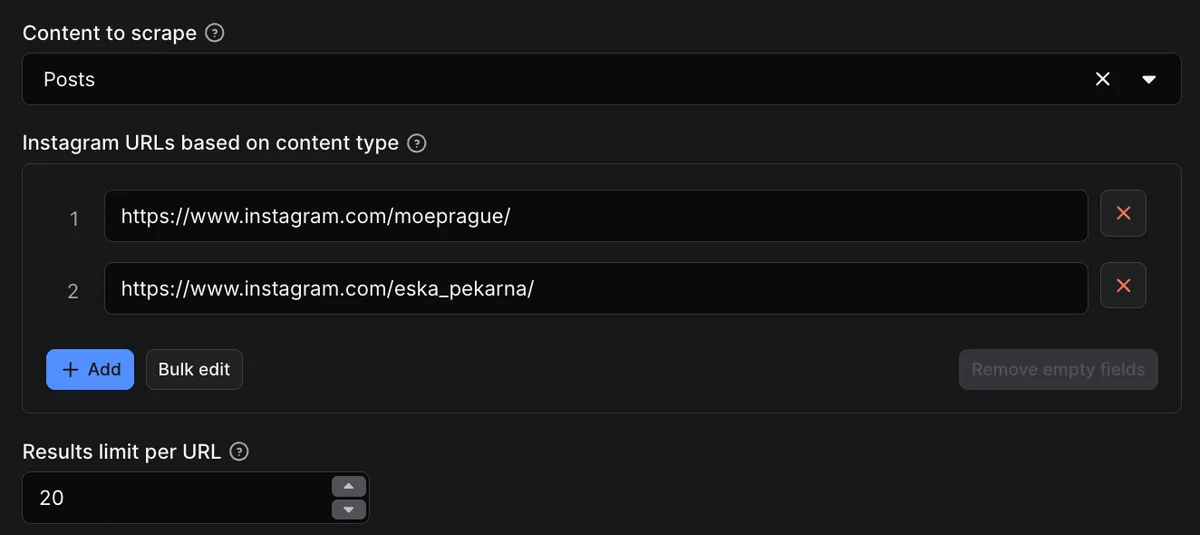 Apify’s input form shows how URLs and collection settings define a run. Source: Apify’s Instagram tutorial.
The listing advertises pricing from $1.50 per 1,000 results, while its detailed description distinguishes rates by plan. Do not use the headline minimum as a universal quote. Check the pricing tab for the selected account and event type, especially when a run mixes posts and comments.
Before adopting it, check one example of each required content type, the field names in the output, and whether a result limit applies per input URL. A successful run with fewer records than requested still needs an explanation.
Bright Data: separate collectors for separate Instagram records
Bright Data's Instagram product lists distinct profile, post, Reel and comment collectors, available through an API or its interface. Its advertised allowance is 5,000 free records per month, with pay-as-you-go pricing of $1.50 per 1,000 records.
Collector choice matters. Its catalog includes a Reel collection variant explicitly described as omitting the post timestamp. If your analysis depends on publication dates, that difference should decide your selection before the price does.
Ask for a sample from the exact collector you intend to buy. A profile sample tells you little about reply pagination, and a downloadable dataset may have a different observation date from an on-demand request.
Meta Instagram API: authorized professional-account workflows
Meta's official API collection describes workflows for professional accounts, including media and comment management. Its Facebook Login setup cannot access ordinary consumer accounts and requires a linked professional account and Facebook Page. The Instagram Login setup has its own permissions and limitations.
For an application connecting customers' own business or creator accounts, this is the first access model to investigate. Define which login setup, permissions and objects the application needs. It is not a general search interface for every public or private Instagram account.
Budget for authorization, token handling and permission review. Comparing that integration with a one-off CSV export requires accounting for the different product you are building.
ScrapeGraphAI: custom records and website enrichment
Extract accepts a URL or supplied content and a requested schema. This is useful when an Instagram-related workflow also needs structured facts from a business's own website, or when you already have permitted source content and need a consistent record.
For example, pair a business profile with the services and contact details published on its linked website. Keep the Instagram account ID beside the website URL so each extracted field has a clear source. When several profiles belong to the same business, the website URL also helps identify duplicate enrichment work.
Define the fields before extraction, then compare the returned values with the source text. Preserve the wording of descriptions and keep absent fields null. This makes the records easier to join with the profile, post or comment data from your chosen collector.
The Facebook Page metadata tutorial provides a runnable example of extraction from supplied content. Its notebook checks the schema and compares extracted metrics with the source before exporting JSON.
Measure useful records rather than a claimed accuracy score
Use a small, mixed sample before scheduling collection. Include a public brand profile, a post with a long caption, a carousel, a Reel and a post with replies. Add a URL you know is unavailable to check how failures are reported. Use only inputs within the scope you are authorized to collect.
For each input, record the requested fields, returned fields, missing fields, duplicate IDs and source URL. Check important values against the page at the same time as the collection. Instagram engagement changes, so a comparison made days later is not a clean accuracy test.
A useful acceptance rule might be: every accepted post has an ID, URL and publication time; missing engagement remains nullable; incomplete comment pagination is flagged. This is a proposed rule for your evaluation, not a result measured across these vendors.
Evaluate discovery separately. A collector can accurately parse each supplied URL while missing most relevant posts during a hashtag search. Field accuracy and coverage answer different questions.
How to search Instagram comments
First identify the posts whose comments you are permitted to analyze. Select a collector that returns individual comments for those post URLs, then export the comment text together with its ID, parent post, timestamp and any reply relationship. A post's comment count is not the text of its comments.
In a spreadsheet, filter the comment-text column for the word or phrase you need and retain the parent-post URL beside every match. For a language-sensitive search, inspect spelling variants and context rather than treating every substring match as the same topic. Deduplicate by comment ID before counting matches.
State the collection cutoff and whether replies or older pages were omitted. A search of 100 collected comments answers a question about those 100 comments; it cannot establish that no other comment on Instagram mentions the phrase. The separate Instagram extraction tutorial covers the integration setup.
Estimate the monthly workload
Suppose your approved monitoring task covers 100 public business accounts, up to 20 recent posts per account, refreshed four times per month. That is at most 8,000 post observations, before profile refreshes, comment collection or retries. It is not necessarily 8,000 unique posts.
At an illustrative $1.50 per 1,000 billed records, 8,000 records would cost $12 before plan minimums, different event rates or free allowances. The arithmetic is only useful if the vendor bills the same unit your forecast counts. If each post produces 50 separately billed comments, the comment workload dominates.
Also track the cost of reviewing failures and repairing downstream mappings. Use the scraping cost calculator to include that work in the comparison.
Questions to settle before recurring collection
Can a scraper collect private Instagram data? This article evaluates public or explicitly authorized workflows. No tool here is being recommended as a way to access private accounts.
Does a no-code tool remove the maintenance work? It can remove some implementation work. Someone still needs to inspect missing records, changed fields, expired authorization and exports that stopped updating.
Does public visibility grant permission to reuse everything? No. Assess the collection method, purpose and applicable obligations separately. Our social media data guide explains those distinctions.
Which option should I try first? Use Meta for an authorized account integration when its objects meet the requirement. Compare dedicated Instagram collectors for public datasets. Test general extraction tools only against a specific source and schema, then retain the evidence for that decision.