


TL;DR
- Compare ScrapeGraphAI and Linkup by the operation you need: source discovery, extraction from a known page or a cited research answer.
- Match output requirements before comparing prices; search modes, result counts and separate extraction calls affect the bill.
- The notebook demonstrates ScrapeGraphAI Search and Extract on one public HHS document. Linkup was not executed for this comparison.

Run the example in Google Colab with your own ScrapeGraphAI API key.
ScrapeGraphAI and Linkup both support finding web information and returning structured data. Compare the operation your application needs: finding sources, extracting fields from a known page, composing a cited answer or carrying out a longer research task.
ScrapeGraphAI publishes this comparison, which describes Linkup's documented capabilities and prices. The runnable example below executes ScrapeGraphAI; it is not a benchmark of both services.
Compare the returned object
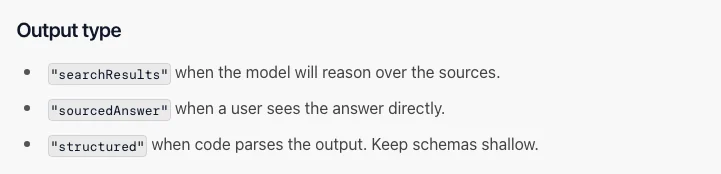 Linkup distinguishes source results, sourced answers and structured output. Source: Linkup’s integration guide.
| Requirement | ScrapeGraphAI | Linkup | Acceptance check |
|---|---|---|---|
| Find relevant sources | Search returns source results; optional prompt and schema | Search can return results, a sourced answer or structured output | The sources address the question and requested date scope |
| Extract a known page | Extract accepts a URL or supplied content and a schema | Fetch documentation describes known-URL content and schema extraction | Returned fields are supported by that page |
| Compose an answer | An application can use extraction results and source content | Sourced-answer output is a documented search mode | Each material claim is supported by a cited source |
| Multi-step research | Compose a workflow with explicit limits and checks | Research is a separate asynchronous service | The task completes within its budget and explains missing evidence |
The ScrapeGraphAI Search documentation describes the distinction between source results and optional structured extraction. Linkup's Search integration guide documents its output modes and links to Fetch and Research.
Valid JSON is only one acceptance check. A schema can ensure that publisher is a string; it cannot establish that the named organization actually published the selected document. Keep the source URL and inspect important facts against the page.
Search depth changes the job
Linkup documents fast, standard and deep search modes. Its fast mode is a keyword retrieval path, while deeper modes involve additional retrieval and processing. The chosen output type also affects whether the response contains source results, composed prose or a structured object. Those settings should be fixed before measuring latency or cost. Linkup Search guide
For a known URL, compare direct extraction operations before paying for discovery again. For an unknown URL, measure whether discovery found an appropriate source before evaluating the extracted fields. Combining both stages into a single pass can be convenient; separating them can make source selection easier to inspect.
A research question may also require several independent sources. One correctly extracted page can still leave that question unanswered. Evaluate source coverage and the resulting answer separately.
Pricing is public, but the units differ
Linkup's USD pricing changelog lists standard search at $0.005 for raw results and $0.006 for sourced or structured output. Deep search is listed at $0.05 and $0.055 respectively. Its current pricing page separates Fetch, Search and Research products. Confirm the exact mode and account conditions when budgeting.
ScrapeGraphAI uses credits. The pricing page lists five base credits for Extract; Search without a prompt costs two credits per result, while prompted Search costs five per result. Optional settings such as stealth and the purchased allowance need to be accounted for using the selected operation.
For example, 1,000 Linkup standard searches with structured output at the documented $0.006 rate would have a $6 gross usage charge before allowances. That does not establish the price of an equivalent ScrapeGraphAI workflow: its result count and whether you call Extract separately affect consumption. Price the same required output before describing a saving.
Run a source-discovery and extraction example
The example builds one public-document catalog record. It finds an official HHS guidance page, accepts only the reviewed URL, extracts document metadata and saves the result with provenance. It does not process patient data or interpret the guidance as a legal opinion.
Use Python 3.12 or newer and a ScrapeGraphAI key. The notebook makes one Search request for up to three results and one Extract request. These use your credits. Search results can change; if the expected source is not returned, the example stops instead of silently substituting another site.
import subprocess
import sys

if sys.version_info < (3, 12):
    raise RuntimeError("Use Python 3.12 or newer.")
subprocess.check_call([
    sys.executable, "-m", "pip", "install", "--quiet",
    "scrapegraph-py==2.3.1", "jsonschema==4.26.0",
])The URL restriction is specific to this demonstration. It is not a general security filter for arbitrary web research. A production fetch layer also needs to control redirects and network destinations.
import os
from getpass import getpass
from scrapegraph_py import ScrapeGraphAI, FetchConfig

client = ScrapeGraphAI(
    api_key=os.environ.get("SGAI_API_KEY") or getpass("ScrapeGraphAI API key: ")
)
query = (
    "site:hhs.gov/hipaa/for-professionals/special-topics/de-identification "
    "Guidance Regarding Methods"
)
expected_url = (
    "https://www.hhs.gov/hipaa/for-professionals/"
    "special-topics/de-identification/index.html"
)
search = client.search(
    query, num_results=3,
    fetch_config=FetchConfig(mode="auto", timeout=30000),
)
if search.status != "success" or search.data is None:
    raise RuntimeError(f"Search failed: {search.error}")
source_results = [
    {"url": item.url, "title": item.title, "content_chars": len(item.content)}
    for item in search.data.results
]
print(source_results)
selected = next((item for item in source_results if item["url"] == expected_url), None)
if selected is None:
    raise RuntimeError("The reviewed source was not returned. Inspect discovery before continuing.")
Do not treat a search title or snippet as the full page. In the initial access check, Search found the intended URL but its returned content was only a navigation fragment. The next step requests the document explicitly and validates a separate extraction result.
import json
from datetime import datetime, timezone
from pathlib import Path
from jsonschema import validate

schema = {
    "type": "object",
    "properties": {
        "title": {"type": "string", "minLength": 8},
        "publisher": {"type": ["string", "null"]},
        "updated_date_text": {"type": ["string", "null"]},
    },
    "required": ["title", "publisher", "updated_date_text"],
    "additionalProperties": False,
}
extraction = client.extract(
    "Extract the document title, publishing organization, and document-specific "
    "last reviewed or updated date as displayed. Ignore navigation and copyright "
    "years. Use null for a publisher or date that is not stated.",
    url=selected["url"], schema=schema, fetch_config=FetchConfig(mode="fast"),
)
if extraction.status != "success" or extraction.data is None:
    raise RuntimeError(f"Extract failed: {extraction.error}")
metadata = extraction.data.json_data
validate(instance=metadata, schema=schema)
if "de-identification" not in metadata["title"].lower():
    raise ValueError("The extracted title does not identify the expected document.")
record = {
    "source_url": selected["url"],
    "query": query,
    "observed_at": datetime.now(timezone.utc).isoformat(),
    "document": metadata,
}
output = Path("source-catalog.json")
output.write_text(json.dumps(record, indent=2, ensure_ascii=False), encoding="utf-8")
assert json.loads(output.read_text(encoding="utf-8")) == record
print(json.dumps(record, indent=2, ensure_ascii=False))
client.close()
The output separates the document's displayed date from the time your application observed it. Missing publication metadata remains nullable. The title check and JSON round trip catch a wrong document or storage mismatch, but a human still needs to inspect important source facts.
A successful run writes source-catalog.json containing the reviewed source URL and the extracted document metadata. The output should identify the HHS de-identification guidance, with nullable publisher and date fields. This one source checks the integration path; it does not establish an accuracy rate or a latency comparison with Linkup.
Evaluate both services against your own task
For a fair comparison, define the question, acceptable sources, required fields, maximum cost and completion deadline before running either product. A company-directory lookup, a product-price extraction and an investigative report need different evaluation sets.
Record source discovery, accepted field values and answer support separately. Include unavailable sources and incomplete outputs in the result. Measure median and slow-case completion time over a stated sample rather than turning one quick request into a speed claim.
The example demonstrates a source-selection boundary and a verified extraction path in ScrapeGraphAI. To evaluate Linkup for the same catalog, use its documented Search and Fetch outputs, then apply the same URL and field checks. Preserve both configurations and actual charges. Use the cost calculator to include review and maintenance time in the final choice.